Server-Side Tools Are Now Available for DigitalOcean Inference Engine

By Grace Morgan
- Updated:
- 3 min read
AI applications and agents are only as capable as the tools, data, and systems they can access. With Server-Side Tools, now in Public Preview for DigitalOcean Inference Engine, a model can call out to search the web, read your data, call your systems, and take action all from inside a single inference request. You can enable the new tools with your existing DigitalOcean Model Access Key. No separate tool infrastructure to assemble, no new credentials, no orchestration layer to operate.
Server-Side Tools bring web search, web fetch, DigitalOcean Knowledge Bases, MCP servers, and supported Anthropic and OpenAI tools into your inference requests, each covered below.
Bring Real-Time Information Into Your AI Applications
When applications need current information such as news, documentation, or live data, models can access the web directly during inference.
Web Search: Get live answers from the web
Web Search enables retrieval of up-to-date information from the web. This enables research workflows, support experiences, and agentic applications that need to reason over recent events, changing information, or content that is not available in a model’s training data.
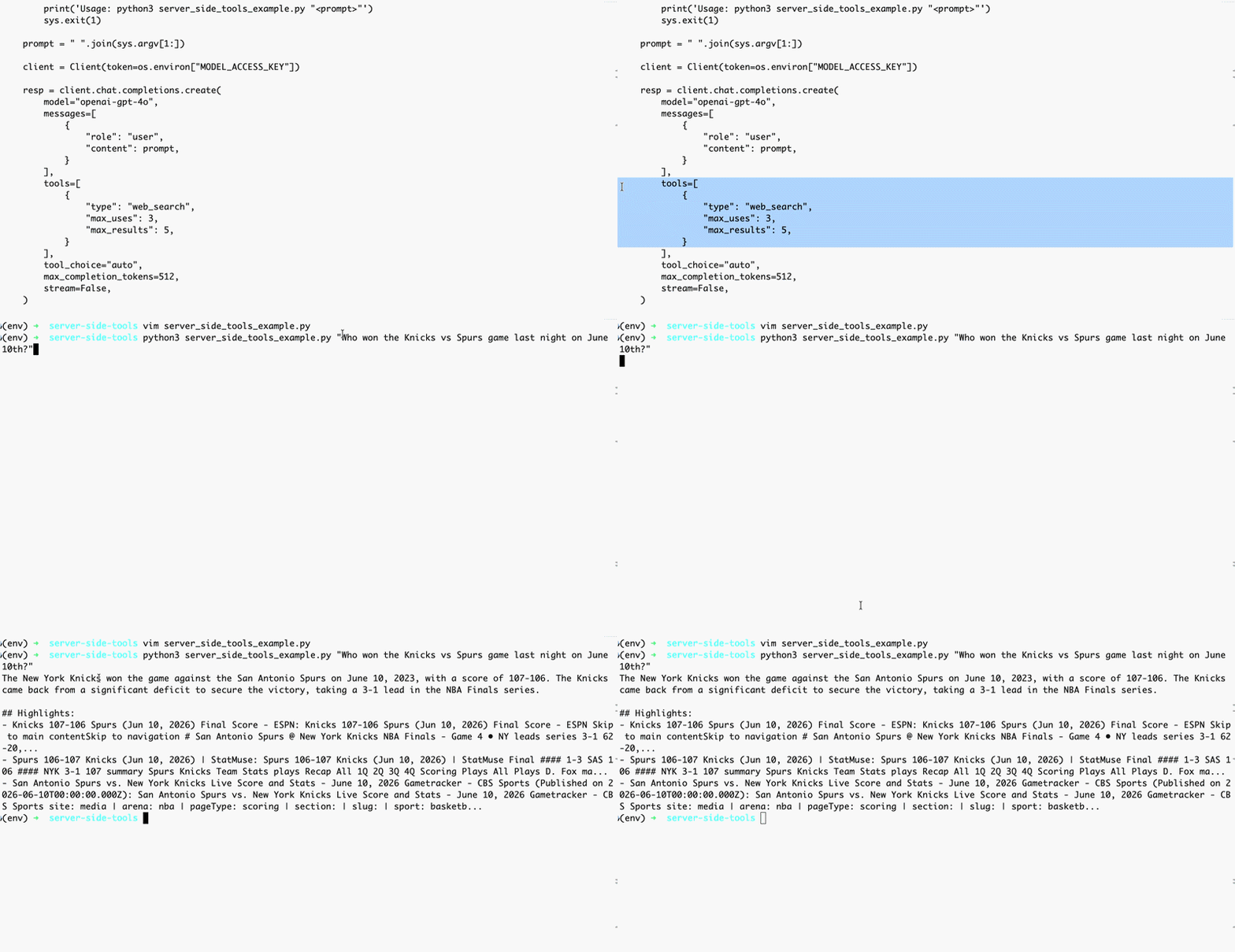
Web Fetch: Pull in content from URLs and documents
Web Fetch pulls in content from specific URLs or PDFs during inference. It is useful for summarizing pages, extracting structured data from documents, or pulling in reference material on demand.
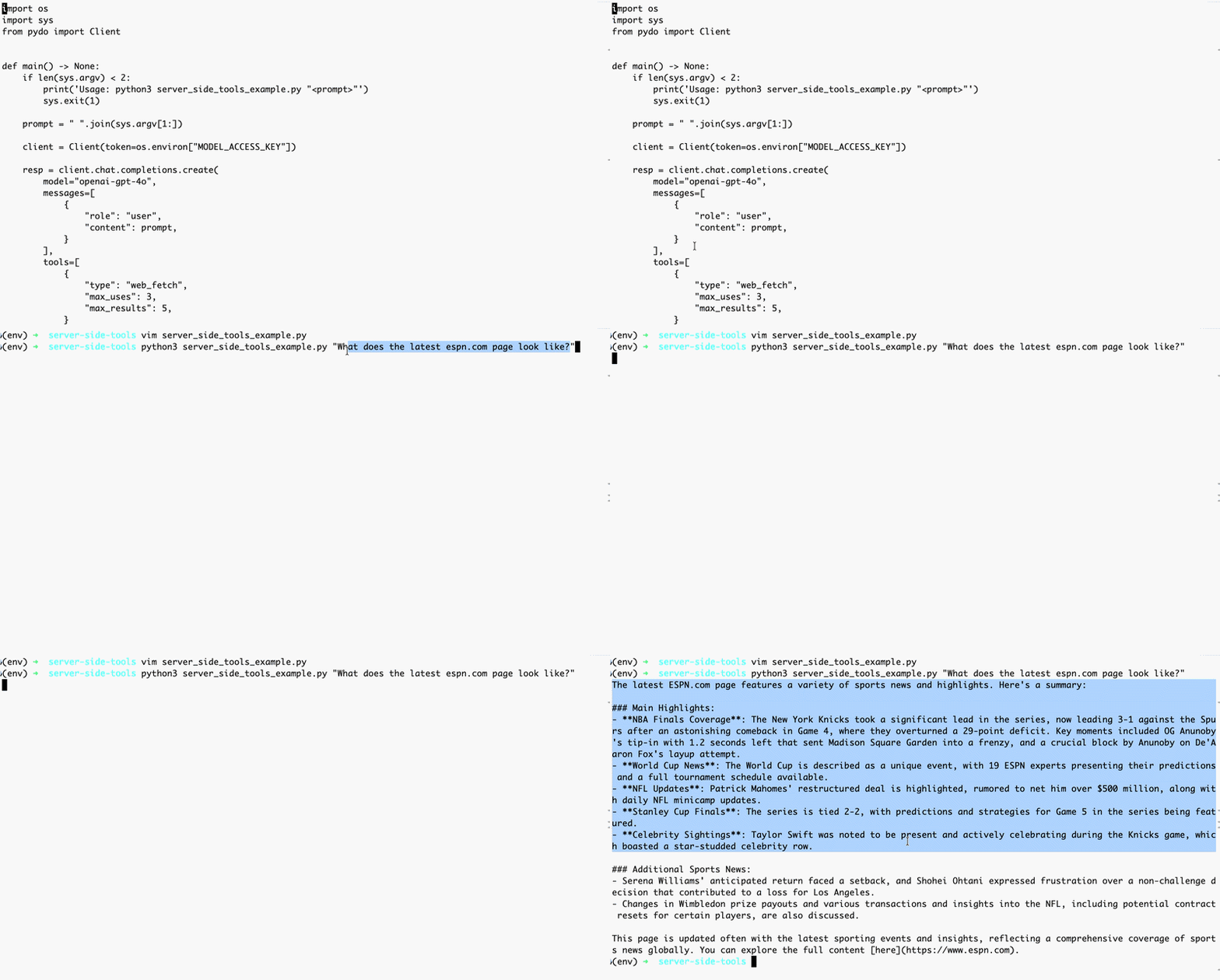
Both Web Search and Web Fetch are powered by Exa. Pricing is usage-based; see the pricing page for current rates.
Web Mode: Enable web access through the model URL
Some agent frameworks only allow you to configure a model name and do not expose tool configuration. For these cases, DigitalOcean supports Web Mode, which automatically enables Web Search and Web Fetch through the model field. This gives the model access to Web Search and Web Fetch without explicitly defining tools, making it easier to integrate with agent frameworks that only allow model-level configuration.
Ground Responses in Your Own Data
For applications that need to work with their own data and systems, Server-Side Tools provides two options.
-
DigitalOcean Knowledge Bases: Give your models access to retrieve relevant content from your indexed data automatically without you building a separate retrieval pipeline. Attach your knowledge base, send the request, and the model grounds its response in your content.
-
MCP Servers: Connect models to your systems and services through the Model Context Protocol. MCP servers expose internal APIs, databases, and tools, allowing models to retrieve information and take actions like writing data, updating systems, or triggering workflows directly within inference requests.
Support for Anthropic and OpenAI Tools
If you are already using Anthropic or OpenAI tool conventions, those same tool definitions work within DigitalOcean Inference Engine. There is no need to rewrite your application logic or adapt to a new interface.
-
Anthropic tools include: Web fetch, Tool search, Bash, Text editor, Computer use
-
OpenAI tools include: Function calling, Computer use, Tool search, Apply Patch, Local shell
All tools incur token costs based on use. For the full list of supported tools, see the documentation.
Use Your Existing Agent Tooling Without Changes
Server-Side Tools also power coding agents and developer workflows. Coding assistants such as Claude Code, Codex, and other agent frameworks rely on capabilities like web search, web fetch, bash, text editing, and computer use to gather context and complete tasks. By supporting these tools directly within inference requests, DigitalOcean Inference Engine makes it easier to run coding agents and agent frameworks without managing additional tool infrastructure.
How to Access Server-Side Tools
Server-Side Tools are available today in Public Preview through your existing DigitalOcean Model Access Key. No new credentials or account changes are required, and we plan to add more tools.
To get started, specify tools as part of your inference request, or enable Web Mode through the model URL. Server-Side Tools are available through Serverless Inference, Inference Router, and Dedicated Inference. Full documentation, including request examples and supported tool configurations, is available here.
About the author

Related Articles

DigitalOcean Inference Router Enhancements: Performance Tuned Routing, No Rules to Write
DigitalOcean
- October 13, 2026
- 4 min read

Introducing DigitalOcean Agent Data Services: The Data Foundation for Agents
- October 12, 2026
- 5 min read

Introducing DigitalOcean Insights: Built-in Observability for Your Agents, Applications, and Infrastructure
Shridhar Pandey
- October 12, 2026
- 4 min read