Optimizing your container registry: Understanding garbage collection in DOCR

By srangare
- Published:
- 3 min read
The DigitalOcean Container Registry (DOCR) is a private Docker image registry that lets you store and manage private container images. As users keep on pushing, updating and deleting the container images, this creates untagged manifests and unreferenced blobs in the container registry which are unused and consumes memory. This data is known as garbage, and to clean up this garbage data, DOCR provides on-demand garbagecollection using which users can cleanup the garbage from their registry.
In this blog post, I would like to share how garbage collection works in DigitalOcean Container Registry.
How garbage collection works
Before garbage collection starts, the user’s registry is put into read-only mode. This makes sure that the newly pushed image does not get deleted during garbage collection. But during garbage collection users are allowed to pull the images from the registry.
The garbage collection process works in two phases.
1. Registry metadata scan
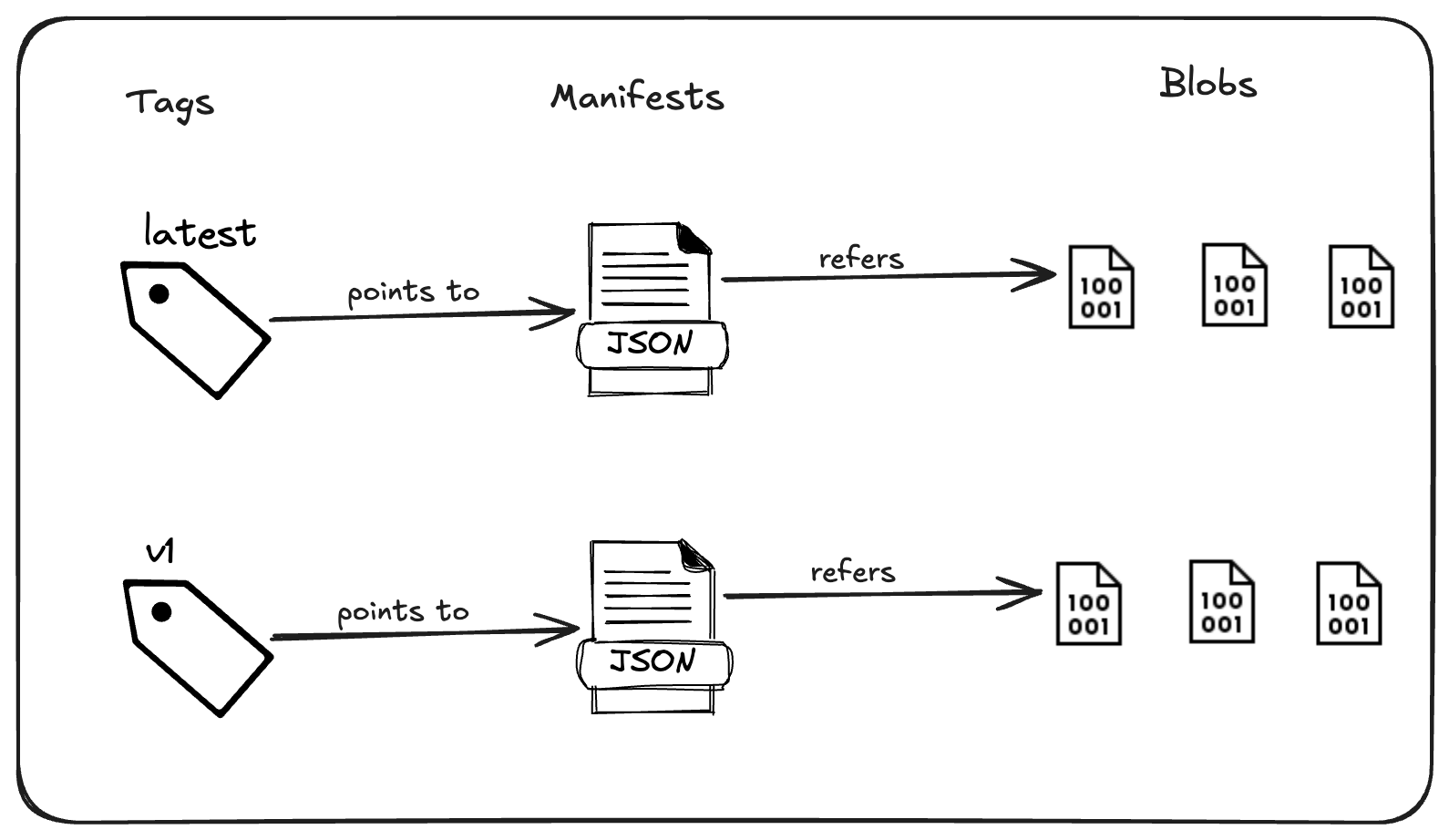
Container images are stored in a Spaces bucket, while a separate metadata database maintains information about manifests, tags, and blobs. This metadata database also tracks the relationships between tags and manifests, as well as between manifests and blobs.
Here is a pictorial representation of the relationship between tags, manifests and
blobs/layers:
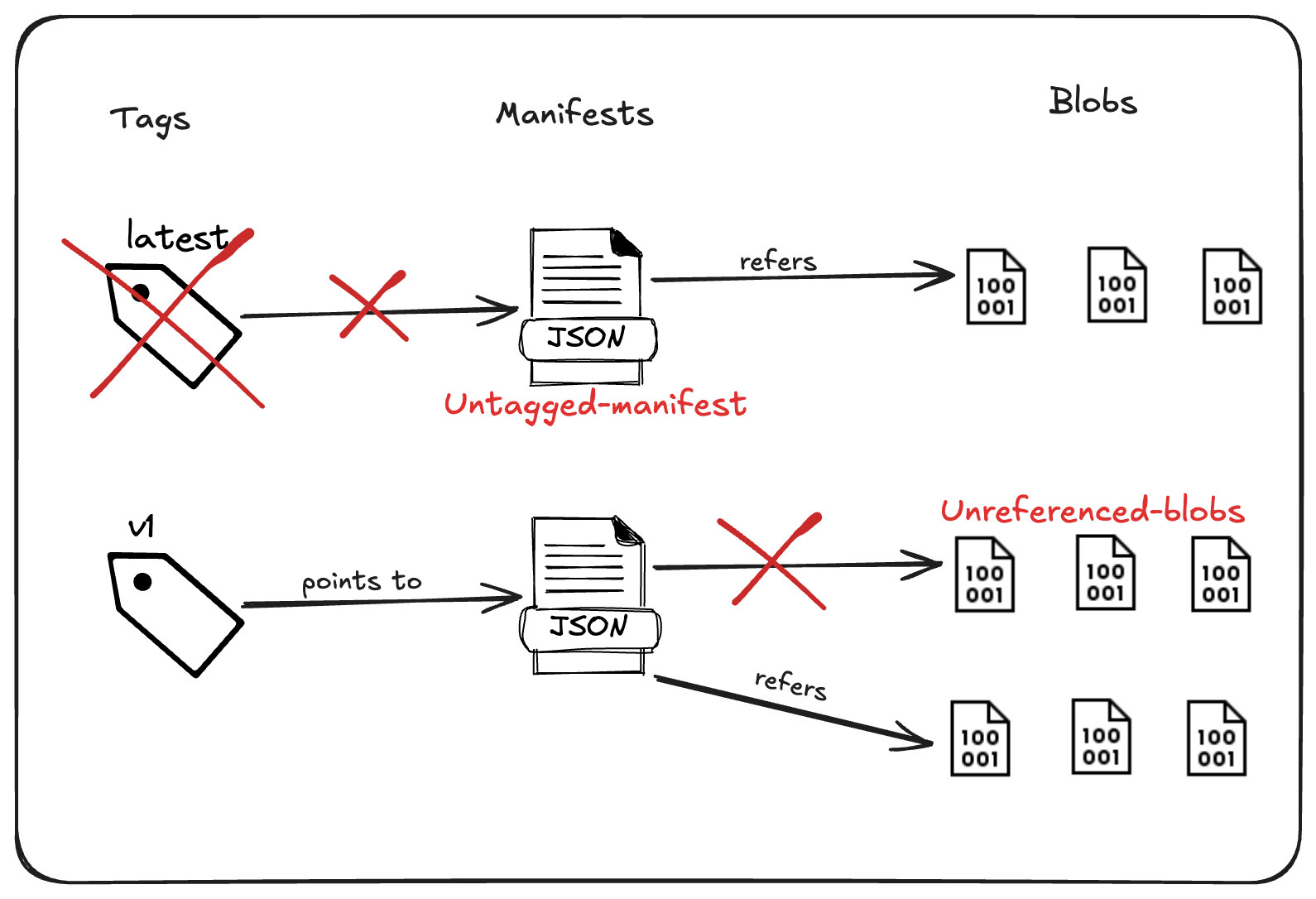
During a registry scan, all entities found in the registry (Spaces bucket) are processed, and their corresponding metadata is updated in the metadata database. This process ensures that the metadata database maintains the most recent information about both tagged and untagged manifests, as well as referenced and unreferenced blobs.
Here is a pictorial representation of how untagged-manifest and unreferenced-blobs look:
2. Deletion of unused data
During this phase, the actual deletion of garbage occurs. Following the registry scan, the metadata database is updated with the most recent metadata of all the registry entities, along with their corresponding relationships.
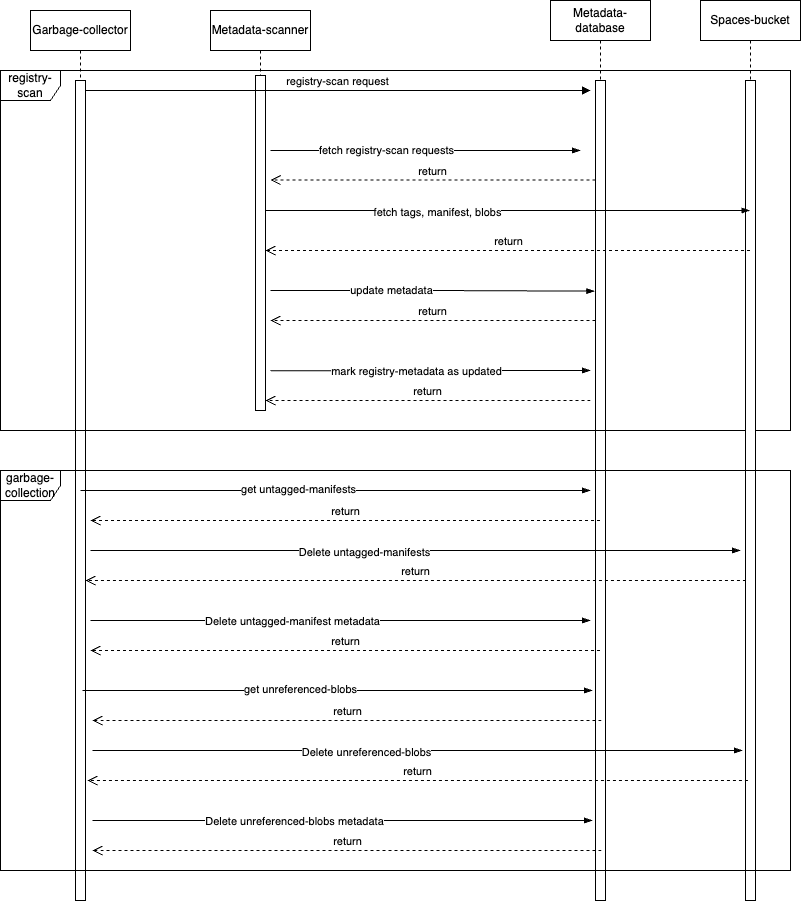
We first retrieve the list of all untagged manifests and unreferenced blobs from the metadata database. These items are then deleted from the registry before being removed from the database. Once all the garbage has been cleaned up, we disable the read-only mode of the registry.
The below diagram depicts different services and interactions between them during garbage collection:
Garbage collection for large registries
One of the major issues we have encountered is running garbage collection on large registries. We have observed that when a registry is large or the volume of garbage data that needs to be cleaned up is substantial, the garbage collection process tends to take longer to complete. If a user cancels a long-running garbage collection in the middle, the metadata won’t be marked as deleted, meaning that re-running the garbage collection will start the process from the beginning.
To address this, we have introduced partial garbage collection, which allows the users to cancel the garbage collection midway and, when re-triggered, resume the process from where it left off. This reduces the duration of re-triggered garbage collection and enables users to perform garbage collection incrementally.
Benefits of garbage collection
The process of garbage collection is a vital maintenance process which provides several benefits. Removal of unused and dangling images helps to reclaim storage space, which in turn reduces the operational cost and enhances the registry’s performance. Garbage collection also simplifies the developer workflows by eliminating the outdated images and promoting better resource management. Overall, garbage collection is necessary for maintaining cost effective and efficient containerized infrastructure.
Conclusion
Beneath the surface, the garbage-collection process is significantly more complex than what has been described here. This is a simplified overview, while in reality, DigitalOcean Container Registry concurrently manages thousands of garbage-collection requests. Although we have solved some of the challenges, we will keep on improving the garbage collection process.
Also, we advise users to run the garbage collections regularly to keep their registries garbage free and it helps maintain garbage collection duration for large registries. Learn how to run garbage collection for your container-registry in our docs.
About the author

Related Articles

Three layers, all config: how DigitalOcean Managed Agents enforce NVIDIA OpenShell-aligned boundaries
Rohit Bhattacharjee
- October 26, 2026
- 5 min read

Prompt Caching is GA on DigitalOcean Serverless Inference: Up to 90% Off the Context Your Agents Resend
- October 23, 2026
- 4 min read

Critical PHP RCE Vulnerabilities: Patch Now (CVE-2026-109618, CVE-2026-109619)
- October 21, 2026
- 10 min read