• Blog
  • Docs
  • Careers
  • Get Support
  • Contact Sales
DigitalOcean
  • Featured AI Products

    Compute

    Build, deploy, and scale cloud compute resources

    Containers and Images

    Safely store and manage containers and backups

    Managed Databases

    Fully managed resources running popular database engines

    Management and Dev Tools

    Control infrastructure and gather insights

    Networking

    Secure and control traffic to apps

    Security

    Help protect your account and resources with these security features

    Storage

    Store and access any amount of data reliably in the cloud

    Browse all products

  • AI/ML

    CMS

    Data and IoT

    Developer Tools

    Gaming and Media

    Hosting

    Security and Networking

    Startups and SMBs

    Web and App Platforms

    See all solutions

  • Community

    Documentation

    Developer Tools

    Get Involved

    Utilities and Help

  • Become a Partner

    Marketplace

  • Pricing
  • Log in
  • Sign up
  • Log in
  • Sign up

Company

  • About
  • Leadership
  • Blog
  • Careers
  • Customers
  • Partners
  • Referral Program
  • Affiliate Program
  • Press
  • Legal
  • Privacy Policy
  • Security
  • Investor Relations

Products

  • GPU Droplets
  • Bare Metal GPUs
  • Inference Engine
  • Data & Learning
  • Evaluations
  • Model Library
  • Droplets
  • Kubernetes
  • Functions
  • App Platform
  • Load Balancers
  • Managed Databases
  • Spaces
  • Block Storage
  • Network File Storage
  • API
  • Uptime
  • Cloud Security Posture Management (CSPM)
  • Identity and Access Management (IAM)
  • Cloudways
  • View all Products

Resources

  • Community Tutorials
  • Community Q&A
  • CSS-Tricks
  • Write for DOnations
  • Currents Research
  • DigitalOcean Startups
  • Wavemakers Program
  • Compass Council
  • Open Source
  • Newsletter Signup
  • Marketplace
  • Pricing
  • Pricing Calculator
  • Documentation
  • Release Notes
  • Code of Conduct
  • Shop Swag

Solutions

  • AI Training GPU
  • GPU Inference
  • VPS Hosting
  • Website Hosting
  • VPN
  • Docker Hosting
  • Node.js Hosting
  • Web Mobile Apps
  • WordPress Hosting
  • Virtual Machines
  • View all Solutions

Contact

  • Support
  • Sales
  • Report Abuse
  • System Status
  • Share your ideas

Company

  • About
  • Leadership
  • Blog
  • Careers
  • Customers
  • Partners
  • Referral Program
  • Affiliate Program
  • Press
  • Legal
  • Privacy Policy
  • Security
  • Investor Relations

Products

  • GPU Droplets
  • Bare Metal GPUs
  • Inference Engine
  • Data & Learning
  • Evaluations
  • Model Library
  • Droplets
  • Kubernetes
  • Functions
  • App Platform
  • Load Balancers
  • Managed Databases
  • Spaces
  • Block Storage
  • Network File Storage
  • API
  • Uptime
  • Cloud Security Posture Management (CSPM)
  • Identity and Access Management (IAM)
  • Cloudways
  • View all Products

Resources

  • Community Tutorials
  • Community Q&A
  • CSS-Tricks
  • Write for DOnations
  • Currents Research
  • DigitalOcean Startups
  • Wavemakers Program
  • Compass Council
  • Open Source
  • Newsletter Signup
  • Marketplace
  • Pricing
  • Pricing Calculator
  • Documentation
  • Release Notes
  • Code of Conduct
  • Shop Swag

Solutions

  • AI Training GPU
  • GPU Inference
  • VPS Hosting
  • Website Hosting
  • VPN
  • Docker Hosting
  • Node.js Hosting
  • Web Mobile Apps
  • WordPress Hosting
  • Virtual Machines
  • View all Solutions

Contact

  • Support
  • Sales
  • Report Abuse
  • System Status
  • Share your ideas
© 2026 DigitalOcean, LLC.Sitemap.
Product updates

Introducing Monitoring

author

By Ankur Jain

  • Published: April 4, 2017
  • 3 min read
<- Back to blog home

Over the lifecycle of your application, knowing when and why an issue in production occurs is critical. At DigitalOcean, we understand this and want to enable developers to make informed decisions about scaling their infrastructure. That’s why we are excited to announce our new Monitoring service, available today for free with all Droplets. It gives you the tools to resolve issues quickly by alerting you when one occurs and giving you the information you need to understand it.

Monitoring the applications you’ve deployed should be as simple and intuitive as the rest of the DigitalOcean experience. Earlier this year, we released an open source agent and improved graphs that give you a better picture of the health of your Droplets. That was just the first piece of the puzzle. The agent offers greater visibility into your infrastructure, and now Monitoring will let you know when to act on that information.

Monitoring is natively integrated with the DigitalOcean platform and can be enabled at no extra cost by simply checking a box when creating your Droplets. It introduces new alerting capabilities using the metrics collected by the agent, allowing your team to receive email or Slack notifications based on the resource utilization and operational health of your Droplets.

View Graphs & Statistics

The Monitoring service exposes system metrics and provides an overview of your Droplets’ health. The metrics are collected at one-minute intervals and the data is retained for a month, enabling you to view both up-to-the-minute and historical data. The improved Droplet graphs allow you to visualize how your instances are performing over time.

The following metrics are currently available:

  • CPU
  • Disk I/O
  • Memory
  • Disk usage
  • Inbound and outbound bandwidth
  • A process list ordered by CPU or memory usage

Create Alert Policies

You can create alert policies on any of your metrics to receive notifications when the metric crosses your specified threshold. An alert policy monitors a single metric over a time period you specify. Alerts are triggered when the state is above or below your threshold for the specified time period. You can leverage DigitalOcean tags to group your Droplets based on your project or environment. Then you can apply the alert policy to specific Droplets or groups of tagged Droplets.

Alert policies can be created from the Monitoring tab in the DigitalOcean control panel:
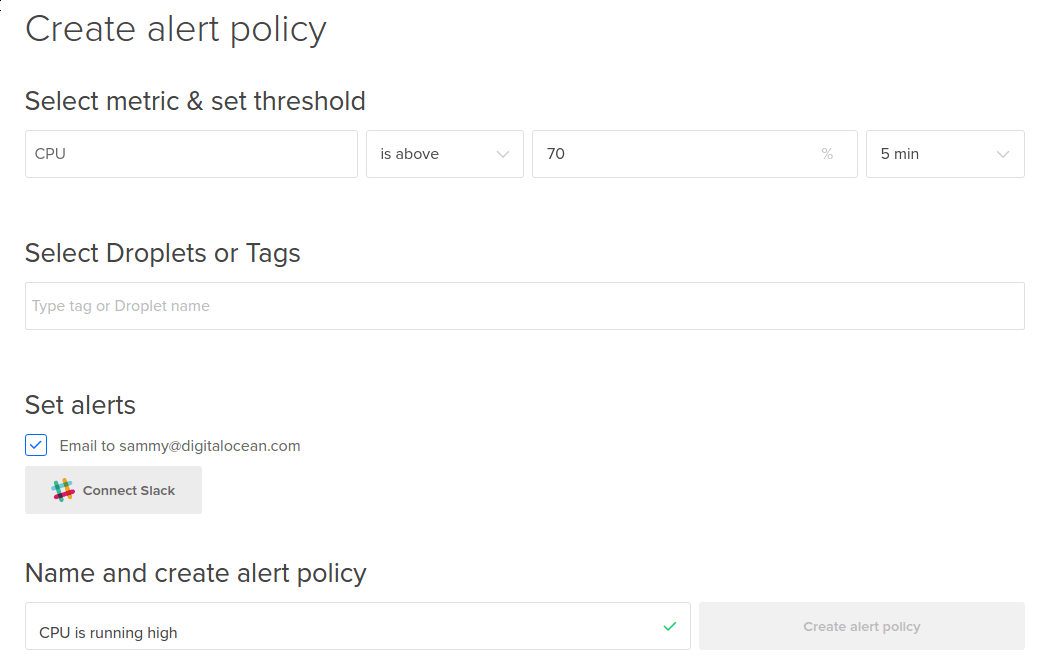
Create alert

You can find more information about creating alert policies in our documentation.

Configure Notifications

When you set up an alert policy, you will be able to choose between two notification methods:

  • Slack Alerts — Post to your team’s Slack channel when a new alert is triggered.
  • Email Notifications — Send emails when a new alert alert is triggered.
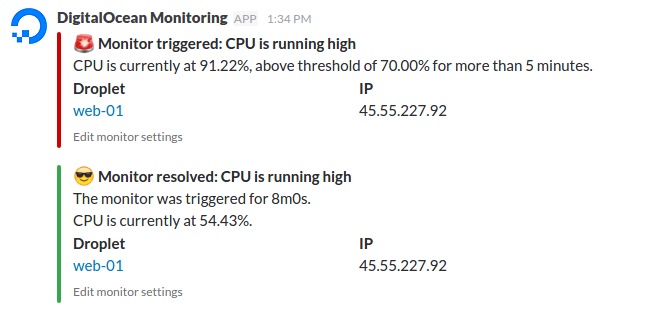
Slack notifications

You’ll receive notifications both when an alert threshold has been exceeded and when the issue has been resolved.

Getting Started

To enable Monitoring on your Droplets, you’ll need to have the agent installed. On new Droplets, it’s as simple as clicking the Monitoring checkbox during Droplet creation.

Enable monitoring

On existing Droplets, you can install the agent by running:

curl -sSL https://agent.digitalocean.com/install.sh | sh

Find more information on the agent itself in this tutorial on the DigitalOcean Community site.

Coming Soon

With the first iteration of our Monitoring service out the door, we’re already working on what’s next. Some features you will see soon include:

  • API support for alert policies
  • Enhanced visualization of alerts
  • Monitoring for Block Storage
  • Webhooks to notify external services about alerts

From alerting on issues to visualizing metrics, we want to provide you with the tools you need to monitor the health and performance of your applications in production. We’d love to hear your feedback. What metrics are important for your team? How can we help integrate Monitoring into your workflow? Let us know in the comments or submit a suggestion on our UserVoice page.

About the author

Ankur Jain
Ankur Jain
Author

Share

  • Product Updates

Start building today

From GPU-powered inference and Kubernetes to managed databases and storage, get everything you need to build, scale, and deploy intelligent applications.
Sign up

Related Articles

Run Codex in the cloud – DigitalOcean for Codex is now available
Product updates

Run Codex in the cloud – DigitalOcean for Codex is now available

Ari Sigal
  • June 25, 2026
  • 3 min read

Read more

Server-Side Tools Are Now Available for DigitalOcean Inference Engine
Product updates

Server-Side Tools Are Now Available for DigitalOcean Inference Engine

Grace Morgan
  • June 17, 2026
  • 3 min read

Read more

Model Evaluations: Prove Your Routing Policy Actually Works
Product updates

Model Evaluations: Prove Your Routing Policy Actually Works

Sathish Jothikumar

  • June 4, 2026
  • 7 min read

Read more