Supabase Template is Now Available on DigitalOcean App Platform

By Bikram Gupta
- Published:
- 3 min read
Modern applications need more than just a database. They need authentication, auto-generated APIs, file storage, and real-time subscriptions. Supabase is a powerful open-source Firebase alternative that transforms PostgreSQL into a complete backend platform. With its developer-friendly SDKs and instant API generation, Supabase is a top request from teams who want full control over their infrastructure without sacrificing speed.
Today, we’re excited to announce native Supabase template support on DigitalOcean App Platform. Deploy a production-ready Supabase backend with one click, complete with managed PostgreSQL, authentication, REST API, file storage, and real-time capabilities.
Benefits
-
Instant Backend: Get authentication, auto-generated REST APIs, file storage, and real-time subscriptions without writing backend code.
-
Production-Ready Security: Every deployment includes JWT authentication, Row Level Security (RLS), and secure credential management out of the box.
-
Self-Hosted Control: Keep your data, auth credentials, and file storage on infrastructure you control—no vendor lock-in.
-
Full-Stack Ready: Deploy Supabase alongside your frontend application in a single App Platform project.
Architecture Overview
The Supabase template deploys a complete backend stack that auto-generates APIs from your PostgreSQL schema. Your frontend applications connect through four specialized services that handle data, authentication, files, and real-time updates.
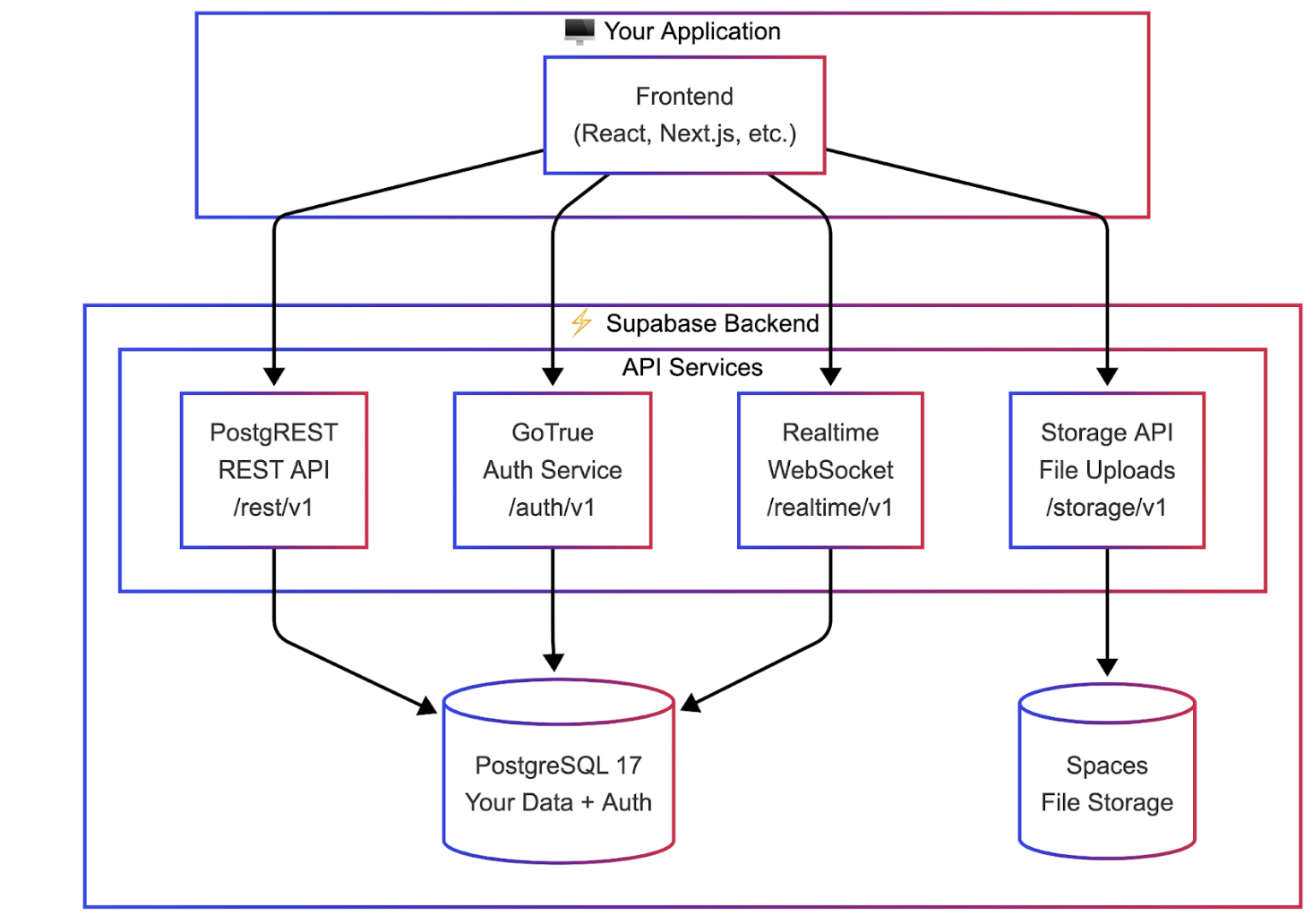
How Supabase Works
Unlike traditional backends where you write API endpoints manually, Supabase auto-generates them from your database schema:
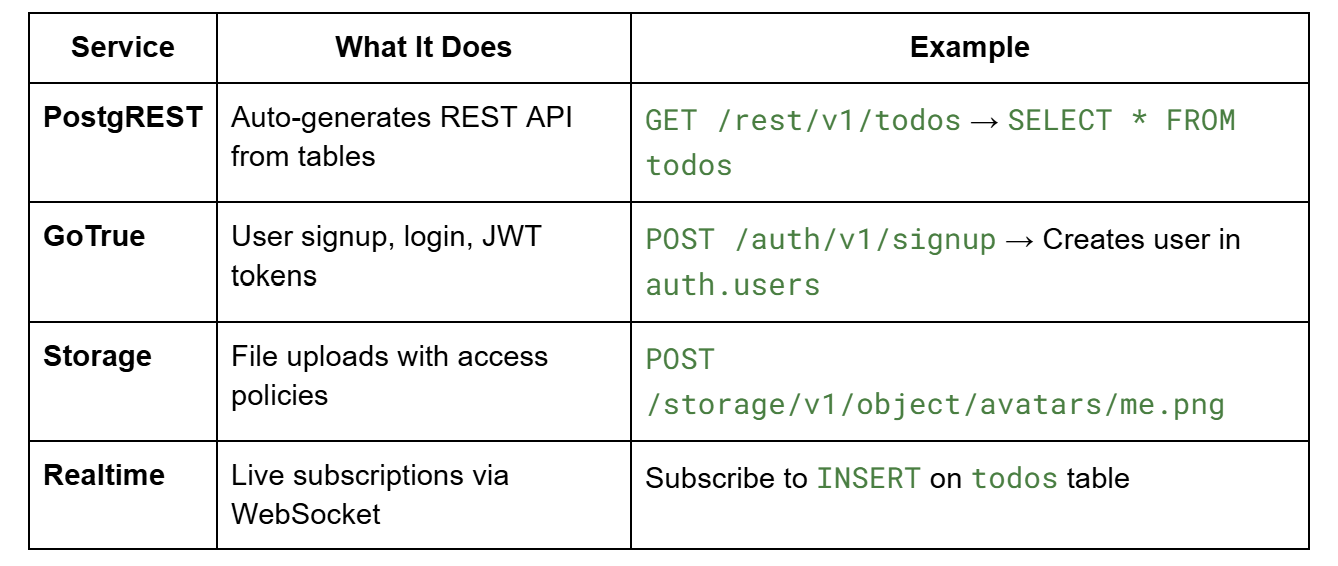
Row Level Security (RLS) policies on your tables control who can access what - users only see their own data, automatically.
How to Get Started
The template repository contains everything you need to deploy Supabase on App Platform:
github.com/AppPlatform-Templates/supabase-appplatform
You have three deployment paths:
-
One-Click: Use the Deploy to DigitalOcean button in the repository for instant deployment
-
Console or CLI: Fork the repo and deploy via the DigitalOcean Control Panel or doctl CLI
-
AI-Assisted: Use an AI coding assistant with App Platform Skills for guided, full-stack deployments
Deploying with AI Assistants
AI assistants can deploy your complete stack—Supabase backend plus your frontend application—in a single workflow. We recommend using DigitalOcean App Platform Skills. Clone the skills repository to your assistant’s skills directory:
# For Claude, Cursor, Codex, or Gemini

git clone https://github.com/digitalocean-labs/do-app-platform-skills.git \

  $HOME/.[claude|cursor|codex|gemini]/skills/do-app-platform-skills**
Verify your assistant has access by asking: “Do you have access to DigitalOcean App Platform skills?”
Then use a prompt like:
Prompt: Build NexusChat on DigitalOcean App Platform

Build NexusChat, a real-time AI-powered chatroom that showcases Supabase capabilities: authentication with user profiles, chat rooms with instant messaging via Realtime subscriptions, image sharing via Storage, and an AI assistant triggered by @ai mentions using the Gradient API. This demonstrates a complete full-stack pattern for Supabase on App Platform.


Use the skills from https://github.com/digitalocean-labs/do-app-platform-skills and reference the Supabase template at https://github.com/AppPlatform-Templates/supabase-appplatform.


Before starting, check if progress-artifacts.md exists—if so, read it to resume from the previous session. Create a detailed implementation plan with checkable tasks, execute phase by phase, and keep artifacts updated so I can start a new session at any time and you'll pick up exactly where we left off.

  - Session continuity: Maintain progress-artifacts.md (gitignored) with GitHub repo, App Platform app ID/URL, secrets status (configured/missing), database cluster info, current phase, and completed tasks—update after every major step

  - App database design: Design your application tables with PostgREST-compatible foreign keys (reference public.profiles, not auth.users), enable RLS on all tables, and use the auth.uid() helper function for JWT claims in policies

  - Deployment: Do NOT deploy Studio or Meta services. GitHub Actions workflow injects secrets via sed, deploys with doctl apps update, and uses --force-rebuild for static site updates

  - Verification: Use browser automation to perform real end-to-end testing—test auth flow, database operations, realtime subscriptions, and AI integration before marking each phase complete
The assistant will create a detailed plan covering database setup, RLS policies, frontend configuration, and deployment - then execute each step with your approval.
What’s Included
-
PostgREST for auto-generated REST APIs from your schema
-
GoTrue for email/password authentication and JWT tokens
-
Storage API for file uploads to DigitalOcean Spaces
-
Realtime for WebSocket subscriptions on database changes
-
PostgreSQL 17 with pre-configured roles (anon, authenticated, service_role)
-
Database initialization with auth helper functions and RLS support
For database management, use any PostgreSQL client (pgAdmin, DBeaver, psql) or run Supabase Studio locally for a visual interface.
Get Started
The Supabase template is available in all App Platform regions today. Visit the template repository to deploy, and check out the Supabase documentation for guides on authentication, RLS policies, and client SDKs.
About the author

Related Articles

Account Control, Every Layer: From Your Organization to Every Session
- October 7, 2026
- 2 min read

Introducing Agent Droplets: everything an agent needs, one price, one bill
DigitalOcean
- October 1, 2026
- 8 min read

DigitalOcean MicroVMs: the Compute foundation for building your AI agent infrastructure (private preview)
Shridhar Pandey
- October 1, 2026
- 4 min read