What Is an AI Agent Runtime? How It Works (2027)

By Jesse Sumrak
Sr. Content Marketing Manager
- Updated:
- 12 min read
An AI agent spends a surprising share of its working life waiting: on a model response, a slow API, or a teammate who hasn’t approved its pull request yet. It briefly jumps into activity… just to wait again. Agent workloads use compute in short bursts separated by long pauses, a pattern that web servers and batch jobs weren’t built to handle.
That stop-and-start rhythm has turned the AI agent runtime into its own layer of infrastructure, though vendors still disagree as to what the term covers. Harness Runtime is DigitalOcean’s AI agent runtime, part of Managed Agents (public preview). It runs every agent session in its own microVM, pauses the session without losing state while the agent waits, and routes tool calls through Action Gateway’s permission checks.
Let’s consider what an agent runtime handles, how it differs from the harness and framework you build with, and how to run agents like Claude Code on Harness Runtime.
Key takeaways:
- An AI agent runtime is the execution layer that runs agent sessions and manages their state, sandboxes, tool access, and records, while the harness decides what the agent does next.
- A runtime is distinct from a framework (a library you build with), a harness (the scaffolding around the model), an orchestrator (logic that decides which agent runs when), and a sandbox (one isolated component inside the runtime).
- Production AI agent runtimes handle four jobs: durable state for long-running sessions, isolation, scoped permissions and credentials, and structured observability.
- DigitalOcean Harness Runtime, part of Managed Agents (public preview), runs harnesses like Claude Code, Codex CLI, and LangGraph in a dedicated microVM per session.
What is an AI agent runtime?
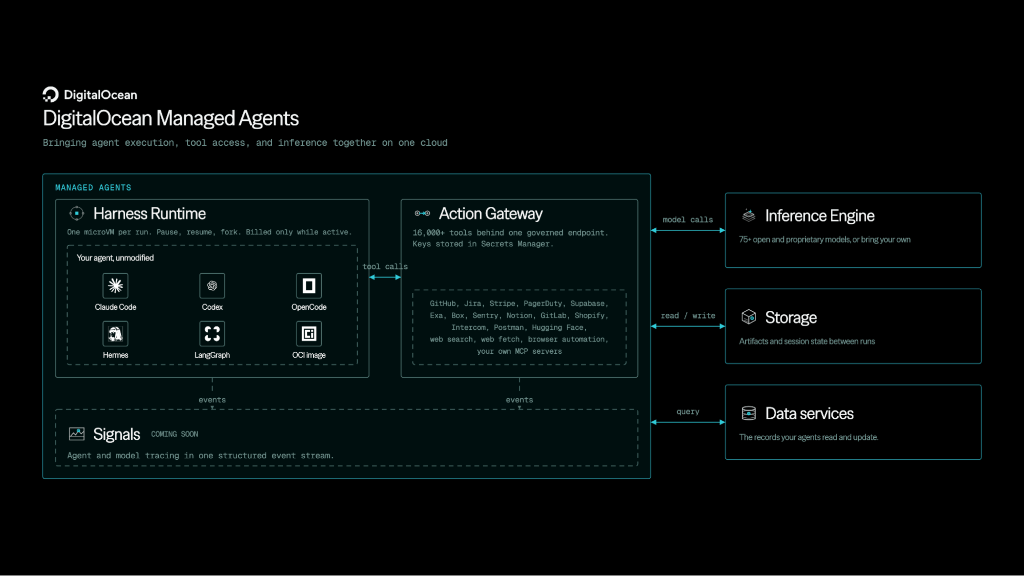
An AI agent runtime is the execution environment in which an AI agent runs and performs its work. It starts and isolates each agent session, keeps that session’s state intact across pauses and failures, enforces which tools and networks the agent can reach, and records what happened along the way. The harness or framework decides what the agent should do next, and the runtime is where that work executes. You might be aware of terms like agentic runtime or agent runtime environment, which also refer to the same concept.
DigitalOcean, the AI-Native Cloud, offers its own agent runtime through Managed Agents, now in public preview. Harness Runtime gives each session a hardware-isolated microVM with built-in tools like Chromium. Its counterpart in Managed Agents, Action Gateway, covers everything the agent does outside that sandbox by governing which of 16,000+ tools it can call. Teams bring the agent they already run (such as from Claude Code or a custom container image), and DigitalOcean handles the infrastructure underneath: provisioning each sandbox, saving its memory and files when a session pauses, and restoring them when work resumes.
AI agent runtime vs. framework, harness, orchestrator, and sandbox
Agent tools often get labeled as frameworks, harnesses, or runtimes depending on who’s describing them, but they’re not interchangeable terms.
Each has different responsibilities and controls:
| Term | What it is | What it controls | How to implement |
|---|---|---|---|
| AI agent runtime | The execution environment that runs agent sessions | Where each session runs, what it can reach, and what survives a pause or failure | DigitalOcean Harness Runtime |
| Framework | A code library of building blocks, like tool definitions and graph primitives, for assembling an agent | How the agent is assembled in code | LangGraph, CrewAI |
| Harness | The scaffolding around a model: the agent loop, context assembly, tool dispatch, and stopping rules | What the agent does next, such as which tool to call or when to stop | Claude Code, Codex CLI, OpenCode |
| Orchestrator | Control logic that decides which agent or task runs, in what order, and with which inputs | Which agent or task runs, and in what order | Multi-agent supervisors, scheduled workflows |
| Sandbox | An isolated environment where code executes, such as a container or microVM | What code can touch inside one isolated environment | Firecracker microVMs, gVisor, Kata Containers |
If a component decides what the agent does next, it belongs to the harness or orchestrator. If it decides whether that action can run, where it runs, and what survives afterward, it belongs to the runtime. Designing and tuning the harness side is a discipline of its own, called harness engineering.
Security vendors also talk about runtime authorization, meaning checks on an agent’s actions as they happen. It’s just one of many jobs a full runtime handles.
Choosing a harness before you decide where to run it? Our guide to the agent harness covers its core components, popular options such as Claude Code and Hermes Agent, and how to choose one for your workflows.
Benefits of an AI agent runtime
A capable model and a well-built harness can still fail if nothing underneath keeps sessions alive, contained, and on the record. The runtime handles that layer, so an agent’s work lasts long enough to be useful.
Here’s what a dedicated runtime adds:
- Long tasks that finish: Durable sessions pick up where they left off after a crash, deployment, or an idle stretch, so a multistep job doesn’t restart from scratch and pay for its tokens twice. This design is intentional- our estimates found that an agentic task uses 5 to 30x as many tokens as a chat interaction.
- Compute bills that track real work: Sessions pause while the agent waits on a model, a tool, or a person, then resume when new input arrives. On Harness Runtime, CPU and memory charges stop while a session is paused.
- Safer autonomy: Isolation, permission policies, and brokered credentials limit the damage a misled agent can cause, making it reasonable to hand agents more complex, multistep work without someone watching every step.
- Faster debugging: A structured record of every tool call and approval shows where a run went wrong without having to reproduce it.
- Less infrastructure to stitch together: Without a runtime, teams often wire up separate vendors for sandboxes, state, tools, and telemetry. A managed runtime on DigitalOcean puts all four in one place.
How an AI agent runtime works
The best way to see how an AI agent runtime works is by following one session from start to finish.
Here’s an example of a GitHub webhook that asks a coding agent to review a pull request:
- A trigger starts a session. The webhook (or a CLI command, schedule, or chat message) requests a session, and the runtime provisions an isolated sandbox with the agent, its configuration, and the repository.
- The agent works in runs. In each turn, the agent calls a model, reads files, and executes code in the sandbox while the runtime streams events.
- Each tool call passes a policy check. Before the agent comments on the pull request or pushes a commit, the runtime permits the action, blocks it, or holds it for human approval. Once the action clears policy or a person approves it, the runtime attaches the credentials the call needs without exposing them to the model.
- Idle sessions pause. While the agent waits for approval or a slow API response, the runtime can pause the session, retain its memory and files, and resume when new input arrives.
- The record outlives the sandbox. Model requests, tool calls, approvals, and errors are logged in a structured format, so you can audit or debug the run after the session ends.
Harness Runtime adds checkpoints to that flow, so you can fork a warmed-up session into parallel copies, for example, to run several evaluations from the same starting point.
What a production AI agent runtime handles
A prototype agent running for a short test can get by with almost no infrastructure.
But once the agent touches real repositories, customer data, or credentials, its runtime has to handle these jobs well:
Durable state and long-running sessions
Agent durability is a runtime’s ability to keep a session’s progress through crashes, deploys, idle hours, and closed laptops. Without it, a three-hour task that fails at step 40 starts over from step one, and you pay again for every token it already used.
Runtimes tend to operate with one of these approaches:
- Durable execution engines replay a recorded event history to rebuild in-progress work.
- Snapshot-based runtimes save the sandbox’s memory and filesystem so a paused session resumes where it left off.
When comparing options, learn what survives a pause, crash, and shutdown, and whether you can branch from a saved checkpoint.
DigitalOcean Harness Runtime takes the snapshot approach. Pausing preserves the full machine state and stops compute charges, and persistent workspaces (in public preview) keep files in /workspace even after a session is removed.
Tired of rebuilding the same agent setup for every attempt? Our tutorial on checkpointing and forking with Harness Runtime sets up a sandbox once, then forks parallel copies with the tests already passing.
Isolation and sandboxing
Agents run code without review, and a prompt hidden in a web page can influence what they write.
Isolation decides how far a bad (or malicious) command can reach:
- Containers share the host’s kernel, so a kernel exploit inside one container can put its neighbors at risk.
- gVisor adds a user-space kernel that intercepts system calls before they reach the host.
- MicroVMs, such as Firecracker and Kata Containers, boot a separate guest kernel for every sandbox, with a hypervisor enforcing the boundary.
Stronger boundaries cost more memory per sandbox, so match the boundary to how much you trust the code, and give customer-facing agents one sandbox per session. Harness Runtime gives each session its own Firecracker microVM, making the session the unit of isolation.
Want to see isolation hold up during a real incident? Our post on building an on-call team of AI agents on DigitalOcean MicroVMs gives each investigator its own MicroVM and requires a human to approve the rollback.
Permissions, secrets, and network access
Isolation limits the damage from bad code, and permissions limit the damage from bad decisions (like a prompt-injected agent deleting a git branch). In a production runtime, you should be able to mark each action as allowed, denied, or held for human approval-the same controls at the center of MCP security.
These controls can help, too:
- Secrets: API keys shouldn’t sit in an agent’s config files, logs, or prompt, where a single prompt injection could expose them. The safer setup keeps keys in a separate service that attaches them only when a call runs. On DigitalOcean, Action Gateway pulls the credential from storage, makes the call on the agent’s behalf, and returns just the result, so the agent never sees the key.
- Network egress: An allowlist of reachable hosts keeps a compromised agent from sending data to an unknown server. In Harness Runtime, adding an allowlist switches the sandbox from open outbound access to a deny-by-default model.
Wondering where an API key lives once an agent works on its own? Our technical deep dive about how DigitalOcean manages credentials for autonomous agents walks through an agent investigating a duplicate charge.
Observability and audit
A production runtime should record every model request, tool call, file operation, approval, and state change as structured events, so its logs can answer these questions without a re-run:
- What did the agent do?
- Who approved it?
- What did it cost?
Harness Runtime logs each tool call, model request, and file operation as a structured event, with token usage and approval activity alongside. DigitalOcean Insights (public preview) adds metrics and logs for Managed Agents and Action Gateway, and Signals (public preview) flags sessions where a tool call failed, the agent looped, or a user asked for a human.
Insights and Signals are part of Agent Learning Services, along with Evaluations and Simulations, which test a fix against scenarios built from flagged sessions before it ships. Agent Data Services (private preview) stores those traces and session histories as queryable data the agent can read back.
AI agent runtime examples
Agent runtimes range from fully managed platforms to open-source building blocks that cover a single layer, like durability or isolation.
Here are a few AI agent runtime examples, starting with DigitalOcean:
- DigitalOcean Harness Runtime: Part of Managed Agents (public preview), it runs Claude Code, Codex CLI, LangGraph, CrewAI, OpenHands, or your own container image in a dedicated microVM per session. Agent Droplets bundle runtime, tool access, inference, and storage into a single monthly plan.
- NVIDIA OpenShell: An open-source runtime that sets a default security posture for agent sandboxes, such as deny-by-default network access. Harness Runtime can enforce an OpenShell policy profile before a session starts.
- Temporal: An open-source durable execution platform that records each workflow step, so in-progress work survives crashes. Its integration with the OpenAI Agents SDK reached general availability in March 2026, though code execution still requires a separate sandbox.
- Kubernetes Agent Sandbox: A Kubernetes SIG Apps project that adds a Sandbox custom resource for isolated, stateful, single-instance workloads, backed by gVisor or Kata Containers. It’s a starting point for platform teams building their own runtime.
- OpenHands Agent Server: The open-source OpenHands coding agent runs its Agent Server as a long-lived process. With OpenHands v1.27.0, developers can create DigitalOcean-hosted OpenHands agents directly from Agent Canvas.
AI agent runtime FAQ
How do I run an always-on AI agent on a cloud VM?
Install the agent on a VM, such as a DigitalOcean Droplet, run it as a system service so it restarts after crashes, and keep its API keys in a secrets manager (patching and monitoring fall to you). Harness Runtime takes that upkeep off your plate by running always-on agents, such as Hermes Agent or the OpenHands Agent Server, as long-lived processes in microVM sandboxes that pause when idle.
Which clouds run AI coding agent sandboxes on microVMs with pause and resume?
DigitalOcean Harness Runtime runs coding agents like Claude Code, Codex CLI, and OpenCode in a dedicated Firecracker microVM for each session. Pausing keeps the sandbox’s memory and filesystem while CPU and memory charges stop, and a paused session resumes in about 300 milliseconds.
Where should I host a Claude Code or other coding agent harness in the cloud?
Choose a host that keeps sessions running after you close your laptop, isolates each session, and keeps credentials away from the agent. On DigitalOcean, one command starts Claude Code in an isolated Harness Runtime sandbox: doctl harness-runtime launch --harness claude-code --name my-first-agent.
Where can I run a long-running background coding agent and stream its logs?
Look for a runtime with durable sessions you can detach from and reattach to. With Harness Runtime, you can start a session, detach, and later reattach or pull logs via doctl or the Control Panel, or follow it from an iPhone with the Cuttlefish iOS app (public preview). DigitalOcean Insights (public preview) also tracks session lifecycle, token usage, and approval activity.
Which cloud provider offers agent sandboxes, inference, and managed databases in one account?
DigitalOcean runs all three on one cloud: Harness Runtime for agent sandboxes, the Inference Engine for open and proprietary models, and Managed Databases for application data. One account means one bill and fewer vendor boundaries between an agent, its model, and its data.
Build and run agents on DigitalOcean Managed Agents
DigitalOcean Managed Agents gives the agents you build a managed runtime, with Harness Runtime running isolated, durable sessions and Action Gateway governing every tool call. Bring Claude Code, Codex CLI, LangGraph, or your own image, and DigitalOcean manages the infrastructure underneath.
Key features include:
- A dedicated Firecracker microVM for each session, with built-in tools like Chromium
- Pause, resume, checkpoint, and fork, with CPU and memory charges stopped while a session is paused
- Per-tool permissions, human approvals, and credentials brokered at call time through Action Gateway
- A structured event log of every tool call, model request, and approval, plus metrics in DigitalOcean Insights
- Agent Droplets plans that bundle runtime, tools, inference, and storage into one monthly price
Get started with Managed Agents ->
Teams are already putting it to work. Qencode built a support-triage agent on Managed Agents that saves an estimated 4 to 8 hours a week, and CEO and co-founder Murad Mordukhay calls it “a huge force-multiplier for our team.”
Results in customer environments may vary depending on configuration, implementation, and usage. Results and/or savings are not guaranteed.
Public Preview products are offered without a service level agreement, are not recommended for production workloads, and their features may change or be withdrawn before general availability. See the DigitalOcean preview terms for details.
Any references to third-party companies, trademarks, or logos in this document are for informational purposes only and do not imply any affiliation with, sponsorship by, or endorsement of those third parties.
About the author

Hi. My name is Jesse Sumrak. I’m a writing zealot by day and a post-apocalyptic peak bagger by night (and early-early morning). Writing is my jam and content is my peanut butter. And I make a mean PB&J.
Start building today
From GPU-powered inference and Kubernetes to managed databases and storage, get everything you need to build, scale, and deploy intelligent applications.