Building a Robust Documentation Agent with DigitalOcean Gradient AI Platform


By Austen Ito and Anna Lushnikova
- Published:
- 14 min read
At DigitalOcean, documentation has always been a priority. Developers come to our docs to get unstuck, and the faster they find what they need, the better. Traditional docs pages work, but they require users to know which page to visit, scan for the relevant section, and map generic instructions to their specific setup. That process takes minutes (or longer) when it could take seconds.
So we built an AI documentation assistant. Ask a question in plain language, get an answer with working links and ready-to-use commands. Simple enough as a demo. Getting it production-ready was a different story. It took us several iterations to reach an agent we were confident enough to ship. The LLM could generate plausible-sounding answers from day one. Knowing whether those answers were grounded, and keeping them grounded after every model update and prompt change — that’s where we spent most of our time.
This post covers what we built, how we validated it, and the specific decisions that moved our metrics from “not great” to “ready for launch.” We’ll walk through prompt engineering, evaluation pipelines, and the CI/CD glue that holds it all together. Throughout, we relied on DigitalOcean’s Agentic Inference Cloud so we could focus on product behavior instead of stitching together inference, RAG, and evaluation tooling ourselves — one place to run agents, attach knowledge bases, and measure quality, with scale when we need it, and straightforward operational patterns.
Architecture
Gradient™ AI Platform is the control plane and runtime for standing up production AI agents without assembling pieces by hand. In one place you can attach a knowledge base, define an agent, and tune how it behaves: pick an LLM (managed or open-source), set temperature and top P, choose retrieval behavior, and edit the system prompt. The goal is to get from an empty project to a working agent in minutes, not to wire up inference, RAG, and evaluation from scratch.
A Gradient AI Agent is the concrete thing you end up with: a configured AI agent aimed at a specific job (for us, docs Q&A), with that stack of choices baked in. Think of it as the deployed product built on top of the Gradient™ AI Inference Cloud building blocks — not a separate platform, but the named, production-shaped instance you operate and evaluate.
We chose an Agent for the docs assistant because of the product fit. We need task-oriented Q&A with grounding and follow-up behavior that fits an assistant, not a raw completion API.
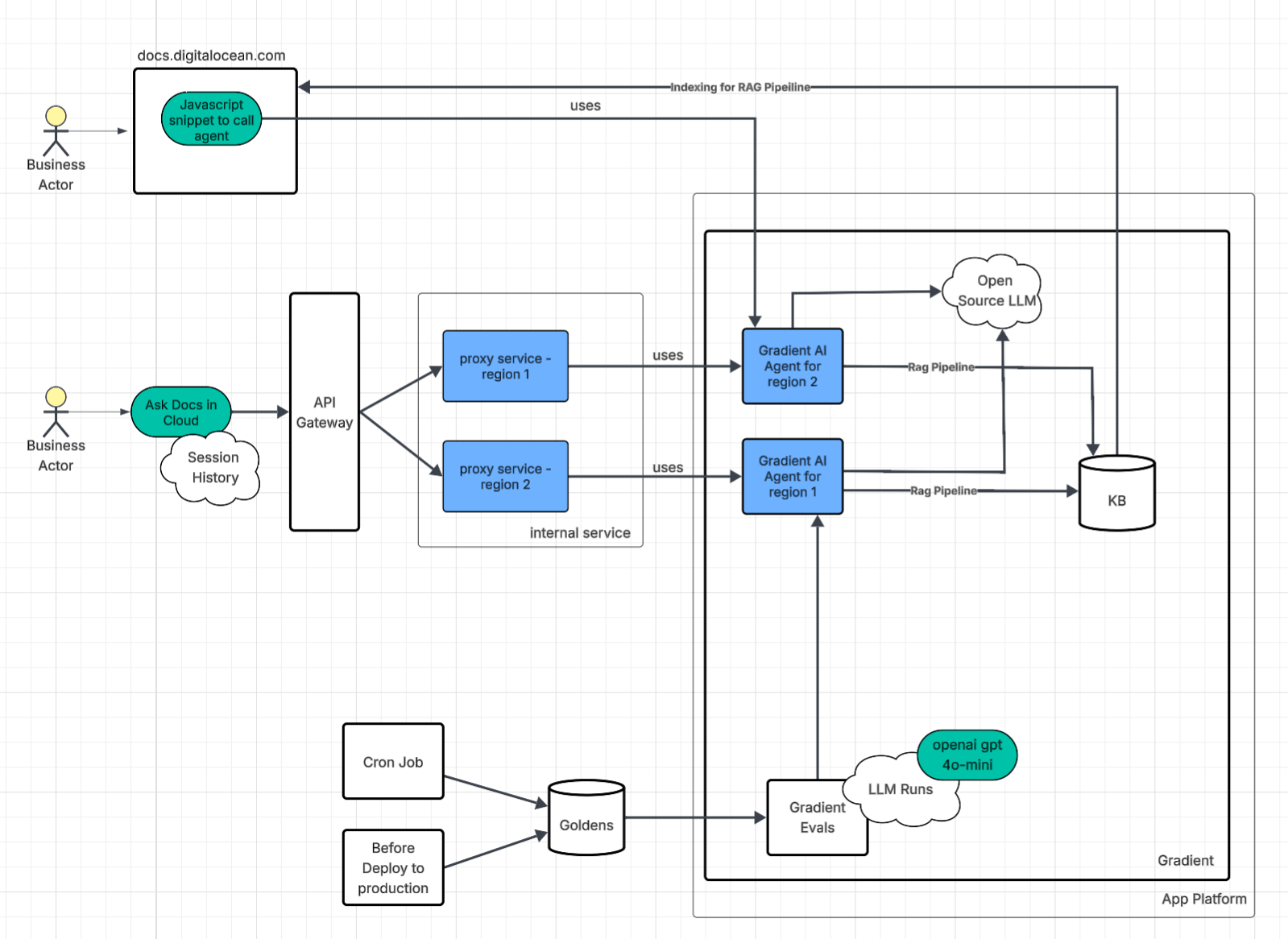
We run two interfaces to the agent, each solving a different problem.
1. Direct script embedding
The first approach is the simplest one. We embedded a Gradient AI JavaScript snippet directly into the DigitalOcean documentation site. This went live early as a low-cost way to get the agent in front of users fast. It generates a token to authenticate with the Gradient AI Agent.
2. API Gateway and Proxy for the AskDocs in Cloud
The second approach is more involved. An API gateway routes requests to an internal proxy service that sits between the user and the Gradient AI Agent. Authentication here relies on the user’s existing DigitalOcean session rather than a generated token.
The proxy turned out to be worth the extra complexity. Because it handles streaming responses from the Gradient AI Agent, we can measure TTFT (time to first token) at the proxy layer and get real latency numbers without instrumenting the agent itself.
Beyond latency measurement, running the proxy as an internal service gave us several things we didn’t have to build from scratch:
-
Logging, golden signals metrics, and access to internal libraries that follow company standards
-
Rate limiting, auth, and load balancing, all reused from existing internal infrastructure
-
A translation layer between the frontend contract and the Gradient Agent API, so either side can change independently
We deploy multiple proxy instances across regions, each paired with its own Gradient AI Agent. The agents are provisioned through Terraform, which eliminates the configuration drift that creeps in when you set things up by hand through a UI. If one proxy goes down, the load balancer redirects traffic to another instance. No single point of failure.
Inference Infrastructure
When building automation with AI, an important question comes up: what kind of inference layer should you put behind that implementation?
Serverless Inference gives direct access to foundation models for straightforward, high-speed, ephemeral completion calls, with automatic scaling and pay-per-token pricing — predictable when your workload is “call model, get text.”
AI agents address a different shape of workload: multi-step, conversational, retrieval-grounded flows. Under the hood they use the same ephemeral completion calls; what changes is the agent platform — injecting RAG context, tuning parameters such as temperature, rewriting queries, and wiring steps together — so the product emphasis is orchestration and agentic behavior.
Agents are the most direct way to keep answers tied to your domain: they add knowledge-base grounding and orchestration on top of Serverless Inference, so you get retrieval, session-shaped flows, and managed RAG wiring in one product path with fewer moving parts.
In practice that showed up as defaults we did not have to build or operate separately. Retrieved chunks are re-ranked for relevance before the model answers, so grounding improves without wiring a custom ranker. The Gradient Agent keeps session context across turns, which makes follow-up questions behave like a conversation instead of a fresh completion each time. When we indexed documentation, the platform handled cleaning and chunking automatically, which cut manual ingestion work and kept retrieval behavior steadier across a large doc set.
Under the hood, the Gradient AI Agent still runs on managed inference — the platform abstracts the exact serving stack so we focus on prompts, retrieval, and evaluation. Teams that need full control over serving (custom images, pinning hardware, or bespoke scaling) may still prefer GPU Droplets, Bare Metal GPUs, or DigitalOcean Kubernetes (DOKS) with their own inference layer; that is a valid alternative when “managed agent endpoint” is not the right tradeoff.
For us, the combination of a managed agent + KB + evaluations matched the bar for speed of iteration and operational simplicity.
Data Driven Approach to Validation
Reliability, scalability, and other traditional development best practices are important, but in AI development, they are worthless if the agent itself is consistently hallucinating or fails to solve the problem it was designed to address.
Metrics
It became obvious early that changing prompts or agent settings without measuring outcomes was a waste of time.
There are several metrics you could track. Some metrics rely on the LLM as a judge and require more time and resources to run, while others are fast, inexpensive, and deterministic.
We settled on a mix of LLM-judged and deterministic metrics:
Correctness (LLM as a judge)
An LLM judge evaluates whether the response is factually accurate, which catches open-domain hallucinations — fabricated information that isn’t grounded in any source document.
Ground truth adherence (LLM as a judge)
Measures whether the response is semantically equivalent to a known-good reference answer. Correctness asks “is this true?” Ground truth adherence asks “is this the right answer to this specific question?” A response can be factually correct but miss what the user was actually asking about.
Time to first token (deterministic)
Tells us whether the agent is responding within an acceptable window — users notice latency before they notice anything else.
URL correctness (deterministic)
Extracts every DigitalOcean documentation link from the response using regex and verifies each one returns a successful HTTP response. Our agent is supposed to point users to the right docs page. Dead links undermine that immediately.
To ship our Product Documentation agent, we chose 80% ground truth adherence and 95% correctness (testing details available upon request) as our release bar — thresholds we picked after weighing accuracy risk, user impact, and what our evaluation pipeline could support reliably.
Getting to those numbers required multiple iterative adjustments. Here is what moved each metric.
Correctness and ground truth adherence
Correctness and ground truth adherence were built through layered prompt engineering:
-
Product identification with keyword mappings to route questions to the right product context (see Prompt Engineering).
-
Chunk validation that blocks cross-product blending at retrieval time. Cross-product blending (e.g., answering an App Platform question with Kubernetes docs) is explicitly forbidden. This is a guardrail against RAG returning semantically similar but factually wrong context.
-
Retrieval failure awareness that prevents the agent from denying features that exist when retrieval is simply missed. The prompt contains a sophisticated heuristic to distinguish “the docs don’t cover this” from “retrieval just failed”.
We also switched the retrieval method from rewrite to sub-queries for better chunk relevance on complex questions. The golden datasets went through numerous passes to fix factually wrong ground truth (like monitoring webhooks and GPU model errors), disambiguate vague questions by adding product context, and add a dedicated validation set that verifies the agent asks clarifying questions on ambiguous terms.
We tuned the model to temperature 0.1 with k=10 retrieval and added strict response constraints: no exhaustive lists; when the documentation states something plainly, answer in the same direct terms; for pricing and plans, use what appears in the retrieved docs or link readers to the official pricing page when those details are not in context; and default to Control Panel steps unless the question asks for the API.
We also overhauled the golden dataset itself: correcting inaccurate answers, removing unanswerable community questions where long answers didn’t match the agent’s concise style, reducing question ambiguity, and adding per-product topic tags for granular tracking.
TTFT (time to first token)
Three changes moved this metric:
-
Reduced the retrieval parameter
kfrom 10 to 5 (fewer chunks to process before generating) -
Shortened the system prompt by removing redundant sections and condensing the Special Cases block to stay under the 10k character limit
-
Added the “no exhaustive lists” directive so the model starts outputting a concise answer sooner instead of planning a long enumeration
URL correctness
URL correctness was hardened separately from correctness by building a custom URL correctness metric and scorer that extracts URLs from agent responses and validates they resolve. We also iteratively hardened the extraction regex to handle edge cases: trailing punctuation, trailing > characters, right square brackets, and periods that are legitimately part of a URL path.
On the prompt side, we added explicit rules:
-
Use URLs exactly as they appear in documentation chunks
-
Never fabricate, infer, or extend URLs
-
Each URL appears once per response
-
Format as Markdown: text
-
Exceptions: URLs may be omitted for clarifications, out-of-scope queries, or “no documentation” responses
We also verified the knowledge base itself (via OpenSearch chunk inspection notebooks) to confirm it only contained docs.digitalocean.com URLs and not community or third-party domains, eliminating a source of invalid URLs at the retrieval layer.
Golden Datasets
Our evaluations require “golden datasets” of question-and-answer pairs that we consider correct. For example, a real golden dataset that we use looks like:
question: How do I rotate my DigitalOcean API tokens securely?
answer: >
  Create a new API token on the API page, update your applications to
  use the new token, then revoke the old token. This ensures continuous service
  while maintaining security by eliminating access through the old token.
product: api
reasoning: moderate
source: synthetic
type: how_to_configuration
The above example contains a question, ground truth answer, and additional metadata such as:
-
Product area/type - allows us to zoom in on product domains that are not performing well or need more test coverage.
-
Reasoning - gives visibility into the level of difficulty for an evaluation, which is useful when looking at results over time. For light questions, we expect higher results since they are “easier” to answer. For heavy questions, we expect more variability over time since these questions are more nuanced and have higher complexity.
-
Source - the origin of the question such as human-generated or synthetic.
Our golden datasets are sent to the Gradient AI Platform where metric results are computed. Evaluations use an LLM-as-a-Judge approach with multiple judges running OpenAI GPT-4o. The judges employ Chain-of-Thought (CoT) reasoning to generate a numeral score between 0 and 1. For example, a golden dataset could return a correctness score of .66 meaning 2 out of 3 judges found the response to be correct.
Once results are created, the metrics and metadata are sent as telemetry via OTLP to our observability cluster for future observability and analysis.
Creating Datasets
There are several ways to create golden datasets.
-
Human-generated - Subject matter experts manually write question-and-answer pairs. While this is the most reliable method to create golden datasets, we quickly realized it was extremely time-consuming for teams.
-
Using existing content - DigitalOcean has resources, such as support and community, which provide gold-standard datasets based on customer support materials. This approach maintains quality while reducing manual effort, however there was still human-work necessary to identify good examples.
-
Synthetic generation - LLMs generated pairs using detailed prompts to produce synthetic datasets. The process involved prompting an LLM to crawl product documentation pages 2-3 levels deep and generating multiple diverse QA pairs. While the answers could introduce bias from the LLM, the tradeoff around accuracy is made up by the speed of generation. Humans are still needed to review synthetically generated datasets.
Since the golden datasets are used by both automated systems and humans in various roles — PMs, engineers, and managers — we chose YAML format for readability due the responses having multiple lines and code. The YAML files are then converted to CSV and fed into the Gradient evaluations.
The generated datasets are submitted as pull requests on GitHub to a dedicated team for review and approval. This approach allowed us to add high-quality responses quickly from subject matter experts with minimal effort.
Running Evaluations
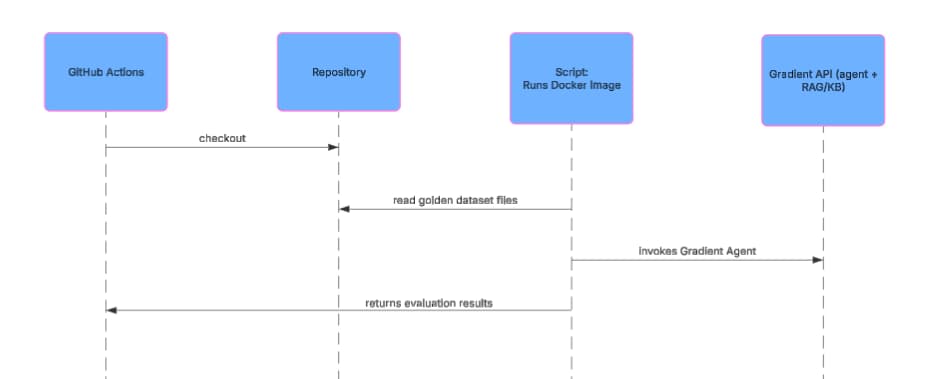
Our agent evaluations are used during development and in our CI/CD pipeline on GitHub Actions. During development, engineers can experiment with changes such as prompt updates and run evaluations locally. When changes are merged, our CI/CD pipeline executes evaluations automatically before deployment. We also periodically run our full evaluation suite once a day to verify our documentation agent continues to operate as we expect.
Agent Configuration Decisions
Once evaluations and metrics were in place, it became possible to iterate on areas important to us, such as correctness and speed, using objective measurements instead of one-off tests and vibes.
Prompt Engineering
From our evaluations, we noticed that the primary area that kept our ground truth adherence metric below 80% and our correctness metric below 95% was that the LLM would decide on its own what ambiguous words meant or how to give suggestions to perform an action. For example, consider the following prompt:
How do I create a Droplet on DigitalOcean?
Based on our results using Gradient evaluations, we discovered that our agent would vary how it responded to this question over multiple evaluation runs. Sometimes the agent would return responses to create Droplets on the Control Panel, other times it would suggest the Public API or doctl. Since the agent lives in the Control Panel, we added the following to our prompt to help ensure that ambiguous requests responded with Control Panel instructions:
- **If public API or automation is NOT specified in the question:**
  - Use ONLY Control Panel chunks in your primary answer
  - If only public API chunks are retrieved, ask clarifying question: "Would you like to know how to do this in the
    Control Panel or via the API?"
  - You may mention API/CLI methods in the Recommendation section as alternative automation options
We also discovered that our golden datasets were too ambiguous with prompts such as:
How do I automate deleting files older than 30 days?
Questions like these would return varying responses since files can live on a variety of different DigitalOcean products. This prompted us to make two changes:
-
We updated our golden dataset questions to be more specific. In this case, we changed the above prompt to be “How do I automate deleting files older than 30 days on Spaces”.
-
We added the following to our agent prompt:
**If uncertainty exists**, ask clarifying question: "Are you asking about [Product A] or [Product B]?"
Finally, we found that certain words in prompts would return inconsistent results. The following prompt adjustment helped our agent relate different words to specific products. In cases where words are too ambiguous, we added a specific clarification prompt to help improve our agent performance.
Identify keywords that map to specific products:
t
- "app" / "deployment" / "build" → App Platform
- "volume" → Block Storage
- "registry" / "container" / "DOCR" → Container Registry
- "droplet" / "VM" / "server" → Droplets
- "workflow" / "gradient" / "notebook" / "gen ai" → Gradient AI Platform
- "1-click" → Marketplace
- "function" / "serverless" → Serverless Functions
- "spaces" / "bucket" → Spaces
- These words alone are ambiguous → ask clarification:
  - "image"
  - "plan"
  - "quota"
  - "storage"
  - "subscription"
  - "tag"
Experimentation
Because LLM responses are non-deterministic, we leaned on the metrics framework to compare configurations instead of eyeballing outputs.
- Splitting the knowledge base (KB). We divided our single OpenSearch knowledge base (all product documentation) into smaller, product-scoped KBs. The hypothesis: smaller, scoped doc sets would produce more relevant results at retrieval time. It didn’t play out that way. We saw worse performance with increased complexity of managing multiple KBs with overlapping content.
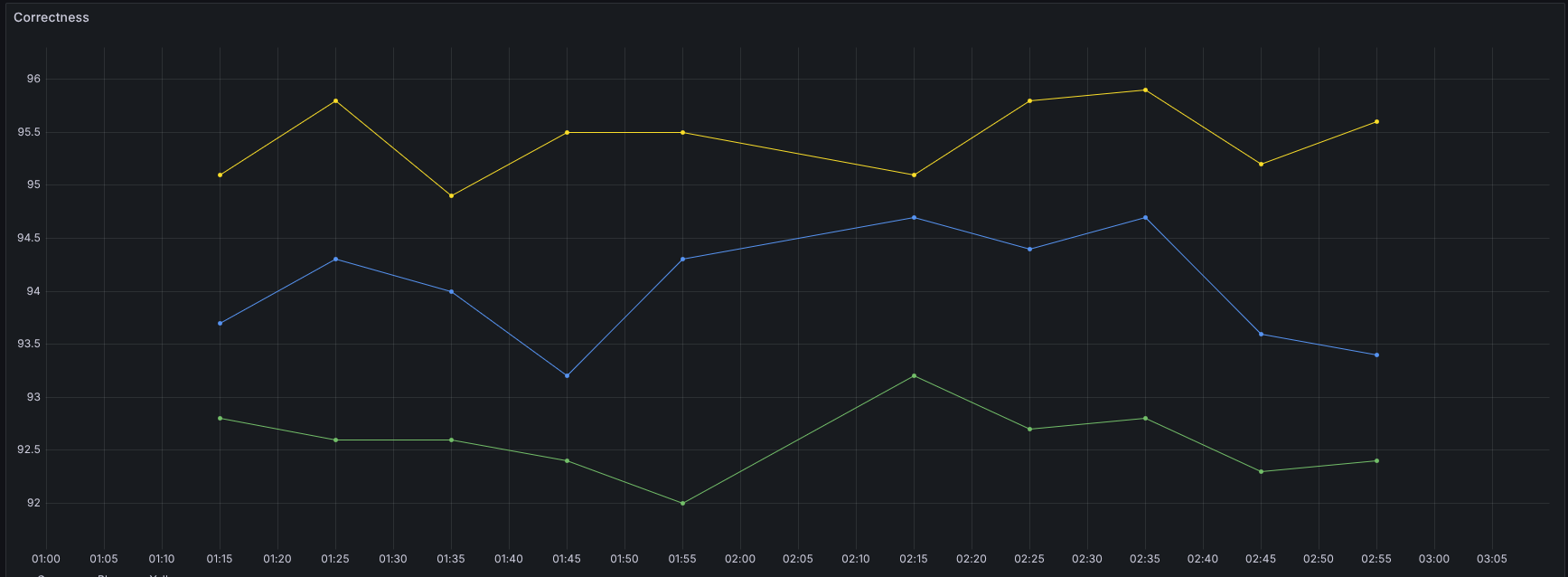
Due to the non-deterministic nature of the results, we ran the same set of tests multiple times to obtain a reliable average. Each point is the overall correctness for a full test run.
Yellow = baseline (one shared KB, one agent). Green = one agent, four product KBs. Blue = shared KB plus four product KBs
- Dedicated agents per knowledge base. Next, we checked whether correctness improved if each KB got its own dedicated agent. We hypothesized that giving each smaller, product-scoped knowledge base its own dedicated child agent under a main orchestrator would narrow retrieval and improve correctness compared to a single agent on one common KB.
This one showed results: roughly ~4% correctness improvement. That’s meaningful, and it might be an approach worth trying in production, but it comes with real costs. Maintaining one agent per product significantly increases operational overhead. So we haven’t committed to that path; one agent + one common KB is still what we run today.
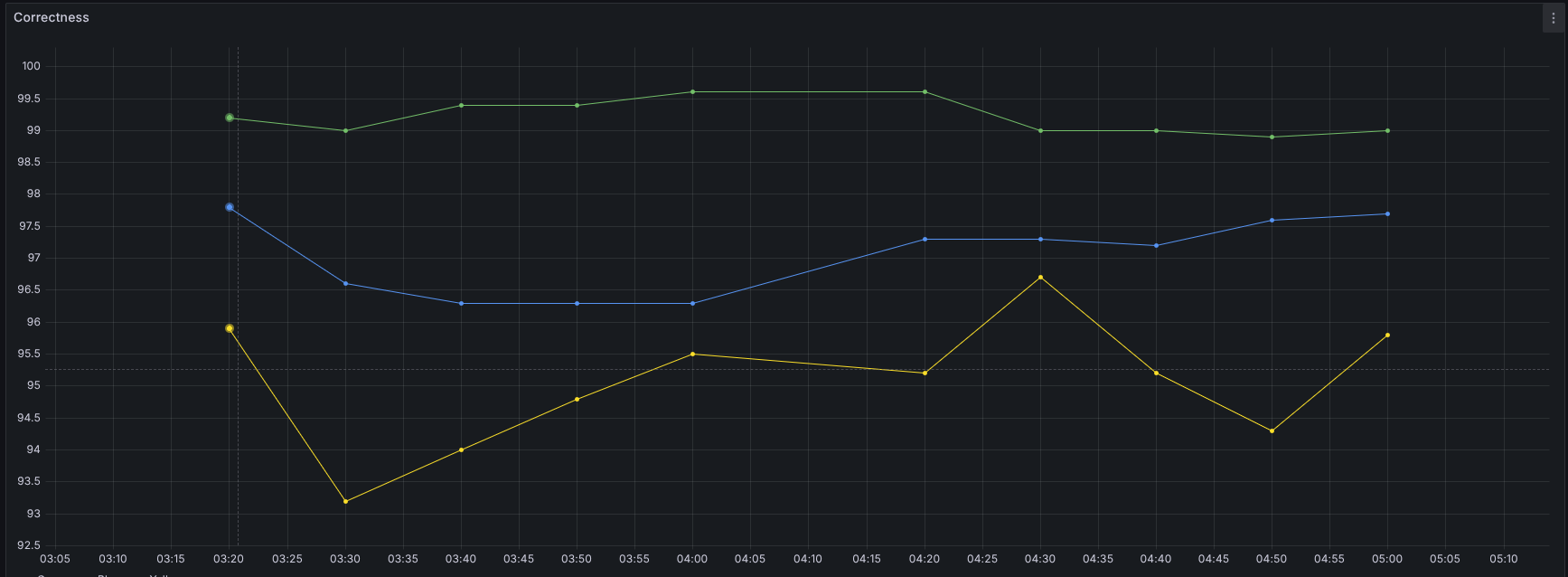
Yellow = baseline (one KB, one agent). Green = four small KBs, each with its own agent, no shared KB. Blue = four agents on small KBs plus a shared KB on the main agent.
None of these decisions would have been possible without having evaluation metrics in place. All of the changes above used our data driven approach to measure, adjust, and measure again to ensure that we meaningfully improved our agent’s performance.
Top 3 Must-Dos When Creating an AI Agent for Production
The work that made our agent reliable enough to ship wasn’t the work we expected to spend time on. It was provisioning agents through Terraform instead of clicking through a UI, building golden datasets before we had a single prompt worth testing, and wiring evaluations into CI so that no change went live without proof it helped. Here’s what that looks like in practice:
1. Treat your agent like a production system
If it’s user-facing, it needs monitoring, redundancy, and infrastructure-as-code — the same bar as every other service in your stack. We use Terraform for agent provisioning and multi-region deployment for availability. The agent is a service, not a side project.
2. Define “good” and measure it
Pick metrics that match your product requirements, build golden datasets, and run evaluations. Don’t rely on assumptions or intuition — our first real evaluation runs surfaced correctness problems on questions we thought were easy. Spot-checking a handful of prompts is not a substitute for an automated evaluation suite.
3. Only ship changes that improve the numbers
Continuously run evaluations against a production-like environment, and only make changes to prompts, retrieval, or models when the metrics indicate improvement. Automate this loop so quality doesn’t depend on manual process.
Build and scale AI applications on DigitalOcean
We built this agent* on DigitalOcean’s Agentic Inference Cloud, which pairs inference-optimized compute with the full-stack cloud to support production AI — managed databases, object storage, Kubernetes, networking, and more. Gradient AI Platform is where the agent came together, with built-in knowledge bases, evaluations, and the iteration loop that got us to launch.
Teams like Character.ai and Workato run inference at scale on the same infrastructure, and they’re sharing how at Deploy on April 28 in San Francisco.
*This agent is designed to navigate the DigitalOcean docs like a pro, but it’s not an oracle. It can still make mistakes. Use the code and advice provided as a guide, and always keep your best architectural judgment in the driver’s seat.
About the author(s)


Related Articles

Under the Hood: Serving Kimi K3
Jonathan Dieu
- July 30, 2026
- 12 min read

The Inference Alpha: Maximizing Frontier Models on AMD
Balaji Varadarajan
- June 10, 2026
- 12 min read

The Inference Tax: How Prefix-Aware Routing Eliminates the Hidden Cost of LLMs at Scale
- June 1, 2026
- 13 min read