Using Vault as a Certificate Authority for Kubernetes

By Tommy Murphy
- Published:
- 6 min read
The Delivery team at DigitalOcean is tasked to make shipping internal services quick and easy. In December of 2015, we set out to design and implement a platform built on top of Kubernetes. We wanted to follow the best practices for securing our cluster from the start, which included enabling mutual TLS authentication between all etcd and Kubernetes components.
However, this is easier said than done. DigitalOcean currently has 12 datacenters in 3 continents. We needed to deploy at least one Kubernetes cluster to each datacenter, but setting up the certificates for even a single Kubernetes cluster is a significant undertaking, not to mention dealing with certificate renewal and revocation for every datacenter.
So, before we started expanding the number of clusters, we set out to automate all certificate management using Hashicorp’s Vault. In this post, we’ll go over the details of how we designed and implemented our certificate authority (CA).
Planning
We found it helpful to look at all of the communication paths before designing the structure of our certificate authority.
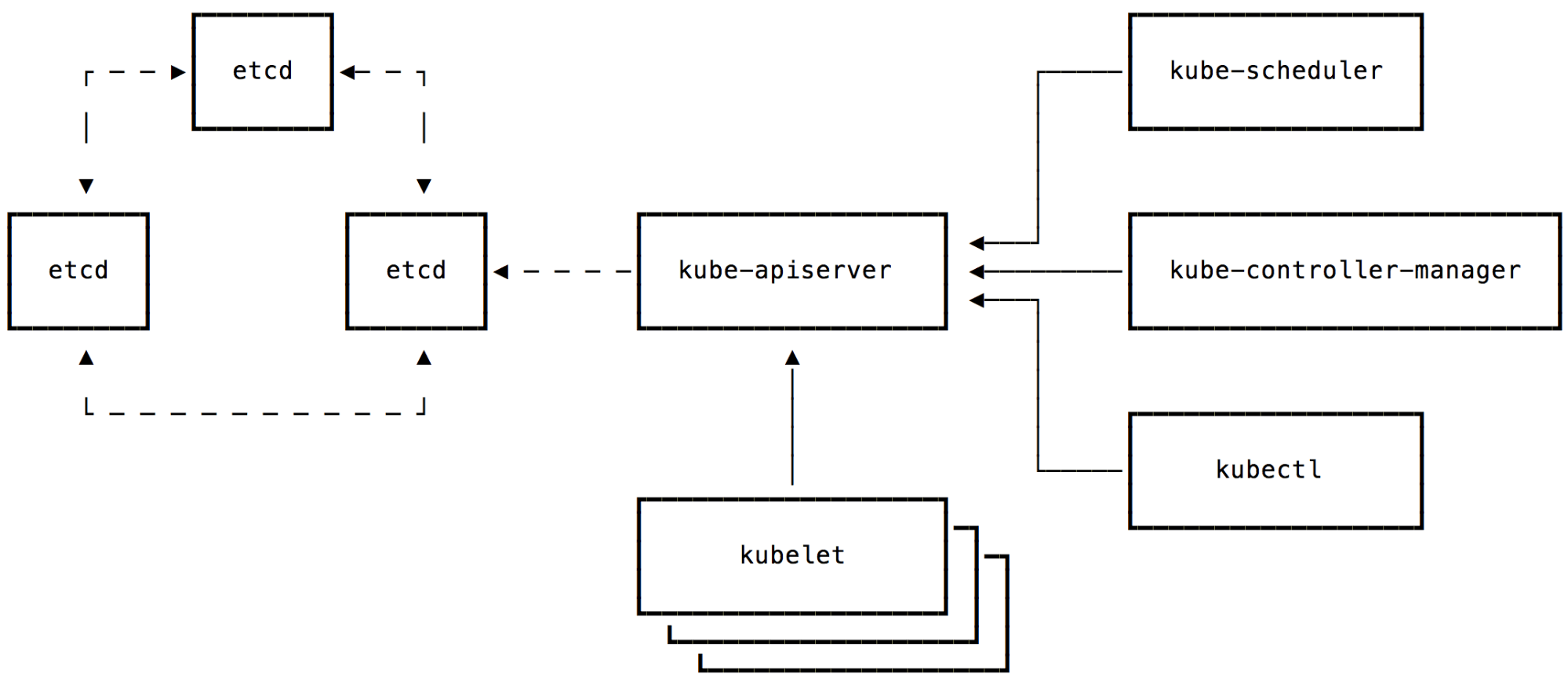
All Kubernetes operations flow through the kube-apiserver and persist in the etcd datastore. etcd nodes should only accept communication from their peers and the API server. The kubelets or other clients must not be able to communicate with etcd directly. Otherwise, the kube-apiserver’s access controls could be circumvented. We also need to ensure that consumers of the Kubernetes API are given an identity (a client certificate) to authenticate to kube-apiserver.
With that information, we decided to create 2 certificate authorities per cluster. The first would be used to issue etcd related certificates (given to each etcd node and the kube-apiserver). The second certificate authority would be for Kubernetes, issuing the kube-apiserver and the other Kubernetes components their certificates. The diagram above shows the communications that use the etcd CA in dashed lines and the Kubernetes CA in solid lines.
With the design finalized, we could move on to implementation. First, we created the CAs and configured the roles to issue certificates. We then configured vault policies to control access to CA roles and created authentication tokens with the necessary policies. Finally, we used the tokens to pull the certificates for each service.
Creating the CAs
We wrote a script that bootstraps the CAs in Vault required for each new Kubernetes cluster. This script mounts new pki backends to cluster-unique paths and generates a 10 year root certificate for each pki backend.
vault mount -path $CLUSTER_ID/pki/$COMPONENT pki vault mount-tune -max-lease-ttl=87600h $CLUSTER_ID/pki/etcd vault write $CLUSTER_ID/pki/$COMPONENT/root/generate/internal \ common_name=$CLUSTER_ID/pki/$COMPONENT ttl=87600h
In Kubernetes, it is possible to use the Common Name (CN) field of client certificates as their user name. We leveraged this by creating different roles for each set of CN certificate requests:
vault write $CLUSTER_ID/pki/etcd/roles/member \ allow_any_name=true \ max_ttl=“720h”
The role above, under the cluster’s etcd CA, can create a 30 day cert for any CN. The role below, under the Kubernetes CA, can only create a certificate with the CN of “kubelet”.
vault write $CLUSTER_ID/pki/k8s/roles/kubelet \ allowed_domains=“kubelet” \ allow_bare_domains=true \ allow_subdomains=false \ max_ttl=“720h”
We can create roles that are limited to individual CNs, such as “kube-proxy” or “kube-scheduler”, for each component that we want to communicate with the kube-apiserver.
Because we configure our kube-apiserver in a high availability configuration, separate from the kube-controller-manager, we also generated a shared secret for those components to use with the `–service-account-private-key-file`flag and write it to the generic secrets backend:
openssl genrsa 4096 > token-key vault write secret/$CLUSTER_ID/k8s/token key=@token-key rm token-key
In addition to these roles, we created individual policies for each component of the cluster which are used to restrict which paths individual vault tokens can access. Here, we created a policy for etcd members that will only have access to the path to create an etcd member certificate.
cat <<EOT | vault policy-write $CLUSTER_ID/pki/etcd/member - path “$CLUSTER_ID/pki/etcd/issue/member” { policy = “write” } EOT
This kube-apiserver policy only has access to the path to create a kube-apiserver certificate and to read the service account private key generated above.
cat <<EOT | vault policy-write $CLUSTER_ID/pki/k8s/kube-apiserver - path “$CLUSTER_ID/pki/k8s/issue/kube-apiserver” { policy = “write” } path “secret/$CLUSTER_ID/k8s/token” { policy = “read” } EOT
Now that we have the structure of CAs and policies created in Vault, we need to configure each component to fetch and renew its own certificates.
Getting Certificates
We provided each machine with a Vault token that can be renewed indefinitely. This token is only granted the policies that it requires. We set up the token role in Vault with:
vault write auth/token/roles/k8s-$CLUSTER_ID \ period=“720h” \ orphan=true \ allowed_policies=“$CLUSTER_ID/pki/etcd/member,$CLUSTER_ID/pki/k8s/kube-apiserver…”
Then, we built tokens from that token role with the necessary policies for the given node. As an example, the etcd nodes were provisioned with a token generated from this command:
vault token-create \ -policy=“$CLUSTER_ID/pki/etcd/member” \ -role=“k8s-$CLUSTER”
All that is left now is to configure each service with the appropriate certificates.
Configuring the Services
We chose to use consul-template to configure services since it will take care of renewing the Vault token, fetching new certificates, and notifying the services to restart when new certificates are available. Our etcd node consul-template configuration is:
{ “template”: { “source”: “/opt/consul-template/templates/cert.template”, “destination”: “/opt/certs/etcd.serial”, “command”: “/usr/sbin/service etcd restart” }, “vault”: { “address”: “VAULT_ADDRESS”, “token”: “VAULT_TOKEN”, “renew”: true } }
Because consul-template will only write one file per template and we needed to split our certificate into its components (certificate, private key, and issuing certificate), we wrote a custom plugin that takes in the data, a file path, and an file owner. Our certificate template for etcd nodes uses this plugin:
{{ with secret “$CLUSTER_ID/pki/data/issue/member” “common_name=$FQDN”}} {{ .Data.serial_number }} {{ .Data.certificate | plugin “certdump” “/opt/certs/etcd-cert.pem” “etcd”}} {{ .Data.private_key | plugin “certdump” “/opt/certs/etcd-key.pem” “etcd”}} {{ .Data.issuing_ca | plugin “certdump” “/opt/certs/etcd-ca.pem” “etcd”}} {{ end }}
The etcd process was then configured with the following options so that both peers and clients must present a certificate issued from Vault in order to communicate:
--peer-cert-file=/opt/certs/etcd-cert.pem --peer-key-file=/opt/certs/etcd-key.pem --peer-trusted-ca-file=/opt/certs/etcd-ca.pem --peer-client-cert-auth --cert-file=/opt/certs/etcd-cert.pem --key-file=/opt/certs/etcd-key.pem --trusted-ca-file=/opt/certs/etcd-ca.pem --client-cert-auth
The kube-apiserver has one certificate template for communicating with etcd and one for the Kubernetes components, and the process is configured with the appropriate flags:
--etcd-certfile=/opt/certs/etcd-cert.pem --etcd-keyfile=/opt/certs/etcd-key.pem --etcd-cafile=/opt/certs/etcd-ca.pem --tls-cert-file=/opt/certs/apiserver-cert.pem --tls-private-key-file=/opt/certs/apiserver-key.pem --client-ca-file=/opt/certs/apiserver-ca.pem
The first three etcd flags allow the kube-apiserver to communicate with etcd with a client certificate; the two TLS flags allow it to host the API over a TLS connection; the last flag allows it to verify clients by ensuring that their certificates were signed by the same CA that issued the kube-apiserver certificate.
Conclusion
Each component of the architecture is issued a unique certificate and the entire process is fully automated. Additionally, we have an audit log of all certificates issued, and frequently exercise certificate expiration and rotation.
We did have to put in some time up front to learn Vault, discover the appropriate command line arguments, and integrate the solution discussed here into our existing configuration management system. However, by using Vault as a certificate authority, we drastically reduced the effort required to set up and maintain many Kubernetes clusters.
by Tommy Murphy
About the author

Related Articles

Building a computer that can pause and resume in milliseconds: Inside the MicroVM architecture behind Managed Agents
Braden Bassingthwaite
- October 15, 2026
- 20 min read


Under the Hood: Serving Kimi K3
Jonathan Dieu
- July 30, 2026
- 12 min read