
By Joshua Bemenderfer

Introduction
Modern CSS is a powerful tool you can use to create many advanced User Interface (UI) features. In the past, these features relied on JavaScript libraries.
In this guide, you will set up a few CSS lines to create a scrolling parallax effect on a web page. You will use images from placekitten.com as placeholder background images.
You will have a webpage with a pure CSS scrolling parallax effect once you’ve completed the tutorial.
Warning: This article uses experimental CSS properties that do not work across browsers. This project has been tested and works on Chrome. This technique doesn’t work well in Firefox, Safari, and iOS due to some of those browsers’ optimizations.
Step 1 — Creating a New Project
In this step, use the command line to set up a new project folder and files. To start, open your terminal and create a new project folder.
Type the following command to create the project folder:
- mkdir css-parallax
In this case, you called the folder css-parallax. Now, change into the css-parallax folder:
- cd css-parallax
Next, create an index.html file in your css-parallax folder with the nano command:
- nano index.html
You will put all the HTML for the project in this file.
In the next step, you will start creating the structure of the webpage.
Step 2 — Setting Up the Application Structure
In this step, you will add the HTML needed to create the structure of the project.
Inside your index.html file add the following code:
<!DOCTYPE html>
<html lang="en">
  <head>
    <meta charset="UTF-8" />
    <meta name="viewport" content="width=device-width, initial-scale=1.0" />
    <title>CSS Scrolling Parallax</title>
  </head>
  <body></body>
</html>
This is the basic structure of most webpages that use HTML.
Add the following code inside the <body> tag:
[label css-parallax/index.html]

<body>
...
   <main>
      <section class="section parallax bg1">
         <h1>Cute Kitten</h1>
      </section>
      <section class="section static">
         <h1>Boring</h1>
      </section>
      <section class="section parallax bg2">
         <h1>Fluffy Kitten</h1>
      </section>
   </main>
...
</body>
This code creates three different sections. Two will have a background image, and one will be a static, plain background.
In the next few steps, you will add the styles for each section using the classes you added in the HTML.
Step 3 — Creating a CSS File and Adding Initial CSS
In this step, you will create a CSS file. Then you will add in the initial CSS needed to style the website and create the parallax effect.
First, create a styles.css file in your css-parallax folder with the nano command:
- nano styles.css
This is where you will put all of the CSS needed to create the parallax scrolling effect.
Next, start with the .wrapper class. Inside your styles.css file add the following code:
[label css-parallax/styles.css]
.wrapper {
  height: 100vh;
  overflow-x: hidden;
  overflow-y: auto;
  perspective: 2px;
}
The .wrapper class sets the perspective and scroll properties for the whole page.
The height of the wrapper needs to be set to a fixed value for the effect to work. You can use the viewport unit vh set to 100 to get the full height of the screen’s viewport.
When you scale the images, they will add a horizontal scrollbar to the screen, so you can disable it by adding overflow-x: hidden;. The perspective property simulates the distance from the viewport to the pseudo-elements you will create and transform further down in the CSS.
In the next step, you will add more CSS to style your webpage.
Step 4 — Adding Styles for the .section Class
.section ClassIn this step, you will add styles to the .section class.
Inside your styles.css file add the following code below the wrapper class:
.wrapper {
  height: 100vh;
  overflow-x: hidden;
  perspective: 2px;
}
.section {
  position: relative;
  height: 100vh;
  display: flex;
  align-items: center;
  justify-content: center;
  color: white;
  text-shadow: 0 0 5px #000;
}
The .section class defines the size, display, and text properties for the main sections.
Set a position of relative so that the child, .parallax::after can be absolutely positioned relative to the parent element .section.
Each section has a view-height(vh) of 100 to take up the viewport’s full height. This value can be changed and set to whatever height you prefer for each section.
Finally, the remainder CSS properties are used to format and add styling to the text inside each section. It positions the text in the center of each section and adds a color of white.
Next, you will add a pseudo-element and style it to create the parallax effect on two of the sections in your HTML.
Step 5 — Adding Styles for the .parallax Class
.parallax ClassIn this step, you will add the styles to the .parallax class.
First, you will add a pseudo-element on the .parallax class to be styled.
Note: You can visit MDN web docs to learn more about CSS pseudo-elements.
Add the following code below the .section class:
...

.section {
  position: relative;
  height: 100vh;
  display: flex;
  align-items: center;
  justify-content: center;
  color: white;
  text-shadow: 0 0 5px #000;
}

.parallax::after {
  content: " ";
  position: absolute;
  top: 0;
  right: 0;
  bottom: 0;
  left: 0;
  transform: translateZ(-1px) scale(1.5);
  background-size: 100%;
  z-index: -1;
}
...
The.parallax class adds an ::after pseudo-element to the background image and provides the transforms needed for the parallax effect.
The pseudo-element is the last child of the element with the class .parallax.
The first half of the code displays and positions the psuedo-element. The transform property moves the pseudo-element back away from the camera on the z-index, then scales it back up to fill the viewport.
Because the pseudo-element is further away, it appears to move more slowly.
In the next step, you will add in the background images and static background style.
Step 6 — Adding the Images and Background For Each Section
In this step, you will add the final CSS properties to add in the background images and background color of the static section.
First, add a solid background color to the .static section with the following code after the .parallax::after class:
...

.parallax::after {
  content: " ";
  position: absolute;
  top: 0;
  right: 0;
  bottom: 0;
  left: 0;
  transform: translateZ(-1px) scale(1.5);
  background-size: 100%;
  z-index: -1;
}

.static {
  background: red;
}
...
The .static class adds a background to the static section that does not have an image.
The two sections with the .parallax class also have an extra class that is different for each. Use the .bg1 and .bg2 classes to add the Kitten background images.
Add the following code to the .static class:
...

.static {
  background: red;
}
.bg1::after {
  background-image: url('https://placekitten.com/g/900/700');
}

.bg2::after {
  background-image: url('https://placekitten.com/g/800/600');
}

...
The .bg1, .bg2 classes add the respective background images for each section.
The images are from the placekitten website. It is a service for getting pictures of kittens for use as placeholders.
Now that all of the code for the parallax scrolling effect is added, you can link to your styles.css file in your index.html.
Step 7 — Linking styles.css and Opening index.html in Your Browser
styles.css and Opening index.html in Your BrowserIn this step, you will link your styles.css file and open up the project in your browser to see the parallax scrolling effect.
First, add the following code to the <head> tag in the index.html file:
[label css-parallax/index.html] ...

<head>
  <meta charset="UTF-8" />
  <^>
  <link rel="stylesheet" href="styles.css" />
  <^>
  <meta name="viewport" content="width=device-width, initial-scale=1.0" />
  <title>CSS Parallax</title>
</head>

...
Now, you can open your index.html file in your browser:
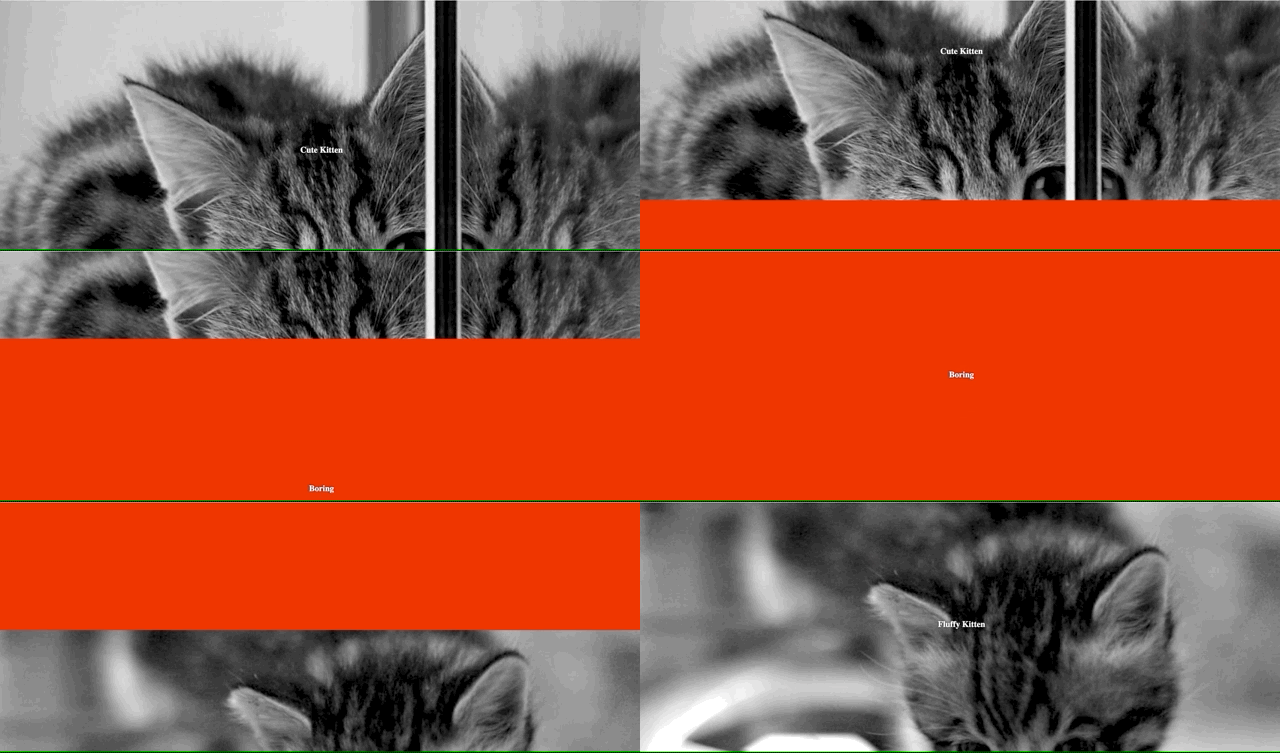
With that, you have set up a functioning webpage with a scrolling effect. Check out this GitHub repository to see the full code.
Conclusion
In this article, you set up a project with an index.html and styles.css file and now have a functional webpage. You added in the structure of your webpage and created styles for the various sections on the site.
It’s possible to put the images you use or the parallax effect further away so that they move more slowly. You’ll have to change the pixel amount on perspective and the transform properties. If you don’t want a background image to scroll at all, use background-attachment: fixed; instead of perspective/translate/scale.
Thanks for learning with the DigitalOcean Community. Check out our offerings for compute, storage, networking, and managed databases.
About the author

Still looking for an answer?
 This work is licensed under a Creative Commons Attribution-NonCommercial- ShareAlike 4.0 International License.
Become a contributor for community
Get paid to write technical tutorials and select a tech-focused charity to receive a matching donation.

DigitalOcean Documentation
Full documentation for every DigitalOcean product.

Resources for startups and AI-native businesses
The Wave has everything you need to know about building a business, from raising funding to marketing your product.
The developer cloud
Scale up as you grow — whether you're running one virtual machine or ten thousand.

Start building today
From GPU-powered inference and Kubernetes to managed databases and storage, get everything you need to build, scale, and deploy intelligent applications.



