
About LAMP
LAMP stack is a group of open source software used to get web servers up and running. The acronym stands for Linux, Apache, MySQL, and PHP. Since the virtual private server is already running Debian, the linux part is taken care of. Here is how to install the rest.
Set Up
Before running through the steps of this tutorial, make sure that all of your repositories are up to date:
apt-get update
With that completed, go ahead and start installing the LAMP server.
Step One—Install Apache
Apache is a free open source software which runs over 50% of the world’s web servers.
To install apache, open terminal and type in these commands:
apt-get install apache2
That’s it. To check if Apache is installed on your VPS, direct your browser to your server’s IP address (eg. http://12.34.56.789). The page should display the words “It works!" like this.
How to Find your Server’s IP address
You can run the following command to reveal your VPS's IP address.
ifconfig eth0 | grep inet | awk '{ print $2 }'
Step Two—Install MySQL
MySQL is a widely-deployed database management system used for organizing and retrieving data.
To install MySQL, open terminal and type in these commands:
apt-get install mysql-server
During the installation, MySQL will ask you to set a root password. If you miss the chance to set the password while the program is installing, it is very easy to set the password later from within the MySQL shell.
Finish up by running the MySQL set up script:
mysql_secure_installation
The prompt will ask you for your current root password.
Type it in.
Enter current password for root (enter for none):
OK, successfully used password, moving on...
Then the prompt will ask you if you want to change the root password. Go ahead and choose N and move on to the next steps.
It’s easiest just to say Yes to all the options. At the end, MySQL will reload and implement the new changes.
By default, a MySQL installation has an anonymous user, allowing anyone
to log into MySQL without having to have a user account created for
them.  This is intended only for testing, and to make the installation
go a bit smoother.  You should remove them before moving into a
production environment.

Remove anonymous users? [Y/n] y
 ... Success!

Normally, root should only be allowed to connect from 'localhost'.  This
ensures that someone cannot guess at the root password from the network.

Disallow root login remotely? [Y/n] y
... Success!

By default, MySQL comes with a database named 'test' that anyone can
access.  This is also intended only for testing, and should be removed
before moving into a production environment.

Remove test database and access to it? [Y/n] y
 - Dropping test database...
 ... Success!
 - Removing privileges on test database...
 ... Success!

Reloading the privilege tables will ensure that all changes made so far
will take effect immediately.

Reload privilege tables now? [Y/n] y
 ... Success!

Cleaning up...
Once you're done with that you can finish up by installing PHP on your virtual server.
Step Three—Install PHP
PHP is an open source web scripting language that is widely use to build dynamic webpages.
To install PHP, open terminal and type in this command. Note: If you are on a version earlier than Debian 7, include php5-suhosin as well.
apt-get install php5 php-pear php5-mysql
After you answer yes to the prompt twice, PHP will install itself.
Finish up by restarting apache:
service apache2 restart
Congratulations! You now have LAMP stack on your droplet!
Step Four—RESULTS: See PHP on your Server
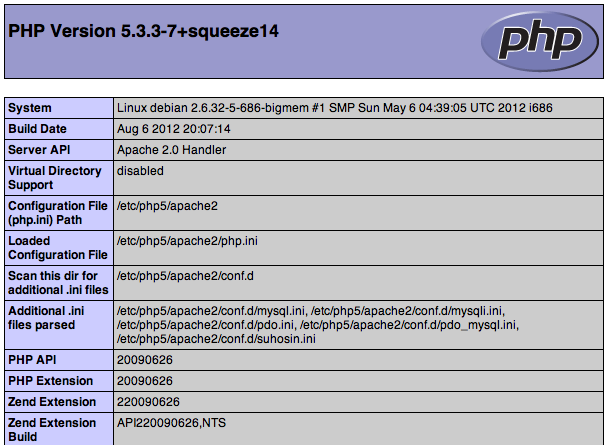
Although LAMP is installed, we can still take a look and see the components online by creating a quick php info page
To set this up, first create a new file:
nano /var/www/info.php
Add in the following line:
<?php
phpinfo();
?>
Then Save and Exit.
Finish up by visiting your php info page (make sure you replace the example ip address with your correct one): http://12.34.56.789/info.php
It should look something like this:
Thanks for learning with the DigitalOcean Community. Check out our offerings for compute, storage, networking, and managed databases.
About the author

Former Director of Community at DigitalOcean. Expert in cloud topics including LAMP Stack, CentOS, Ubuntu, MySQL, SSL certificates, and more.
Still looking for an answer?
 This work is licensed under a Creative Commons Attribution-NonCommercial- ShareAlike 4.0 International License.
Become a contributor for community
Get paid to write technical tutorials and select a tech-focused charity to receive a matching donation.

DigitalOcean Documentation
Full documentation for every DigitalOcean product.

Resources for startups and AI-native businesses
The Wave has everything you need to know about building a business, from raising funding to marketing your product.
The developer cloud
Scale up as you grow — whether you're running one virtual machine or ten thousand.

Start building today
From GPU-powered inference and Kubernetes to managed databases and storage, get everything you need to build, scale, and deploy intelligent applications.



