

By Koen Vlaswinkel and Hazel Virdó

Written in collaboration with Solr
Introduction
Solr is a search engine platform based on Apache Lucene. It is written in Java and uses the Lucene library to implement indexing. It can be accessed using a variety of REST APIs, including XML and JSON. This is the feature list from their website:
- Advanced Full-Text Search Capabilities
- Optimized for High Volume Web Traffic
- Standards Based Open Interfaces - XML, JSON and HTTP
- Comprehensive HTML Administration Interfaces
- Server statistics exposed over JMX for monitoring
- Linearly scalable, auto index replication, auto failover and recovery
- Near Real-time indexing
- Flexible and Adaptable with XML configuration
- Extensible Plugin Architecture
In this article, we will install Solr using its binary distribution.
Prerequisites
To follow this tutorial, you will need:
-
One 1 GB Ubuntu 14.04 Droplet at minimum, but the amount of RAM needed depends highly on your specific situation.
Step 1 — Installing Java
Solr requires Java, so in this step, we will install it.
The complete Java installation process is thoroughly described in this article, but we’ll use a slightly different process.
First, use apt-get to install python-software-properties:
- sudo apt-get install python-software-properties
Instead of using the default-jdk or default-jre packages, we’ll install the latest version of Java 8. To do this, add the unofficial Java installer repository:
- sudo add-apt-repository ppa:webupd8team/java
You will need to press ENTER to accept adding the repository to your index.
Then, update the source list:
- sudo apt-get update
Last, install Java 8 using apt-get. You will need to agree to the Oracle Binary Code License Agreement for the Java SE Platform Products and JavaFX.
- sudo apt-get install oracle-java8-installer
Step 2 — Installing Solr
In this section, we will install Solr 5.2.1. We will begin by downloading the Solr distribution.
First, find a suitable mirror on this page. Then, copy the link of solr-5.2.1.tgz from the mirror. For example, we’ll use http://apache.mirror1.spango.com/lucene/solr/5.2.1/.
Then, download the file in your home directory:
- cd ~
- wget http://apache.mirror1.spango.com/lucene/solr/5.2.1/solr-5.2.1.tgz
Next, extract the service installation file:
- tar xzf solr-5.2.1.tgz solr-5.2.1/bin/install_solr_service.sh --strip-components=2
And install Solr as a service using the script:
- sudo bash ./install_solr_service.sh solr-5.2.1.tgz
Finally, check if the server is running:
- sudo service solr status
You should see an output that begins with this:
Found 1 Solr nodes:

Solr process 2750 running on port 8983

. . .
Step 3 — Creating a Collection
In this section, we will create a simple Solr collection.
Solr can have multiple collections, but for this example, we will only use one. To create a new collection, use the following command. We run it as the Solr user in this case to avoid any permissions errors.
- sudo su - solr -c "/opt/solr/bin/solr create -c gettingstarted -n data_driven_schema_configs"
In this command, gettingstarted is the name of the collection and -n specifies the configset. There are 3 config sets supplied by Solr by default; in this case, we have used one that is schemaless, which means that any field can be supplied, with any name, and the type will be guessed.
You have now added the collection and can start adding data. The default schema has only one required field: id. It has no other default fields, only dynamic fields. If you want to have a look at the schema, where everything is explained clearly, have a look at the file /opt/solr/server/solr/gettingstarted/conf/schema.xml.
Step 4 — Adding and Querying Documents
In this section, we will explore the Solr web interface and add some documents to our collection.
When you visit http://your_server_ip:8983/solr using your web browser, the Solr web interface should appear:
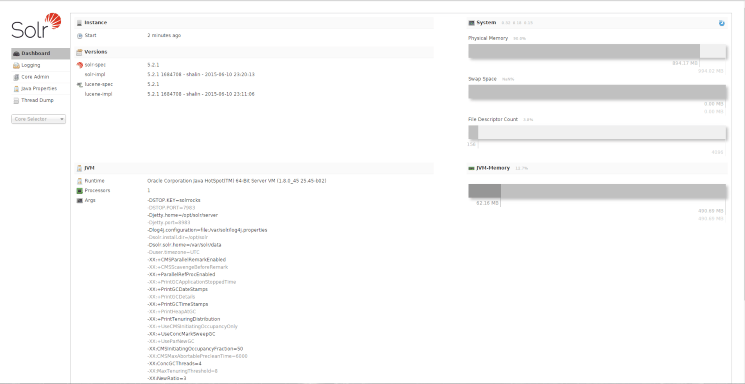
The web interface contains a lot of useful information which can be used to debug any problems you encounter during use.
Collections are divided up into cores, which is why there are a lot of references to cores in the web interface. Right now, the collection gettingstarted only contains one core, named gettingstarted. At the left-hand side, the Core Selector pull down menu is visible, in which you’ll be able to select gettingstarted to view more information.
After you’ve selected the gettingstarted core, select Documents. Documents store the real data that will be searchable by Solr. Because we have used a schemaless configuration, we can use any field. Let’sl add a single document with the following example JSON representation by copying the below into the Document(s) field:
{
    "number": 1,
    "president": "George Washington",
    "birth_year": 1732,
    "death_year": 1799,
    "took_office": "1789-04-30",
    "left_office": "1797-03-04",
    "party": "No Party"
}
Click Submit document to add the document to the index. After a few moments, you will see the following:
Status: success
Response:
{
  "responseHeader": {
    "status": 0,
    "QTime": 509
  }
}
You can add more documents, with a similar or a completely different structure, but you can also continue with just one document.
Now, select Query on the left to query the document we just added. With the default values in this screen, after clicking on Execute Query, you will see 10 documents at most, depending on how many you added:
{
  "responseHeader": {
    "status": 0,
    "QTime": 58,
    "params": {
      "q": "*:*",
      "indent": "true",
      "wt": "json",
      "_": "1436827539345"
    }
  },
  "response": {
    "numFound": 1,
    "start": 0,
    "docs": [
      {
        "number": [
          1
        ],
        "president": [
          "George Washington"
        ],
        "birth_year": [
          1732
        ],
        "death_year": [
          1799
        ],
        "took_office": [
          "1789-04-30T00:00:00Z"
        ],
        "left_office": [
          "1797-03-04T00:00:00Z"
        ],
        "party": [
          "No Party"
        ],
        "id": "1ce12ed2-add9-4c65-aeb4-a3c6efb1c5d1",
        "_version_": 1506622425947701200
      }
    ]
  }
}
Conclusion
There are many more options available, but you have now successfully installed Solr and can start using it for your own site.
Thanks for learning with the DigitalOcean Community. Check out our offerings for compute, storage, networking, and managed databases.
About the author(s)
Tutorial writer
former DO tech editor publishing articles here with the community, then founded the DO product docs team (https://do.co/docs). to all of my authors: you are incredible. working with you was a gift. love is what makes us great.
Still looking for an answer?
This textbox defaults to using Markdown to format your answer.
You can type !ref in this text area to quickly search our full set of tutorials, documentation & marketplace offerings and insert the link!


This comment has been deleted
After complete Step3, I tried to open http://your_server_ip:8983/solr using my web browser, then Solr web interface is not appearing.
Plz I am waiting for your responses. in which step I have done wrong.
Last issue I found that Soluton. After that I stuck over Core folder’s. Bcoz I used ur command to create Core Folder i.e. sudo su - solr -c “/opt/solr/bin/solr create -c gettingstarted -n data_driven_schema_configs” And it creates. But I am trying to open from Putty and from that created folder i.e. gettingstarted and followed the Path “/opt/solr/server/solr/gettingstarted”, but i am not getting any folder like “gettingstarted”. So plz let me know how to get created folders.
sorry, no dataimport-handler defined!
Plz can u explain me how to resolve above issue.


Having a similar issue to msahu. After install, going to http://[my.ip.add.ress]:8983/solr I see:
SolrCore Initialization Failures Please check your logs for more information [links] No cores available Go and create one… [links]
What am I doing wrong? “gettingstarted” exists in /var/solr/data…?
Thanks!

Hi, I have installed the solr, it is running on the port 8983, but it shows this error new_core: org.apache.solr.common.SolrException:org.apache.solr.common.SolrException: Could not load conf for core new_core: Error loading solr config from /var/solr/data/new_core/conf/solrconfig.xml… Could u help me to solve this error, Thanks in advance!
 This work is licensed under a Creative Commons Attribution-NonCommercial- ShareAlike 4.0 International License.
Become a contributor for community
Get paid to write technical tutorials and select a tech-focused charity to receive a matching donation.

DigitalOcean Documentation
Full documentation for every DigitalOcean product.

Resources for startups and AI-native businesses
The Wave has everything you need to know about building a business, from raising funding to marketing your product.
The developer cloud
Scale up as you grow — whether you're running one virtual machine or ten thousand.

Start building today
From GPU-powered inference and Kubernetes to managed databases and storage, get everything you need to build, scale, and deploy intelligent applications.
