

By Jesin A and Sharon Campbell
Not using Ubuntu 14.04?
Choose a different version or distribution.
Introduction
Apache and Nginx are two popular open source web servers often used with PHP. It can be useful to run both of them on the same virtual machine when hosting multiple websites which have varied requirements. The general solution for running two web servers on a single system is to either use multiple IP addresses or different port numbers.
Droplets which have both IPv4 and IPv6 addresses can be configured to serve Apache sites on one protocol and Nginx sites on the other, but this isn’t currently practical, as IPv6 adoption by ISPs is still not widespread. Having a different port number like 81 or 8080 for the second web server is another solution, but sharing URLs with port numbers (such as http://example.com:81) isn’t always reasonable or ideal.
This tutorial will show you how to configure Nginx as both a web server and as a reverse proxy for Apache – all on one Droplet. Depending on the web application, code changes might be required to keep Apache reverse-proxy-aware, especially when SSL sites are configured. To ensure this, we will install an Apache module named mod_rpaf which rewrites certain environment variables so it appears that Apache is directly handling requests from web clients.
We will host four domain names on one Droplet. Two will be served by Nginx: example.com (the default virtual host) and sample.org. The remaining two, foobar.net and test.io, will be served by Apache.
Prerequisites
-
A new Ubuntu 14.04 Droplet.
-
A standard user account with
sudoprivileges. You can set up a standard account by following Steps 2 and 3 of the Initial Server Setup with Ubuntu 14.04. -
The desired domain names should point to your Droplet’s IP address in the DigitalOcean control panel. See Step 3 of How To Set Up a Host Name with DigitalOcean for an example of how to do this. If you host your domains’ DNS elsewhere, you should create appropriate A records there instead.
Optional References
This tutorial requires basic knowledge of virtual hosts in Apache and Nginx, and SSL certificate creation and configuration. For more information on these topics, see the following articles.
- Setting up virtual hosts on Apache
- Setting up virtual hosts on Nginx
- Setting up multiple SSL certificates on one IP with Nginx
Step 1 — Installing Apache and PHP5-FPM
In addition to Apache and PHP-FPM, we must also install the PHP FastCGI Apache module. This is libapache2-mod-fastcgi, available in Ubuntu’s multiverse repository, which must first be enabled in the sources.list file.
sudo nano /etc/apt/sources.list
Find the following lines and uncomment them by removing the hash symbol (#) at the beginning.
# deb http://mirrors.digitalocean.com/ubuntu trusty multiverse

 . . .

# deb http://mirrors.digitalocean.com/ubuntu trusty-updates multiverse
That should leave you with what’s shown below.
 deb http://mirrors.digitalocean.com/ubuntu trusty multiverse

 . . .

 deb http://mirrors.digitalocean.com/ubuntu trusty-updates multiverse
Save the file and update the apt repository.
sudo apt-get update
Then install the necessary packages.
sudo apt-get install apache2 libapache2-mod-fastcgi php5-fpm
Step 2 — Configuring Apache and PHP5-FPM
In this step we will change Apache’s port number to 8080 and configure it to work with PHP5-FPM using the mod_fastcgi module. Edit the Apache configuration file and change the port number of Apache.
sudo nano /etc/apache2/ports.conf
Find the following line:
Listen 80
Change it to:
Listen 8080
Save and exit ports.conf.
Note: Web servers are generally set to listen on 127.0.0.1:8080 when configuring a reverse proxy but doing so would set the value of PHP’s environment variable SERVER_ADDR to the loopback IP address instead of the server’s public IP. Our aim is to set up Apache in such a way that its websites do not see a reverse proxy in front of it. So, we will configure it to listen on 8080 on all IP addresses.
Next we’ll edit the default virtual host file of Apache. The <VirtualHost> directive in this file is set to serve sites only on port 80.
sudo nano /etc/apache2/sites-available/000-default.conf
The first line should be:
<VirtualHost *:80>
Change it to:
<VirtualHost *:8080>
Save the file and reload Apache.
sudo service apache2 reload
Verify that Apache is now listening on 8080.
sudo netstat -tlpn
The output should look like below, with apache2 listening on :::8080.
Active Internet connections (only servers)
Proto Recv-Q Send-Q Local Address     Foreign Address      State    PID/Program name
tcp        0      0 0.0.0.0:22        0.0.0.0:*            LISTEN   1086/sshd
tcp6       0      0 :::8080           :::*                 LISTEN   4678/apache2
tcp6       0      0 :::22             :::*                 LISTEN   1086/sshd
Step 3 — Configuring Apache to Use mod_fastcgi
Apache works with mod_php by default, but it requires additional configuration to work with PHP5-FPM.
Note: If you are trying this tutorial on an existing installation of LAMP with
mod_php, disable it first with:sudo a2dismod php5
We will be adding a configuration block for mod_fastcgi which depends on mod_action. mod-action is disabled by default, so we first need to enable it.
sudo a2enmod actions
Find out which version of Apache is installed on your Droplet with:
sudo apache2 -v
Edit the fastcgi configuration file accordingly. These configuration directives pass requests for .php files to the PHP5-FPM UNIX socket.
sudo nano /etc/apache2/mods-enabled/fastcgi.conf
Add the following lines to the bottom of the <IfModule mod_fastcgi.c> . . . </IfModule> block for Apache 2.4:
 AddType application/x-httpd-fastphp5 .php
 Action application/x-httpd-fastphp5 /php5-fcgi
 Alias /php5-fcgi /usr/lib/cgi-bin/php5-fcgi
 FastCgiExternalServer /usr/lib/cgi-bin/php5-fcgi -socket /var/run/php5-fpm.sock -pass-header Authorization
 <Directory /usr/lib/cgi-bin>
  Require all granted
 </Directory>
Apache 2.2 does not require the <Directory> section so add the following:
 AddType application/x-httpd-fastphp5 .php
 Action application/x-httpd-fastphp5 /php5-fcgi
 Alias /php5-fcgi /usr/lib/cgi-bin/php5-fcgi
 FastCgiExternalServer /usr/lib/cgi-bin/php5-fcgi -socket /var/run/php5-fpm.sock -pass-header Authorization
When finished in fastcgi.conf, do a configuration test.
sudo apachectl -t
Reload Apache if Syntax OK is displayed. If you see the warning Could not reliably determine the server's fully qualified domain name, using 127.0.1.1. Set the 'ServerName' directive globally to suppress this message., that’s fine. It doesn’t affect us now.
sudo service apache2 reload
Step 4 — Verifying PHP Functionality
Check if PHP works by creating a phpinfo() file and accessing it from your web browser.
echo "<?php phpinfo(); ?>" | sudo tee /var/www/html/info.php
To see the file in a browser, go to http://111.111.111.111:8080/info.php but using your Droplet’s IP address. This will give you a list of configuration specifications PHP is using.
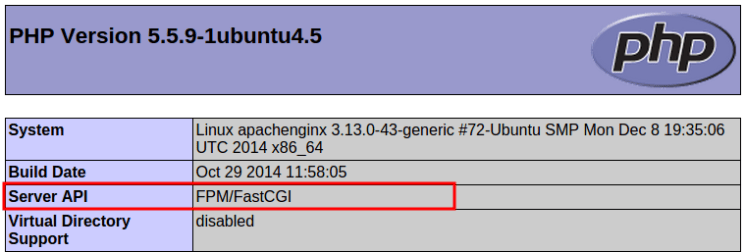
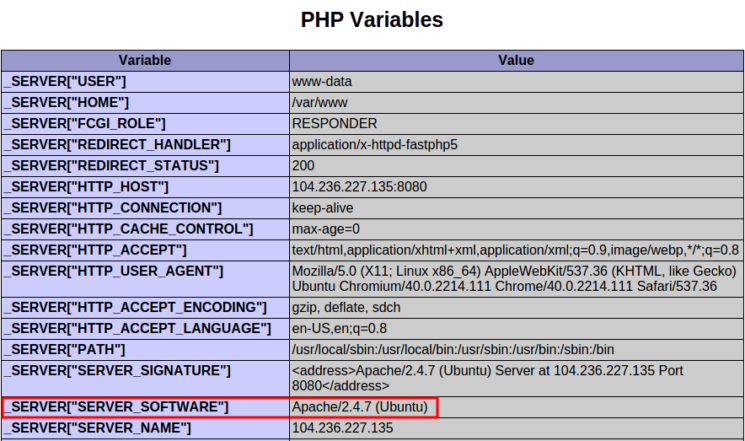
At the top of the page, check that Server API says FPM/FastCGI. About two-thirds of the way down the page, the PHP Variables section will tell you the SERVER_SOFTWARE is Apache on Ubuntu. These confirm that mod_fastcgi is active and Apache is using PHP5-FPM to process PHP files.
Step 5 — Creating Virtual Hosts for Apache
We will create two Apache virtual host files for the domains foobar.net and test.io. This begins with creating document root directories for both sites.
sudo mkdir -v /var/www/{foobar.net,test.io}
Now we will add two files to each directory for testing after setup is complete.
First we’ll create an index file for each site.
echo "<h1 style='color: green;'>Foo Bar</h1>" | sudo tee /var/www/foobar.net/index.html
echo "<h1 style='color: red;'>Test IO</h1>" | sudo tee /var/www/test.io/index.html
Then, a phpinfo() file.
echo "<?php phpinfo(); ?>" | sudo tee /var/www/foobar.net/info.php
echo "<?php phpinfo(); ?>" | sudo tee /var/www/test.io/info.php
Create the virtual host file for the foobar.net domain.
sudo nano /etc/apache2/sites-available/foobar.net.conf
Place the following directive in it:
<VirtualHost *:*>
	ServerName foobar.net
	ServerAlias www.foobar.net
	DocumentRoot /var/www/foobar.net
	<Directory /var/www/foobar.net>
		AllowOverride All
	</Directory>
</VirtualHost>
Save and close the file. Then do the same for test.io.
sudo nano /etc/apache2/sites-available/test.io.conf
<VirtualHost *:*>
	ServerName test.io
	ServerAlias www.test.io
	DocumentRoot /var/www/test.io
	<Directory /var/www/test.io>
		AllowOverride All
	</Directory>
</VirtualHost>
Note 1: AllowOverride All enables .htaccess support.
Note 2: These are only the most basic directives. For a complete guide on setting up virtual hosts in Apache, see How To Set Up Apache Virtual Hosts on Ubuntu 14.04 LTS.
Now that both Apache virtual hosts are set up, enable the sites using the a2ensite command. This creates a symbolic link to the virtual host file in the sites-enabled directory.
sudo a2ensite foobar.net
sudo a2ensite test.io
Check Apache for configuration errors again.
sudo apachectl -t
Reload it if Syntax OK is displayed.
sudo service apache2 reload
To confirm the sites are working, open http://foobar.net:8080 and http://test.io:8080 in your browser and verify they’re displaying their index.html files.
You should see:
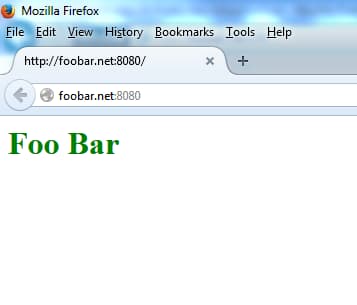
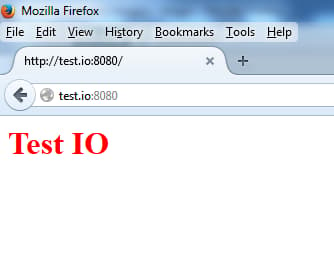
Also, check if PHP is working by accessing the info.php files: http://foobar.net:8080/info.php and http://test.io:8080/info.php.
You should see the same PHP configuration spec list on each site as you saw in Step 1. We now have two websites hosted on Apache at port 8080.
Step 6 — Installing and Configuring Nginx
In this step we will install Nginx and configure the domains example.com and sample.org as Nginx’s virtual hosts. For a complete guide on setting up virtual hosts in Nginx, see How To Set Up Nginx Server Blocks (Virtual Hosts) on Ubuntu 14.04 LTS.
Install Nginx.
sudo apt-get install nginx
Then remove the default virtual host’s symlink.
sudo rm /etc/nginx/sites-enabled/default
Now we’ll create virtual hosts for Nginx. First make document root directories for both the websites:
sudo mkdir -v /usr/share/nginx/{example.com,sample.org}
As we did with Apache’s virtual hosts, we’ll again create index and phpinfo() files for testing after setup is complete.
echo "<h1 style='color: green;'>Example.com</h1>" | sudo tee /usr/share/nginx/example.com/index.html
echo "<h1 style='color: red;'>Sample.org</h1>" | sudo tee /usr/share/nginx/sample.org/index.html
echo "<?php phpinfo(); ?>" | sudo tee /usr/share/nginx/example.com/info.php
echo "<?php phpinfo(); ?>" | sudo tee /usr/share/nginx/sample.org/info.php
Now create a virtual host file for the domain example.com.
sudo nano /etc/nginx/sites-available/example.com
Nginx calls server {. . .} areas of a configuration file server blocks. Create a server block for the primary virtual host, example.com. The default_server configuration directive makes this the default virtual host which processes HTTP requests that do not match any other virtual host.
Paste the following into the file for example.com:
server {
	listen 80 default_server;

	root /usr/share/nginx/example.com;
	index index.php index.html index.htm;

	server_name example.com www.example.com;
	location / {
		try_files $uri $uri/ /index.php;
	}

	location ~ \.php$ {
		try_files $uri =404;
		fastcgi_pass unix:/var/run/php5-fpm.sock;
		fastcgi_index index.php;
		include fastcgi_params;
	}
}
Save and close the file. Now create a virtual host file for Nginx’s second domain, sample.org.
sudo nano /etc/nginx/sites-available/sample.org
The server block for sample.org should look like this:
server {
	root /usr/share/nginx/sample.org;
	index index.php index.html index.htm;

	server_name sample.org www.sample.org;
	location / {
		try_files $uri $uri/ /index.php;
	}

	location ~ \.php$ {
		try_files $uri =404;
		fastcgi_pass unix:/var/run/php5-fpm.sock;
		fastcgi_index index.php;
		include fastcgi_params;
	}
}
Save and close the file. Then enable both the sites by creating symbolic links to the sites-enabled directory.
sudo ln -s /etc/nginx/sites-available/example.com /etc/nginx/sites-enabled/example.com
sudo ln -s /etc/nginx/sites-available/sample.org /etc/nginx/sites-enabled/sample.org
Do an Nginx configuration test:
sudo service nginx configtest
Then reload Nginx if OK is displayed.
sudo service nginx reload
Now acccess the phpinfo() file of your Nginx virtual hosts in a web browser by http://example.com/info.php and http://sample.org/info.php. Look under the PHP Variables section again.
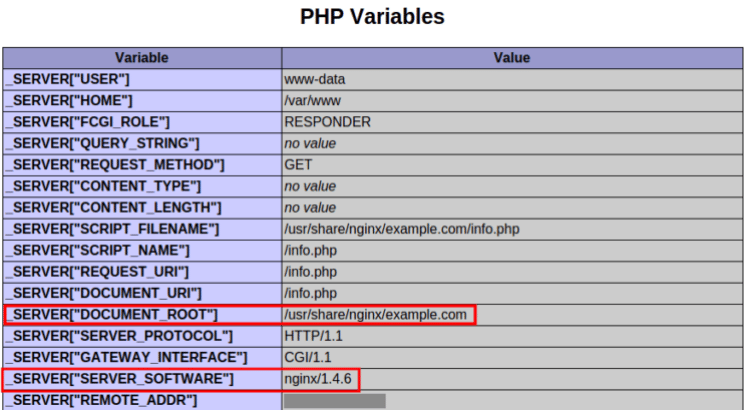
[“SERVER_SOFTWARE”] should say nginx, indicating that the files were directly served by Nginx. [“DOCUMENT_ROOT”] should point to the directory you created earlier in this step for each Nginx site.
At this point, we have installed Nginx and created two virtual hosts. Next we will set up an additional virtual host to proxy requests meant for domains hosted on Apache.
Step 7 — Configuring Nginx for Apache’s Virtual Hosts
In this section we will create an additional Nginx virtual host with multiple domain names in the server_name directives. Requests for these domain names will be proxied to Apache.
Create a new Nginx virtual host file:
sudo nano /etc/nginx/sites-available/apache
Add the code block below. This specifies the names of both Apache virtual host domains, and proxies their requests to Apache. Remember to use the public IP address in proxy_pass.
server {
	listen 80;
	server_name foobar.net www.foobar.net test.io www.test.io;

	location / {
		proxy_pass http://111.111.111.111:8080;
		proxy_set_header Host $host;
		proxy_set_header X-Real-IP $remote_addr;
		proxy_set_header X-Forwarded-For $proxy_add_x_forwarded_for;
		proxy_set_header X-Forwarded-Proto $scheme;
	}
}
Save the file and enable this new virtual host by creating a symbolic link.
sudo ln -s /etc/nginx/sites-available/apache /etc/nginx/sites-enabled/apache
Do a configuration test:
sudo service nginx configtest
Reload Nginx if OK is displayed.
sudo service nginx reload
Open the browser and access the http://foobar.net/info.php on one of Apache’s domain names. Scroll down to the PHP Variables section and check the values displayed.
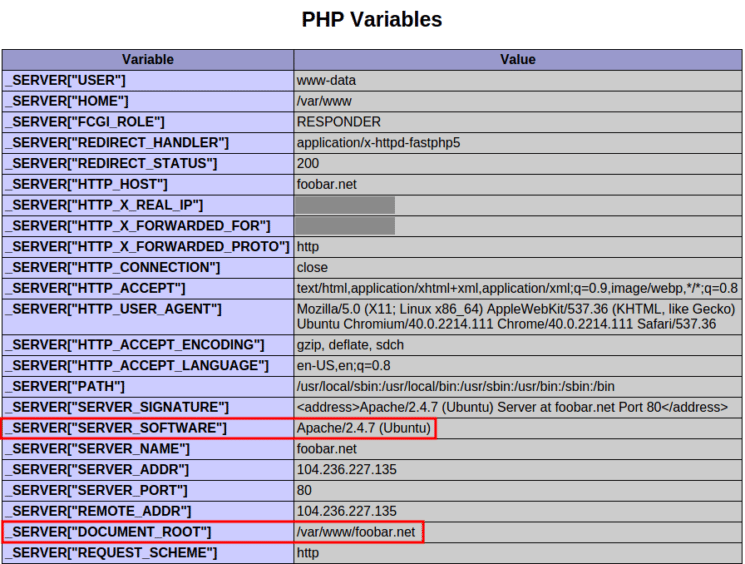
The variables SERVER_SOFTWARE and DOCUMENT_ROOT should confirm that this request was handled by Apache. The variables HTTP_X_REAL_IP and HTTP_X_FORWARDED_FOR were added by Nginx and should show the public IP address of the computer you’re accessing the URL from in your browser.
We have successfully setup Nginx to proxy requests for specific domains to Apache. The next step is to configure Apache to set variables REMOTE_ADDR as if it were handling these requests directly.
Step 8 — Installing and Configuring mod_rpaf
In this step we will install an Apache module named mod_rpaf which rewrites the values of REMOTE_ADDR, HTTPS and HTTP_PORT based on the values provided by a reverse proxy. Without this module, some PHP applications would require code changes to work seamlessly from behind a proxy. This module is present in Ubuntu’s repository as libapache2-mod-rpaf but is outdated and doesn’t support certain configuration directives. Instead, we will install it from source.
Install the packages needed to compile and build the module:
sudo apt-get install unzip build-essential apache2-threaded-dev
Download the latest stable release from GitHub.
wget https://github.com/gnif/mod_rpaf/archive/stable.zip
Extract it with:
unzip stable.zip
Change into the working directory.
cd mod_rpaf-stable
Then compile and install the module.
sudo make
sudo make install
Create a file in the mods-available directory which loads the rpaf module.
sudo nano /etc/apache2/mods-available/rpaf.load
Add the following line to the file:
LoadModule rpaf_module /usr/lib/apache2/modules/mod_rpaf.so
Create another file in this directory. This will contain the configuration directives.
sudo nano /etc/apache2/mods-available/rpaf.conf
Add the following code block, making sure to add the IP address of your Droplet.
<IfModule mod_rpaf.c>
        RPAF_Enable             On
        RPAF_Header             X-Real-Ip
        RPAF_ProxyIPs           111.111.111.111
        RPAF_SetHostName        On
        RPAF_SetHTTPS           On
        RPAF_SetPort            On
</IfModule>
Here’s a brief description of each directive. See the mod_rpaf README file for more information.
- RPAF_Header - The header to use for the client’s real IP address.
- RPAF_ProxyIPs - The proxy IP to adjust HTTP requests for.
- RPAF_SetHostName - Updates the vhost name so ServerName and ServerAlias work.
- RPAF_SetHTTPS - Sets the
HTTPSenvironment variable based on the value contained inX-Forwarded-Proto. - RPAF_SetPort - Sets the
SERVER_PORTenvironment variable. Useful for when Apache is behind a SSL proxy.
Save rpaf.conf and enable the module.
sudo a2enmod rpaf
This creates symbolic links of the files rpaf.load and rpaf.conf in the mods-enabled directory. Now do a configuration test.
sudo apachectl -t
Reload Apache if Syntax OK is returned.
sudo service apache2 reload
Access one of Apache’s websites’ phpinfo() page on your browser and check the PHP Variables section. The REMOTE_ADDR variable will now also be that of your local computer’s public IP address.
Step 9 — Setting Up HTTPS Websites (Optional)
In this step we will configure SSL certificates for both the domains hosted on Apache. Nginx supports SSL termination so we can set up SSL without modifying Apache’s configuration files. The mod_rpaf module ensures the required environment variables are set on Apache to make applications work seamlessly behind a SSL reverse proxy.
Create a directory for the SSL certificates and their private keys.
sudo mkdir /etc/nginx/ssl
For this article we will use self-signed SSL certificates with a validity of 10 years. Generate self-signed certificates for both foobar.net and test.io.
sudo openssl req -x509 -sha256 -newkey rsa:2048 -keyout /etc/nginx/ssl/foobar.net-key.pem -out /etc/nginx/ssl/foobar.net-cert.pem -days 3650 -nodes
sudo openssl req -x509 -sha256 -newkey rsa:2048 -keyout /etc/nginx/ssl/test.io-key.pem -out /etc/nginx/ssl/test.io-cert.pem -days 3650 -nodes
Each time, you will be prompted for certificate identification details.
Country Name (2 letter code) [AU]:US
State or Province Name (full name) [Some-State]:New York
Locality Name (eg, city) []:New York City
Organization Name (eg, company) [Internet Widgits Pty Ltd]:DigitalOcean Inc
Organizational Unit Name (eg, section) []:
Common Name (e.g. server FQDN or YOUR name) []:example.com
Email Address []:
Now open the apache virtual host file that proxies requests from Nginx to Apache.
sudo nano /etc/nginx/sites-available/apache
Since we have separate certificates and keys for each domain we need to have separate server { . . . } blocks for each domain. You should delete it’s current contents and when finished, your apache vhost file should look similar to below.
server {
	listen 80;
	listen 443 ssl;
	server_name test.io www.test.io;

	ssl on;
	ssl_certificate /etc/nginx/ssl/test.io-cert.pem;
	ssl_certificate_key /etc/nginx/ssl/test.io-key.pem;

	location / {
		proxy_pass http://111.111.111.111:8080;
		proxy_set_header Host $host;
		proxy_set_header X-Real-IP $remote_addr;
		proxy_set_header X-Forwarded-For $proxy_add_x_forwarded_for;
		proxy_set_header X-Forwarded-Proto $scheme;
	}
}

server {
	listen 80;
	listen 443 ssl;
	server_name foobar.net www.foobar.net;

	ssl on;
	ssl_certificate /etc/nginx/ssl/foobar.net-cert.pem;
	ssl_certificate_key /etc/nginx/ssl/foobar.net-key.pem;

	location / {
		proxy_pass http://111.111.111.111:8080;
		proxy_set_header Host $host;
		proxy_set_header X-Real-IP $remote_addr;
		proxy_set_header X-Forwarded-For $proxy_add_x_forwarded_for;
		proxy_set_header X-Forwarded-Proto $scheme;
	}
}
Save the file and perform a configuration test.
sudo service nginx configtest
Reload Nginx if the test succeeds.
sudo service nginx reload
Access one of Apache’s domains over the browser with the https:// prefix: https://foobar.net/info.php
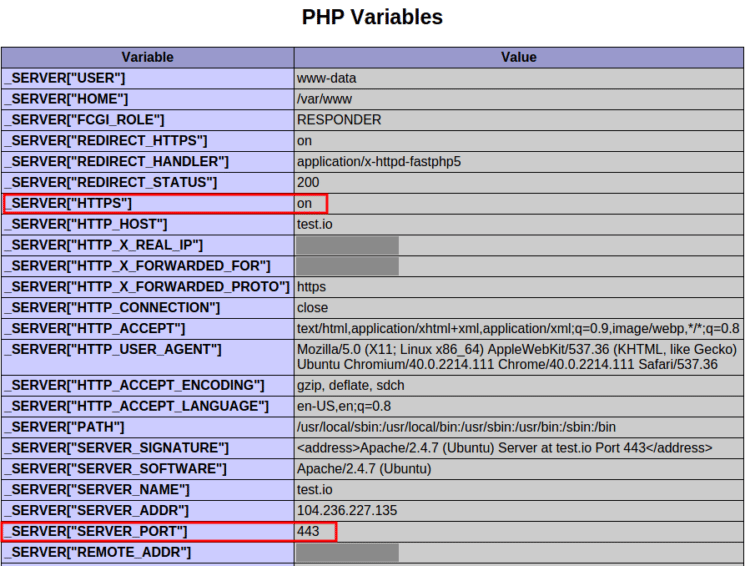
Look in the PHP Variables section. The variable SERVER_PORT has been set to 443 and HTTPS set to on, as though Apache was directly accessed over HTTPS. With these variables set, PHP applications do not have to be specially configured to work behind a reverse proxy.
Step 10 — Blocking Direct Access to Apache (Optional)
Since Apache is listening on port 8080 on the public IP address, it is accessible by everyone. It can be blocked by working the following IPtables command into your firewall rule set.
sudo iptables -I INPUT -p tcp --dport 8080 ! -s 111.111.111.111 -j REJECT --reject-with tcp-reset
Be sure to use your Droplet’s IP address in place of the example in red. Once port 8080 is blocked in your firewall, test that Apache is unreachable on it. Open your web browser and try accessing one of Apache’s domain names on port 8080. For example: http://example.com:8080
The browser should display an “Unable to connect” or “Webpage is not available” error message. With the IPtables tcp-reset option in place, an outsider would see no difference between port 8080 and a port that doesn’t have any service on it.
Note: IPtables rules do not survive a system reboot by default. There are multiple ways to preserve IPtables rules, but the easiest is to use iptables-persistent in Ubuntu’s repository.
Step 11 — Serving Static Files Using Nginx (Optional)
When Nginx proxies requests for Apache’s domains, it sends every file request to domain to Apache. Nginx is faster than Apache in serving static files like images, JavaScript and style sheets. So in this section we will configure Nginx’s apache virtual host file to directly serve static files and just send PHP requests to Apache.
Open the apache virtual host file.
sudo nano /etc/nginx/sites-available/apache
Add two additional location blocks to each server block as shown in red in the code block below.
server {
	listen 80;
	server_name test.io www.test.io;
	root /var/www/test.io;
	index index.php index.htm index.html;

	location / {
		try_files $uri $uri/ /index.php;
	}

	location ~ \.php$ {
		proxy_pass http://111.111.111.111:8080;
		proxy_set_header Host $host;
		proxy_set_header X-Real-IP $remote_addr;
		proxy_set_header X-Forwarded-For $proxy_add_x_forwarded_for;
		proxy_set_header X-Forwarded-Proto $scheme;
	}

	location ~ /\. {
		deny all;
	}
}

server {
	listen 80;
	server_name foobar.net www.foobar.net;
	root /var/www/foobar.net;
	index index.php index.htm index.html;

	location / {
		try_files $uri $uri/ /index.php;
	}

	location ~ \.php$ {
		proxy_pass http://111.111.111.111:8080;
		proxy_set_header Host $host;
		proxy_set_header X-Real-IP $remote_addr;
		proxy_set_header X-Forwarded-For $proxy_add_x_forwarded_for;
		proxy_set_header X-Forwarded-Proto $scheme;
	}

	location ~ /\. {
		deny all;
	}
}
The try_files directive makes Nginx to look for files in the document root and directly serve them. If the file has a .php extension, the request is passed to Apache. Even if the file is not found in the document root, the request is passed on to Apache so that application features like permalinks work without problems.
Safe the file and perform a configuration test.
sudo service nginx configtest
Reload Nginx if the test succeeds.
sudo service nginx reload
To verify this is working, you can examine Apache’s log files in /var/log/apache2 and see the GET requests for the index.php files of test.io and foobar.net. The only caveat of this setup is that Apache will not be able to restrict access to static files. Access control for static files would need to be configured in Nginx’s apache virtual host file.
Warning: The location ~ /\. directive is very important to include. This prevents Nginx from printing the contents of files like .htaccess and .htpasswd.
Conclusion
Having completed this tutorial, you should now have one Ubuntu Droplet with Nginx serving example.com and sample.org, along with Apache serving foobar.net and test.io. Though Nginx is acting as a reverse-proxy for Apache, Nginx’s proxy service is transparent and connections to Apache’s domains appear be served directly from Apache itself.
Thanks for learning with the DigitalOcean Community. Check out our offerings for compute, storage, networking, and managed databases.
About the author(s)
Independent Technical writer, WordPress developer and Linux administrator.
Current fan and former Editorial Manager at DigitalOcean. Hi! Expertise in areas including Ubuntu, Docker, Rails, and more.
Still looking for an answer?
 This work is licensed under a Creative Commons Attribution-NonCommercial- ShareAlike 4.0 International License.
Become a contributor for community
Get paid to write technical tutorials and select a tech-focused charity to receive a matching donation.

DigitalOcean Documentation
Full documentation for every DigitalOcean product.

Resources for startups and AI-native businesses
The Wave has everything you need to know about building a business, from raising funding to marketing your product.
The developer cloud
Scale up as you grow — whether you're running one virtual machine or ten thousand.

Start building today
From GPU-powered inference and Kubernetes to managed databases and storage, get everything you need to build, scale, and deploy intelligent applications.



