

By Koen Vlaswinkel and Hazel Virdó
Not using Ubuntu 14.04?
Choose a different version or distribution.
Introduction
MediaWiki is a PHP wiki package, originally intended for use on Wikipedia, which allows anyone to create their own personal wiki site. It is used by a majority of the wikis on the Internet. More information about MediaWiki can be found on its homepage.
This tutorial goes through how to set up MediaWiki on a Ubuntu 14.04 Droplet.
Prerequisites
- A Ubuntu 14.04 droplet with SSH access. For more information, visit this tutorial
- A LAMP stack, which you can install by following this tutorial
Step 1 — Setting Up Your Server
After you have installed the LAMP stack, we will first need to install a few additional PHP 5 modules. All four are optional, but the first two in particular (Intl and GD) are recommended.
The first one we will be installing is the Intl extension, for internationalization support:
sudo apt-get install php5-intl
Secondly, we will install GD for image thumbnailing:
sudo apt-get install php5-gd
You can install Tex Live for in-line display of mathematical formulae.
sudo apt-get install texlive
Finally, you can install XCache for added performance.
sudo apt-get install php5-xcache
After you’ve installed the modules you want, restart Apache.
sudo service apache2 restart
Step 2 — Downloading MediaWiki
In this section we will download MediaWiki.
MediaWiki is available on the apt-get repository of Ubuntu, but it is out of date. Therefore, it is best to download MediaWiki from source.
curl -O http://releases.wikimedia.org/mediawiki/1.24/mediawiki-1.24.1.tar.gz
You can double check the latest version on this page. Copy the link from Download MediaWiki followed by a version number and use that instead of the link above.
After it has finished downloading, extract the package:
tar xvzf mediawiki-*.tar.gz
Next, we will move the MediaWiki directory to the document root:
sudo mv mediawiki-1.24.1/* /var/www/html
Step 3 — Creating a Database
In this section we will set up a MySQL database. This is not strictly required to successfully install MediaWiki, as you can use a SQLite database as well. Despite this, it is definitely a recommended measure.
To create the database, we will first log in to MySQL:
mysql -u root -p
You will see your terminal prompt change to mysql>.
We can now create the database. You can choose whatever database name you prefer, but the default name in MediaWiki’s configuration is my_wiki.
CREATE DATABASE my_wiki;
You should see the output:
Query OK, 1 row affected (0.00 sec)
Next, we will create a database user for the MediaWiki installation:
GRANT INDEX, CREATE, SELECT, INSERT, UPDATE, DELETE, ALTER, LOCK TABLES ON my_wiki.* TO 'sammy'@'localhost' IDENTIFIED BY 'password';
Change the first highlighted variable to your chosen database name, the second variable to the username you want to use, and the last to a secure password. You should see the output:
Query OK, 0 rows affected (0.00 sec)
Next, we need to flush the MySQL privileges.
FLUSH PRIVILEGES;
The output should be:
Query OK, 0 rows affected (0.00 sec)
Last, we will need to exit the MySQL shell:
exit
The output should be:
Bye
Step 4 — Setting Up MediaWiki
In this section, we will set up MediaWiki so it is ready to use. Visit the homepage of your Droplet in your browser by pointing your browser to http://your_server_ip. On this page, select set up the wiki.
On the first page, select a language and click Continue. The next page should show your environment and it should say in green: “The environment has been checked. You can install MediaWiki.” Click Continue.
You will now get to the page with MySQL settings. For the Database type select MySQL (or compatible). For the database host, use localhost, and for the database name, username, and password, use the values you chose before. The table prefix can be left empty. It will look like this:
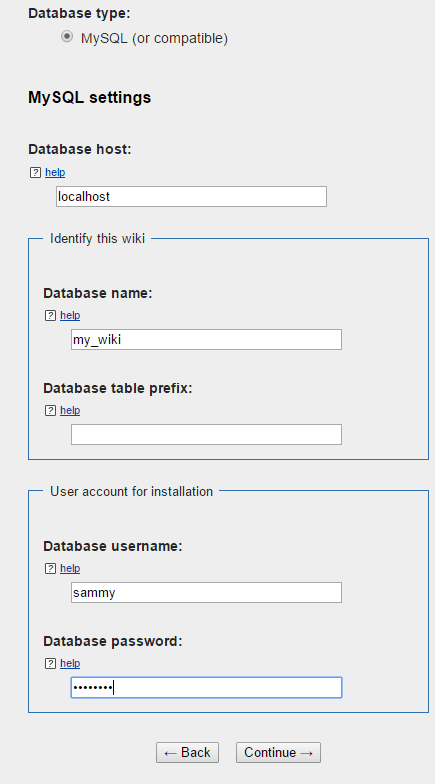
After you have completed this step, you will need to complete the tutorial. In the screen after the MySQL settings, the values can be left at their defaults. In the next screen, you will need to fill in the details of your wiki, like its name. You can also create the admin user for the wiki on this page.
In all the other screens, most, if not all, of the settings can be left untouched. If you want a specific setting enabled for your wiki, you might need to change something on one of these screens. Particularly if you have installed XCache before, you will need to check that to enable it.
When you have completed these steps, you should arrive at this page:
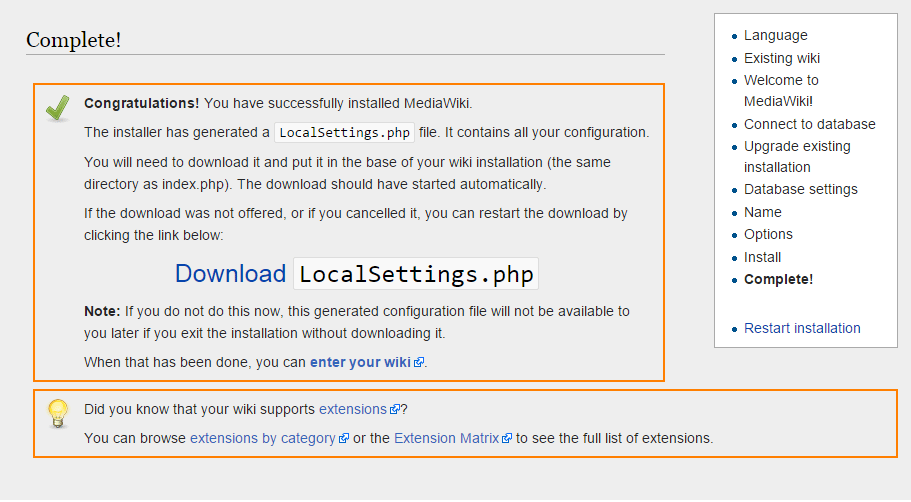
A file called LocalSettings.php should start downloading automatically. To successfully complete the installation, you need to move this file to the server, so make sure to download the file before closing the page.
You should now move it the file to /var/www/html on the server. The easiest way to do this is to open the file on your own computer, copy the contents and paste them into the server. To do this, first open the file on the server:
nano /var/www/html/LocalSettings.php
Now, open the file on your computer in your text editor of choice and copy the contents into your SSH window. After you have saved the file, you can click enter your wiki and your wiki should be ready to use.
Conclusion
You have now installed your own MediaWiki installation which you can use for any purposes you like. You can now customize your installation using the links on the MediaWiki homepage or you can start adding pages.
Thanks for learning with the DigitalOcean Community. Check out our offerings for compute, storage, networking, and managed databases.
About the author(s)
Tutorial writer
former DO tech editor publishing articles here with the community, then founded the DO product docs team (https://do.co/docs). to all of my authors: you are incredible. working with you was a gift. love is what makes us great.
Still looking for an answer?
 This work is licensed under a Creative Commons Attribution-NonCommercial- ShareAlike 4.0 International License.
Become a contributor for community
Get paid to write technical tutorials and select a tech-focused charity to receive a matching donation.

DigitalOcean Documentation
Full documentation for every DigitalOcean product.

Resources for startups and AI-native businesses
The Wave has everything you need to know about building a business, from raising funding to marketing your product.
The developer cloud
Scale up as you grow — whether you're running one virtual machine or ten thousand.

Start building today
From GPU-powered inference and Kubernetes to managed databases and storage, get everything you need to build, scale, and deploy intelligent applications.



