

Status: Deprecated
This article is deprecated and no longer maintained.
Reason
Ubuntu 12.04 reached end of life (EOL) on April 28, 2017 and no longer receives security patches or updates.
See Instead
This article may still be useful as a reference, but may not follow best practices or work on this or other Ubuntu releases. We strongly recommend using a recent article written for the version of Ubuntu you are using.
If you are currently operating a server running Ubuntu 12.04, we highly recommend upgrading or migrating to a supported version of Ubuntu:
Intro
One of the commonly asked questions from our users is how to add another IP address to their server. You can assign your own private IP address to your droplet by creating a VPN tunnel. Whether you want to build your own Virtual Private Network (VPN), or assign an SSL certificate to that IP address, you have several options. From all of the possible options, the most optimal ones are between PPTP and OpenVPN. A Point-To-Point Tunneling Protocol (PPTP) allows you to implement your own VPN very quickly, and is compatible with most mobile devices. Even though PPTP is less secure than OpenVPN, it is also faster and uses less CPU resources.
Step 1 - PPTP Installation
You will have to select one server to be responsible for handling out IPs to others and authenticating all of your servers into your VPN. This will become your PPTP Server.
On CentOS 6 x64:
rpm -i http://poptop.sourceforge.net/yum/stable/rhel6/pptp-release-current.noarch.rpm
yum -y install pptpd
On Ubuntu 12.10 x64:
apt-get install pptpd
Now you should edit /etc/pptpd.conf and add the following lines:
localip 10.0.0.1
remoteip 10.0.0.100-200
Where localip is IP address of your server and remoteip are IPs that will be assigned to clients that connect to it.
Next, you should setup authentication for PPTP by adding users and passwords. Simply add them to /etc/ppp/chap-secrets :
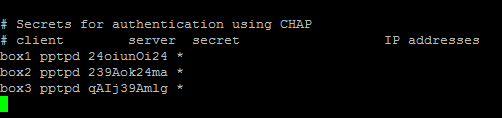
Where client is the username, server is type of service – pptpd for our example, secret is the password, and IP addresses specifies which IP address may authenticate. By setting ‘*’ in IP addresses field, you specify that you would accept username/password pair for any IP.
Step 2 - Add DNS servers to /etc/ppp/pptpd-options
ms-dns 8.8.8.8
ms-dns 8.8.4.4
Now you can start PPTP daemon:
service pptpd restart
Verify that it is running and accepting connections:
)
Step 3 - Setup Forwarding
It is important to enable IP forwarding on your PPTP server. This will allow you to forward packets between public IP and private IPs that you setup with PPTP. Simply edit /etc/sysctl.conf and add the following line if it doesn’t exist there already:
net.ipv4.ip_forward = 1
To make changes active, run sysctl -p
Step 4 - Create a NAT rule for iptables
iptables -t nat -A POSTROUTING -o eth0 -j MASQUERADE && iptables-save
If you would also like your PPTP clients to talk to each other, add the following iptables rules:
iptables --table nat --append POSTROUTING --out-interface ppp0 -j MASQUERADE
iptables -I INPUT -s 10.0.0.0/8 -i ppp0 -j ACCEPT
iptables --append FORWARD --in-interface eth0 -j ACCEPT
Now your PPTP server also acts as a router.
If you would like to restrict which servers can connect to your droplets, you can setup an iptables rule that restricts TCP connects to port 1723.
Step 6 - Add necessary Kernel module
modprobe ppp_mppe
Create a new file /etc/ppp/peers/pptpserver and add the following lines, replacing name and password with your own values:
pty "pptp 198.211.104.17 --nolaunchpppd"
name box1
password 24oiunOi24
remotename PPTP
require-mppe-128
Where 198.211.104.17 is the public IP address of our PPTP server, with username ‘box1’ and password ‘24oiunOi24’ that we specified /etc/ppp/chap-secrets file on our PPTP server.
Now we can ‘call’ this PPTP server, since this is a point-to-point protocol. Whichever name you gave your peers file in/etc/ppp/peers/ should be used in this next line. Since we called our file pptpserver:
pppd call pptpserver
You should see successful connection from PPTP server logs:
)
On your PPTP client, setup routing to your private network via ppp0 interface:
ip route add 10.0.0.0/8 dev ppp0
Your interface ppp0 should come up on PPTP client server, and can be checked by running ifconfig
)
Now you can ping your PPTP server and any other clients that are connected to this network:

We can add our second PPTP client to this network:
yum -y install pptp
modprobe ppp_mppe
Add to /etc/ppp/peers/pptpserver (replacing with your own name and password values):
pty "pptp 198.211.104.17 --nolaunchpppd"
name box2
password 239Aok24ma
remotename PPTP
require-mppe-128
Now run on your second client the following:
pppd call pptpserver
ip route add 10.0.0.0/8 dev ppp0
)
You can also ping the first client, as packets would go through the PPTP server and be routed using the iptables rules we’ve placed earlier:
)
This setup allows you to create your own virtual private network:
)
If you wanted to have all of your devices communicating securely on one network, this is a quick way of implementing it.
You can use it with Nginx, Squid, MySQL, and any other application you can think of.
Since traffic is 128-bit encrypted, it is less CPU-intensive than OpenVPN, and still provides an added level of security to your traffic.
Thanks for learning with the DigitalOcean Community. Check out our offerings for compute, storage, networking, and managed databases.
About the author

Still looking for an answer?
 This work is licensed under a Creative Commons Attribution-NonCommercial- ShareAlike 4.0 International License.
Become a contributor for community
Get paid to write technical tutorials and select a tech-focused charity to receive a matching donation.

DigitalOcean Documentation
Full documentation for every DigitalOcean product.

Resources for startups and AI-native businesses
The Wave has everything you need to know about building a business, from raising funding to marketing your product.
The developer cloud
Scale up as you grow — whether you're running one virtual machine or ten thousand.

Start building today
From GPU-powered inference and Kubernetes to managed databases and storage, get everything you need to build, scale, and deploy intelligent applications.



