Not using Ubuntu 14.04?
Choose a different version or distribution.
Introduction
Django is a flexible framework for quickly creating Python applications. By default, Django applications are configured to store data into a lightweight SQLite database file. While this works well under some loads, a more traditional DBMS can improve performance in production.
In this guide, we’ll demonstrate how to install and configure PostgreSQL to use with your Django applications. We will install the necessary software, create database credentials for our application, and then start and configure a new Django project to use this backend.
Prerequisites
To get started, you will need a clean Ubuntu 14.04 server instance with a non-root user set up. The non-root user must be configured with sudo privileges. Learn how to set this up by following our initial server setup guide.
When you are ready to continue, read on.
Install the Components from the Ubuntu Repositories
Our first step will be install all of the pieces that we need from the repositories. We will install pip, the Python package manager, in order to install and manage our Python components. We will also install the database software and the associated libraries required to interact with them.
The following apt commands will get you the packages you need:
sudo apt-get update
sudo apt-get install python-pip python-dev libpq-dev postgresql postgresql-contrib
With the installation out of the way, we can move on to create our database and database user.
Create a Database and Database User
By default, Postgres uses an authentication scheme called “peer authentication” for local connections. Basically, this means that if the user’s operating system username matches a valid Postgres username, that user can login with no further authentication.
During the Postgres installation, an operating system user named postgres was created to correspond to the postgres PostgreSQL administrative user. We need to change to this user to perform administrative tasks:
sudo su - postgres
You should now be in a shell session for the postgres user. Log into a Postgres session by typing:
psql
First, we will create a database for our Django project. Each project should have its own isolated database for security reasons. We will call our database myproject in this guide, but it’s always better to select something more descriptive:
CREATE DATABASE myproject;
Remember to end all commands at an SQL prompt with a semicolon.
Next, we will create a database user which we will use to connect to and interact with the database. Set the password to something strong and secure:
CREATE USER myprojectuser WITH PASSWORD 'password';
Afterwards, we’ll modify a few of the connection parameters for the user we just created. This will speed up database operations so that the correct values do not have to be queried and set each time a connection is established.
We are setting the default encoding to UTF-8, which Django expects. We are also setting the default transaction isolation scheme to “read committed”, which blocks reads from uncommitted transactions. Lastly, we are setting the timezone. By default, our Django projects will be set to use UTC:
ALTER ROLE myprojectuser SET client_encoding TO 'utf8';
ALTER ROLE myprojectuser SET default_transaction_isolation TO 'read committed';
ALTER ROLE myprojectuser SET timezone TO 'UTC';
Now, all we need to do is give our database user access rights to the database we created:
GRANT ALL PRIVILEGES ON DATABASE myproject TO myprojectuser;
Exit the SQL prompt to get back to the postgres user’s shell session:
\q
Exit out of the postgres user’s shell session to get back to your regular user’s shell session:
exit
Install Django within a Virtual Environment
Now that our database is set up, we can install Django. For better flexibility, we will install Django and all of its dependencies within a Python virtual environment.
You can get the virtualenv package that allows you to create these environments by typing:
sudo pip install virtualenv
Make a directory to hold your Django project. Move into the directory afterwards:
mkdir ~/myproject
cd ~/myproject
We can create a virtual environment to store our Django project’s Python requirements by typing:
virtualenv myprojectenv
This will install a local copy of Python and pip into a directory called myprojectenv within your project directory.
Before we install applications within the virtual environment, we need to activate it. You can do so by typing:
source myprojectenv/bin/activate
Your prompt will change to indicate that you are now operating within the virtual environment. It will look something like this (myprojectenv)user@host:~/myproject$.
Once your virtual environment is active, you can install Django with pip. We will also install the psycopg2 package that will allow us to use the database we configured:
pip install django psycopg2
We can now start a Django project within our myproject directory. This will create a child directory of the same name to hold the code itself, and will create a management script within the current directory. Make sure to add the dot at the end of the command so that this is set up correctly:
django-admin.py startproject myproject .
Configure the Django Database Settings
Now that we have a project, we need to configure it to use the database we created.
Open the main Django project settings file located within the child project directory:
nano ~/myproject/myproject/settings.py
Towards the bottom of the file, you will see a DATABASES section that looks like this:
. . .

DATABASES = {
    'default': {
        'ENGINE': 'django.db.backends.sqlite3',
        'NAME': os.path.join(BASE_DIR, 'db.sqlite3'),
    }
}

. . .
This is currently configured to use SQLite as a database. We need to change this so that our PostgreSQL database is used instead.
First, change the engine so that it uses the postgresql_psycopg2 backend instead of the sqlite3 backend. For the NAME, use the name of your database (myproject in our example). We also need to add login credentials. We need the username, password, and host to connect to. We’ll add and leave blank the port option so that the default is selected:
. . .

DATABASES = {
    'default': {
        'ENGINE': 'django.db.backends.postgresql_psycopg2',
        'NAME': 'myproject',
        'USER': 'myprojectuser',
        'PASSWORD': 'password',
        'HOST': 'localhost',
        'PORT': '',
    }
}

. . .
When you are finished, save and close the file.
Migrate the Database and Test your Project
Now that the Django settings are configured, we can migrate our data structures to our database and test out the server.
We can begin by creating and applying migrations to our database. Since we don’t have any actual data yet, this will simply set up the initial database structure:
cd ~/myproject
python manage.py makemigrations
python manage.py migrate
After creating the database structure, we can create an administrative account by typing:
python manage.py createsuperuser
You will be asked to select a username, provide an email address, and choose and confirm a password for the account.
Once you have an admin account set up, you can test that your database is performing correctly by starting up the Django development server:
python manage.py runserver 0.0.0.0:8000
In your web browser, visit your server’s domain name or IP address followed by :8000 to reach default Django root page:
http://server_domain_or_IP:8000
You should see the default index page:

Append /admin to the end of the URL and you should be able to access the login screen to the admin interface:
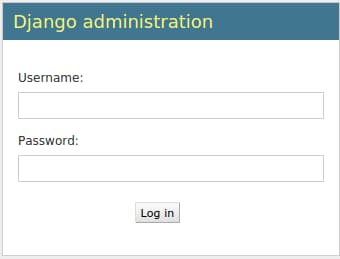
Enter the username and password you just created using the createsuperuser command. You will then be taken to the admin interface:

When you’re done investigating, you can stop the development server by hitting CTRL-C in your terminal window.
By accessing the admin interface, we have confirmed that our database has stored our user account information and that it can be appropriately accessed.
Conclusion
In this guide, we’ve demonstrated how to install and configure PostgreSQL as the backend database for a Django project. While SQLite can easily handle the load during development and light production use, most projects benefit from implementing a more full-featured DBMS.
Thanks for learning with the DigitalOcean Community. Check out our offerings for compute, storage, networking, and managed databases.
About the author

Former Senior Technical Writer at DigitalOcean, specializing in DevOps topics across multiple Linux distributions, including Ubuntu 18.04, 20.04, 22.04, as well as Debian 10 and 11.
Still looking for an answer?
 This work is licensed under a Creative Commons Attribution-NonCommercial- ShareAlike 4.0 International License.
Become a contributor for community
Get paid to write technical tutorials and select a tech-focused charity to receive a matching donation.

DigitalOcean Documentation
Full documentation for every DigitalOcean product.

Resources for startups and AI-native businesses
The Wave has everything you need to know about building a business, from raising funding to marketing your product.
The developer cloud
Scale up as you grow — whether you're running one virtual machine or ten thousand.

Start building today
From GPU-powered inference and Kubernetes to managed databases and storage, get everything you need to build, scale, and deploy intelligent applications.



