
Introduction
A Linux container is a grouping of processes that is isolated from the rest of the system through the use of Linux kernel security features, such as namespaces and control groups. It’s a construct similar to a virtual machine, but it’s much more light-weight; you don’t have the overhead of running an additional kernel, or simulating the hardware. This means you can easily create multiple containers on the same server. Using Linux containers, you can run multiple instances of whole operating systems, confined, on the same server, or bundle your application and its dependencies in a container without affecting the rest of the system.
For example, imagine that you have a server and you have set up several services, including web sites, for your clients. In a traditional installation, each web site would be a virtual host of the same instance of the Apache or Nginx web server. But with Linux containers, each web site will be configured in its own container, with its own web server.
We can use LXD to create and manage these containers. LXD provides a hypervisor service to manage the entire life cycle of containers.
In this tutorial, you’ll use LXD to install two Nginx-based web sites on the same server, each confined to its own container. Then you’ll install HAProxy in a third container which will act as a reverse proxy. You’ll then route traffic to the HAProxy container in order to make both web sites accessible from the Internet.
Prerequisites
To complete this tutorial, you’ll need the following:
- One Ubuntu 16.04 server, configured by following the tutorial Initial Server Setup with Ubuntu 16.04, with a sudo non-root user and a firewall.
- Two Fully-Qualified Domain Names (FQDNs), with each DNS A record pointing to the IP address of your server. To configure this, follow the tutorial How To Set Up a Host Name with DigitalOcean.
- Optionally, add 20GB or more of block storage by following the tutorial Getting Started with DigitalOcean Block Storage. You can use this to store all data related to the containers.
Step 1 — Adding Your User to the lxd Group
lxd GroupLog in to the server using the non-root user account. We will be using this non-user account to perform all container management tasks. For this to work, you must first add this user to the lxd group. Do this with the following command:
- sudo usermod --append --groups lxd sammy
Log out of the server and log back in again so that your new SSH session will be updated with the new group membership. Once you’re logged in, you can start configuring LXD.
Step 2 — Configuring LXD
LXD needs to be configured properly before you can use it. The most important configuration decision is the type of storage backend for storing the containers. The recommended storage backend for LXD is the ZFS filesystem, stored either in a preallocated file or by using Block Storage. To use the ZFS support in LXD, install the zfsutils-linux package:
- sudo apt-get update
- sudo apt-get install zfsutils-linux
With that installed, you’re ready to initialize LXD. During the initialization, you’ll be prompted to specify the details for the ZFS storage backend. There are two sections that follow, depending on whether you want to use a preallocated file or block storage. Follow the appropriate step for your case. Once you’ve specified the storage mechanism, you’ll configure the networking options for your containers.
Option 1 – Using a Preallocated File
Follow these steps to configure LXD to use a preallocated file to store containers. First, execute the following command to start the LXD initialization process:
- sudo lxd init
You’ll be prompted to provide several pieces of information, as shown in the following output. We’ll select all the defaults, including the suggested size for the preallocated file, called the loop device:
OutputName of the storage backend to use (dir or zfs) [default=zfs]: zfs
Create a new ZFS pool (yes/no) [default=yes]? yes
Name of the new ZFS pool [default=lxd]: lxd
Would you like to use an existing block device (yes/no) [default=no]? no
Size in GB of the new loop device (1GB minimum) [default=15]: 15
Would you like LXD to be available over the network (yes/no) [default=no]? no
Do you want to configure the LXD bridge (yes/no) [default=yes]? yes
Warning: Stopping lxd.service, but it can still be activated by:
  lxd.socket
LXD has been successfully configured.
The suggested size is automatically calculated from the available disk space of your server.
Once the device is configured, you’ll configure the networking settings, which we’ll explore after the next optional section.
Option 2 – Using Block Storage
If you’re going to use Block Storage, you’ll need to find the device that points to the block storage volume that you created in order to specify it in the configuration of LXD. Go to the Volumes tab in the DigitalOcean control panel, locate your volume, click on the More pop-up, and then click on Config instructions.
Locate the device by looking at the command to format the volume. Specifically, look for the path specified in the sudo mkfs.ext4 -F command. The following figure shows an example of the volume. You only need the part that is underlined:
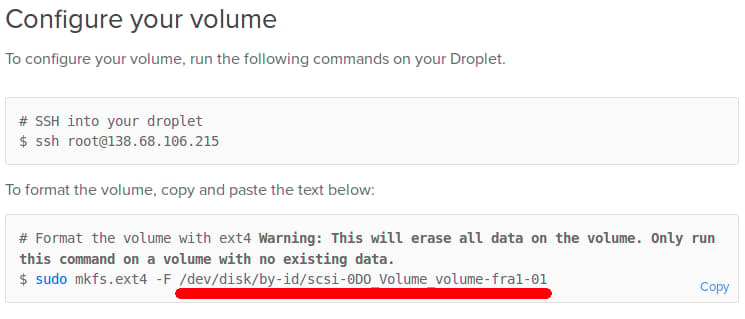
In this case, the volume name is /dev/disk/by-id/scsi-0D0_Volume_volume-fra1-01, although yours may differ.
Once you identify the volume, return to your terminal and issue the following command to begin the LXD initialization process.
- sudo lxd init
You’ll be presented with series of questions. Answer the questions as shown in the following output:
OutputName of the storage backend to use (dir or zfs) [default=zfs]: zfs
Create a new ZFS pool (yes/no) [default=yes]? yes
Name of the new ZFS pool [default=lxd]: lxd
When you’re prompted about using an existing block device, choose yes and provide the path to your device:
Output of the "lxd init" commandWould you like to use an existing block device (yes/no) [default=no]? yes
Path to the existing block device: /dev/disk/by-id/scsi-0DO_Volume_volume-fra1-01
Then use the default value for the remaining questions:
Output of the "lxd init" commandWould you like LXD to be available over the network (yes/no) [default=no]? no
Do you want to configure the LXD bridge (yes/no) [default=yes]? yes
Warning: Stopping lxd.service, but it can still be activated by:
  lxd.socket
LXD has been successfully configured.
Once the process completes, you’ll configure the network.
Configuring Networking
The initialization process will present us with a series of screens like the following figure that let us configure the networking bridge for the containers so they can get private IP addresses, communicate with each other, and have access to the Internet.
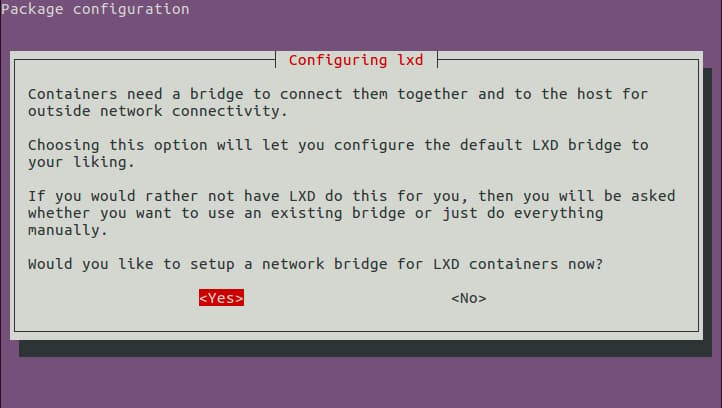
Use the default value for each option, but when asked about IPv6 networking, select No, since we won’t be using it in this tutorial.
Once you’ve completed the networking configuration, you’re ready to create your containers.
Step 3 — Creating Containers
We have successfully configured LXD. We have specified the location of the storage backend and have configured the default networking for any newly created containers. We are ready to to create and manage some containers, which we’ll do with the lxc command.
Let’s try our first command, which lists the available installed containers:
- lxc list
You’ll see the following output:
Output of the "lxd list" commandGenerating a client certificate. This may take a minute...
If this is your first time using LXD, you should also run: sudo lxd init
To start your first container, try: lxc launch ubuntu:16.04

+------+-------+------+------+------+-----------+
| NAME | STATE | IPV4 | IPV6 | TYPE | SNAPSHOTS |
+------+-------+------+------+------+-----------+
Since this is the first time that the lxc command communicates with the LXD hypervisor, the output lets us know that the command automatically created a client certificate for secure communication with LXD. Then, it shows some information about how to launch a container. Finally, the command shows an empty list of containers, which is expected since we haven’t created any yet.
Let’s create three containers. We’ll create one for each web server, and a third container for the reverse proxy. The purpose of the reverse proxy is to direct incoming connections from the Internet to the correct web server in the container.
We will use the lxc launch command to create and start an Ubuntu 16.04 (ubuntu:x) container named web1. The x in ubuntu:x is a shortcut for the first letter of Xenial, the codename of Ubuntu 16.04. ubuntu: is the identifier for the preconfigured repository of LXD images.
Note: You can find the full list of all available Ubuntu images by running lxc image list ubuntu: and other distributions by running lxc image list images:.
Execute the following commands to create the containers:
- lxc launch ubuntu:x web1
- lxc launch ubuntu:x web2
- lxc launch ubuntu:x haproxy
Because this is the first time that we have created a container, the first command downloads the container image from the Internet and caches it locally. The next two containers will be created significantly faster.
Here you can see the sample output from the creation of container web1.
OutputCreating web1
Retrieving image: 100%
Starting web1
Now that we have created three empty vanilla containers, let’s use the lxc list command to show information about them:
- lxc list
The output shows a table with the name of each container, its current state, its IP address, its type, and whether there are snapshots taken.
+---------+---------+-----------------------+------+------------+-----------+
|  NAME   |  STATE  |         IPV4          | IPV6 |    TYPE    | SNAPSHOTS |
+---------+---------+-----------------------+------+------------+-----------+
| haproxy | RUNNING | 10.10.10.10 (eth0)    |      | PERSISTENT | 0         |
+---------+---------+-----------------------+------+------------+-----------+
| web1    | RUNNING | 10.10.10.100 (eth0)   |      | PERSISTENT | 0         |
+---------+---------+-----------------------+------+------------+-----------+
| web2    | RUNNING | 10.10.10.200 (eth0)   |      | PERSISTENT | 0         |
+---------+---------+-----------------------+------+------------+-----------+
Take note of the container names and their corresponding IPv4 addresss. You’ll need them to configure your services.
Step 4 — Configuring the Nginx Containers
Let’s connect to the web1 container and configure the first web server.
To connect, we use the lxc exec command, which takes the name of the container and the commands to execute. Execute the following command to connect to the container:
- lxc exec web1 -- sudo --login --user ubuntu
The -- string denotes that the command parameters for lxc should stop there, and the rest of the line will be passed as the command to be executed inside the container. The command is sudo --login --user ubuntu, which provides a login shell for the preconfigured account ubuntu inside the container.
Note: If you need to connect to the containers as root, you can use the command lxc exec web1 -- /bin/bash instead.
Once inside the container, our shell prompt now looks like the following.
Outputubuntu@web1:~$
This ubuntu user in the container has preconfigured sudo access, and can run sudo commands without supplying a password. This shell is limited inside the confines of the container. Anything that we run in this shell stays in the container and cannot escape to the host server.
Let’s update the package list of the Ubuntu instance inside the container and install Nginx:
- sudo apt-get update
- sudo apt-get install nginx
Let’s edit the default web page for this site and add some text that makes it clear that this site is hosted in the web1 container. Open the file /var/www/html/index.nginx-debian.html:
- sudo nano /var/www/html/index.nginx-debian.html
Make the following change to the file:
<!DOCTYPE html>
<html>
<head>
<title>Welcome to nginx on LXD container web1!</title>
<style>
    body {
        width: 35em;
        margin: 0 auto;
        font-family: Tahoma, Verdana, Arial, sans-serif;
    }
</style>
</head>
<body>
<h1>Welcome to nginx on LXD container web1!</h1>
<p>If you see this page, the nginx web server is successfully installed and
working. Further configuration is required.</p>
...
We have edited the file in two places and specifically added the text on LXD container web1. Save the file and exit your editor.
Now log out of the container and return back to the host server:
- logout
Repeat this procedure for the web2 container. Log in, install Nginx, and then edit the file /var/www/html/index.nginx-debian.html to mention web2. Then exit the web2 container.
Let’s use curl to test that the web servers in the containers are working. We need the IP addresses of the web containers which were shown earlier.
- curl http://10.10.10.100/
The output should be:
Output of "curl http://10.10.10.100/" command<!DOCTYPE html>
<html>
<head>
<title>Welcome to nginx on LXD container web1!</title>
<style>
    body {
        width: 35em;
        margin: 0 auto;
        font-family: Tahoma, Verdana, Arial, sans-serif;
    }
</style>
</head>
<body>
<h1>Welcome to nginx on LXD container web1!</h1>
<p>If you see this page, the nginx web server is successfully installed and
working. Further configuration is required.</p>
...
Test the second container as well, using the curl command and its IP address to verify it’s also set up correctly. With both containers configured, we can move on to setting up HAProxy.
Step 5 — Configuring the HAProxy container
We’ll set up HAProxy as a proxy in front of these containers. If you need more background on how this works, review the tutorial An Introduction to HAProxy and Load Balancing Concepts. We’ll direct traffic to each container based on the domain name we use. We’ll use the domainexample.com in the configuration example that follows, which is a special reserved domain for documentation like this tutorial. We’ll make the first website available at the hostnames example.com and www.example.com. The second website will be at www2.example.com. Substitute your own domain names in place of these domain names.
Log in to the haproxy container:
- lxc exec haproxy -- sudo --login --user ubuntu
Update the list of installation packages and install HAProxy:
- sudo apt-get update
- sudo apt-get install haproxy
Once the installation completes, we can configure HAProxy. The configuration file for HAProxy is located at /etc/haproxy/haproxy.cfg. Open the file with your favorite text editor.
- sudo nano /etc/haproxy/haproxy.cfg
First, we’ll make a couple of modifications to the defaults section. We’ll add the forwardfor option so we retain the real source IP of the web client, and we’ll add the http-server-close option, which enables session reuse and lower latency.
global
...
defaults
	log	global
	mode	http
	option	httplog
	option	dontlognull
	option 	forwardfor
	option 	http-server-close
	timeout connect 5000
	timeout client  50000
	timeout server  50000
...
Next, we’ll configure the frontend to point to our two backend containers. Add a new frontend section called www_frontend that looks like this:
frontend www_frontend
	bind *:80		# Bind to port 80 (www) on the container

	# It matches if the HTTP Host: field mentions any of the hostnames (after the '-i').
	acl host_web1 hdr(host) -i example.com www.example.com
	acl host_web2 hdr(host) -i web2.example.com

	# Redirect the connection to the proper server cluster, depending on the match.
	use_backend web1_cluster if host_web1
	use_backend web2_cluster if host_web2
The acl commands match the hostnames of the web servers and redirect the requests to the corresponding backend section.
Then we define two new backend sections, one for each web server, and name them web1_cluster and web2_cluster respectively. Add the following code to the file to define the backends:
backend web1_cluster
	balance leastconn
   	# We set the X-Client-IP HTTP header. This is useful if we want the web server to know the real client IP.
	http-request set-header X-Client-IP %[src]
	# This backend, named here "web1", directs to container "web1.lxd" (hostname).
	server web1 web1.lxd:80 check

backend web2_cluster
	balance leastconn
	http-request set-header X-Client-IP %[src]
	server web2 web2.lxd:80 check
The balance option denotes the load-balancing strategy. In this case, we opt for the least number of connections. The http-request option sets an HTTP header with the real web client IP. If we did not set this header, the web server would record the HAProxy IP address as the source IP for all connections, making it more difficult to analyze where your traffic originates from. The server option specifies an arbitrary name for the server (web1), followed by the hostname and port of the server…
LXD provides a DNS server for the containers, so web1.lxd resolves to the IP associated with the web1 container. The other containers have their own hostnames, such as web2.lxd and haproxy.lxd.
The check parameter tells HAPRoxy to perform health checks on the web server to make sure it’s available.
To test that the configuration is valid, run the following command:
- /usr/sbin/haproxy -f /etc/haproxy/haproxy.cfg -c
The output should be
Configuration file is valid
Let’s reload HAProxy so that it reads the new configuration.
- sudo systemctl reload haproxy
Now log out of the container in order to return back to the host.
- logout
We have configured HAProxy to act as a reverse proxy that forwards any connections that it receives on port 80 to the appropriate web server in the other two containers. Let’s test that haproxy actually manages to forward the requests to the correct web container. Execute this command:
- curl --verbose --header 'Host: web2.example.com' http://10.10.10.10
This makes a request to HAProxy and sets an HTTP host header, which HAProxy should use to redirect the connection to the appropriate web server.
The output should be
Output of "curl --verbose --header 'Host: web2.example.com' http://10.10.10.10" command...
> GET / HTTP/1.1
> Host: web2.example.com
> User-Agent: curl/7.47.0
> Accept: */*
>
...
<
<!DOCTYPE html>
<html>
<head>
<title>Welcome to nginx on LXD container web2!</title>
<style>
...
HAProxy correctly understood the request and forwarded it to the web2 container. There, the web server served the default index page that we have edited earlier, and shows the text on LXD container web2. Now let’s route external requests to HAProxy so the world can access our web sites.
Step 6 — Forwarding Incoming Connections to the HAProxy Container
The final piece of the puzzle is to connect the reverse proxy to the Internet. We need to set up our server to forward any connections that it may receive from the Internet on port 80 to the haproxy container.
HAProxy is installed in a container, and, by default, is inaccessible from the Internet. To solve this, we’ll create an iptables rule to forward connections.
The iptables command requires two IP addresses: the public IP address of the server (your_server_ip) and the private IP address of the haproxy container (your_haproxy_ip), which you can obtain with the lxc list command.
Execute this command to create the rule:
- sudo iptables -t nat -I PREROUTING -i eth0 -p TCP -d your_server_ip/32 --dport 80 -j DNAT --to-destination your_haproxy_ip:80
Here’s how the command breaks down:
-t natspecifies that we’re using thenattable.-I PREROUTINGspecifies that we’re adding the rule to the PREROUTING chain.-i eth0specifies the interface eth0, which is the default public interface on Droplets.-p TCPsays we’re using the the TCP protocol.-d your_server_ip/32specifies the destination IP address for the rule.--dport 80: specifies the destination port.-j DNATsays that we want to perform a jump to Destination NAT (DNAT).--to-destination your_haproxy_ip:80says that we want the request to go to the IP address of the container with HAProxy.
Learn more about IPTables in How the Iptables Firewall Works and IPtables Essentials: Common Firewall Rules and Commands.
Finally, to save this iptables command so that it is re-applied after a reboot, we install the iptables-persistent package:
- sudo apt-get install iptables-persistent
When installing the package, you will be prompted to save the current iptables rules. Accept and save all current iptables rules.
If you have set up the two FQDNs, then you should be able to connect to each website using your web browser. Try it out.
To test that the two Web servers are actually accessible from the Internet, access each from your local computer using the curl command like this:
- curl --verbose --header 'Host: example.com' 'http://your_server_ip'
- curl --verbose --header 'Host: web2.example.com' 'http://your_server_ip'
These commands make HTTP connections to the public IP address of the server and add an HTTP header field with the --header option which HAProxy will use to handle the request, just like you did in Step 5.
Here is the output of the first curl command:
Output*   Trying your_server_ip...
* Connected to your_server_ip (your_server_ip) port 80 (#0)
> GET / HTTP/1.1
> Host: example.com
> User-Agent: curl/7.47.0
> Accept: */*
>
< HTTP/1.1 200 OK
< Server: nginx/1.10.0 (Ubuntu)
...
<!DOCTYPE html>
<html>
<head>
<title>Welcome to nginx on LXD container web1!</title>
<style>
    body {
...
Here is the output of the second curl command:
Output*   Trying your_server_ip...
* Connected to your_server_ip (your_server_ip) port 80 (#0)
> GET / HTTP/1.1
> Host: web2.example.com
> User-Agent: curl/7.47.0
> Accept: */*
>
< HTTP/1.1 200 OK
< Server: nginx/1.10.0 (Ubuntu)
...
<!DOCTYPE html>
<html>
<head>
<title>Welcome to nginx on LXD container web2!</title>
<style>
    body {
...
In both cases, the correct website is shown.
Conclusion
You’ve set up two websites, each in its own container, with HAProxy directing traffic. You can replicate this process to configure many more websites, each confined to its own container.
You could also add MySQL in a new container and then install a CMS like WordPress to run each website. You can also use this process to support older versions of software. For example, if an installation of a CMS requires an older version of software like PHP5, then you can install Ubuntu 14.04 in the container (lxc launch ubuntu:t), instead of trying to downgrade the package manager versions available on Ubuntu 16.04.
Finally, LXD provides the ability to take snapshots of the full state of containers, which makes it easy to create backups and roll containers back at a later time. In addition, if we install LXD on two different servers, then it is possible to connect them and migrate containers between servers over the Internet.
Thanks for learning with the DigitalOcean Community. Check out our offerings for compute, storage, networking, and managed databases.
About the author

Still looking for an answer?
 This work is licensed under a Creative Commons Attribution-NonCommercial- ShareAlike 4.0 International License.
Become a contributor for community
Get paid to write technical tutorials and select a tech-focused charity to receive a matching donation.

DigitalOcean Documentation
Full documentation for every DigitalOcean product.

Resources for startups and AI-native businesses
The Wave has everything you need to know about building a business, from raising funding to marketing your product.
The developer cloud
Scale up as you grow — whether you're running one virtual machine or ten thousand.

Start building today
From GPU-powered inference and Kubernetes to managed databases and storage, get everything you need to build, scale, and deploy intelligent applications.



