

By Vadym Kalsin and Brian Hogan
Not using Ubuntu 16.04?
Choose a different version or distribution.
Introduction
Zabbix is open-source monitoring software for networks and applications. It offers real-time monitoring of thousands of metrics collected from servers, virtual machines, and any other kind of network device. These metrics can help you determine the current health of your IT infrastructure and detect problems with hardware or software components before customers complain. Useful information is stored in a database so you can analyze data over time and improve the quality of provided services, or plan upgrades of your equipment.
Zabbix uses a client-server architecture and uses a small agent on the monitored client to gather data and send it to the Zabbix server. Zabbix version 3 supports encrypted communication between the server and connected clients, so your data is protected while it travels over insecure networks.
The Zabbix server stores its data in a relational database powered by MySQL, PostgreSQL, or Oracle. It also provides a web interface so you can view data and configure system settings. In this tutorial, we will configure two machines. One will be configured as the server, and the other as a client which you’ll monitor. The server will use a MySQL database to record monitoring data and use Apache to serve the web interface.
Prerequisites
To follow this tutorial, you will need:
- Two Ubuntu 16.04 servers, each configured with a sudo non-root user. You can set these up by following this initial Ubuntu server setup article.
- The server that will run the Zabbix server needs Apache, MySQL, and PHP installed. Follow this guide to configure those on one of your servers.
Step 1 — Installing the Zabbix Server
First, we need to install the Zabbix Server on the server where we installled MySQL, Apache, and PHP. We’ll refer to this machine as the “Zabbix server” in this tutorial. Log into this machine as your non-root user:
- ssh sammy@your_zabbix_server_ip_address
Before we install Zabbix, we need to install a few PHP modules that Zabbix needs. First, update your system’s list of available packages:
- sudo apt-get update
Then install the PHP modules Zabbix needs:
- sudo apt-get install php7.0-xml php7.0-bcmath php7.0-mbstring
Now we can install Zabbix.
Zabbix is available in Ubuntu’s package manager, but it’s outdated, so we’ll use the official Zabbix repository to install the latest stable version. Download and install the repository configuration package:
wget http://repo.zabbix.com/zabbix/3.2/ubuntu/pool/main/z/zabbix-release/zabbix-release_3.2-1+xenial_all.deb
sudo dpkg -i zabbix-release_3.2-1+xenial_all.deb
You will see the following output:
OutputSelecting previously unselected package zabbix-release.
(Reading database ... 55276 files and directories currently installed.)
Preparing to unpack zabbix-release_3.2-1+xenial_all.deb ...
Unpacking zabbix-release (3.2-1+xenial) ...
Setting up zabbix-release (3.2-1+xenial) ...
Update the package index so the new repository is included:
sudo apt-get update
Then install the Zabbix server and web frontend with MySQL database support:
sudo apt-get install zabbix-server-mysql zabbix-frontend-php
Let’s also install the Zabbix agent, which will let us collect data about the Zabbix server status itself.
sudo apt-get install zabbix-agent
Before we can use Zabbix, we have to set up a database to hold the data that the Zabbix server will collect from its agents.
Step 2 — Configuring the MySQL Database For Zabbix
We need to create a new MySQL database and populate it with some basic information in order to make it suitable for Zabbix. We’ll also create a specific user for this database so Zabbix isn’t logging into MySQL with the root account.
Log into MySQL as the root user using the root password that you set up during the MySQL server installation:
mysql -uroot -p
Create the Zabbix database with UTF-8 character support:
- create database zabbix character set utf8 collate utf8_bin;
Then create a user that the Zabbix server will use, give it access to the new database, and set the password for the user:
- grant all privileges on zabbix.* to zabbix@localhost identified by 'your_password';
Then apply these new permissions:
- flush privileges;
That takes care of the user and the database. Exit out of the database console.
- quit;
Next we have to import the initial schema and data. The Zabbix installation provided us with a file that sets this up for us.
Run the following command to set up the schema and import the data into the zabbix database. We’ll use zcat since the data in the file is compressed.
zcat /usr/share/doc/zabbix-server-mysql/create.sql.gz | mysql -uzabbix -p zabbix
Enter the password for the zabbix MySQL user that you configured when prompted.
This command will not output any errors if it was successful. If you see the error ERROR 1045 (28000): Access denied for user 'zabbix'@'localhost' (using password: YES) then make sure you used the password for the zabbix user and not the root user.
In order for the Zabbix server to use this database, you need to set the database password in the Zabbix server configuration file. Open the configuration file in your editor:
sudo nano /etc/zabbix/zabbix_server.conf
Look for the following section of the file:
### Option: DBPassword
#       Database password. Ignored for SQLite.
#       Comment this line if no password is used.
#
# Mandatory: no
# Default:
# DBPassword=
These comments in the file explain how to connect to the database. We need to set the DBPassword value in the file to the password for our database user. Add this line below those comments to configure the database:
DBPassword=your_zabbix_mysql_password
That takes care of the Zabbix server configuration, but we have to make some modifications to our PHP setup in order for the Zabbix web interface to work properly.
Step 3 — Configuring PHP For Zabbix
The Zabbix web interface is written in PHP and requires some special PHP server settings. The Zabbix installation process created an Apache configuration file that contains these settings. It is located in the directory /etc/zabbix and is loaded automatically by Apache. We need to make a small change to this file, so open it up.
sudo nano /etc/zabbix/apache.conf
The file contains PHP settings that meet the necessary requirements for the Zabbix web interface. The only change you need to make is to set the appropriate timezone, which is commented out by default.
...
<IfModule mod_php7.c>
    php_value max_execution_time 300
    php_value memory_limit 128M
    php_value post_max_size 16M
    php_value upload_max_filesize 2M
    php_value max_input_time 300
    php_value always_populate_raw_post_data -1
    # php_value date.timezone Europe/Riga
</IfModule>
Uncomment the timezone line, highlighted above, and change it to your time zone. You can use this list of supported time zones to find the right one for you. Then save and close the file.
Now restart Apache to apply these new settings.
sudo systemctl restart apache2
You can now start the Zabbix server.
sudo systemctl start zabbix-server
Then check whether the Zabbix server is running properly:
sudo systemctl status zabbix-server
You will see the following status:
Output● zabbix-server.service - Zabbix Server
   Loaded: loaded (/lib/systemd/system/zabbix-server.service; disabled; vendor preset: enabled)
   Active: :active (running) since Thu 2017-06-08 06:40:43 UTC; 6s ago
  Process: 15201 ExecStart=/usr/sbin/zabbix_server -c $CONFFILE (code=exited, status=0/SUCCESS)
  ...
Finally, enable the server to start at boot time:
- sudo systemctl enable zabbix-server
The server is set up and connected to the database. Now let’s set up the web frontend.
Step 4 — Configuring Settings for the Zabbix Web Interface
The web interface lets us see reports and add hosts that we want to monitor, but it needs some initial setup before we can use it. Launch your browser and go to the address http://your_zabbix_server_ip_address/zabbix/. On the first screen, you will see a welcome message. Click Next step to continue.
On the next screen, you will see the table that lists all of the prerequisites to run Zabbix.
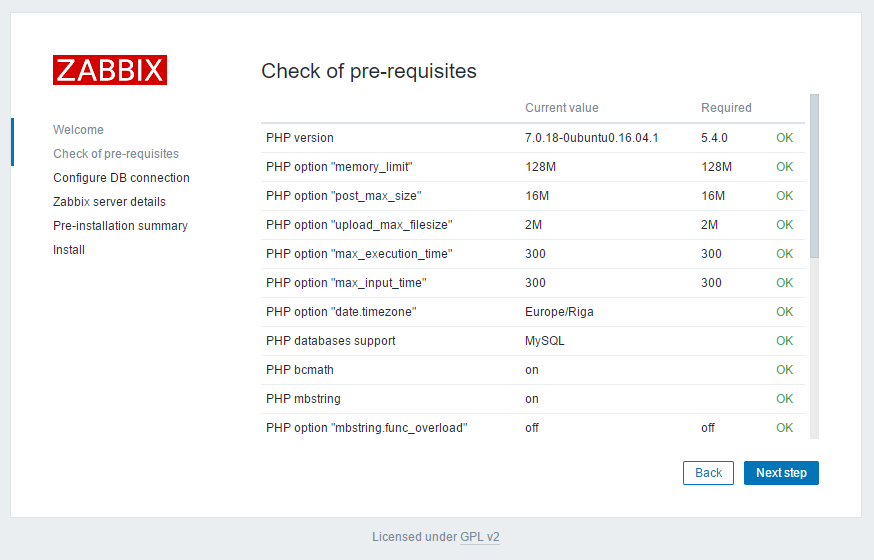
All of the values in this table must be OK, so verify that they are. Be sure to scroll down and look at all of the prerequisites. Once you’ve verified that everything is ready to go, click Next step to proceed.
The next screen asks for database connection information.
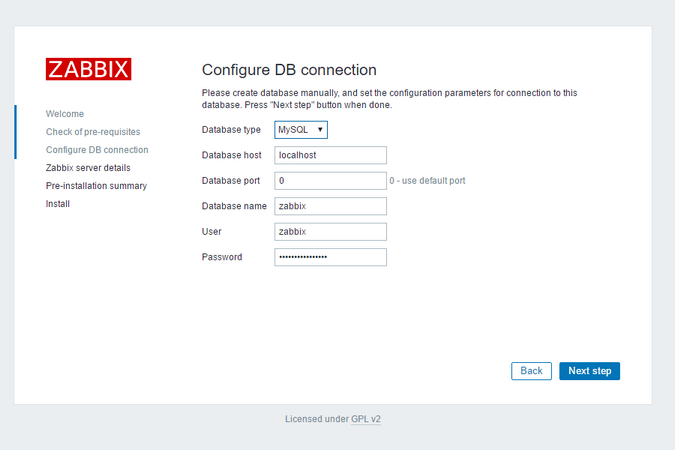
We told the Zabbix server about our database, but the Zabbix web interface also needs access to the database to manage hosts and read data. Therefore enter the MySQL credentials you configured in Step 2 and click Next step to proceed.
On the next screen, you can leave the options at their default values.
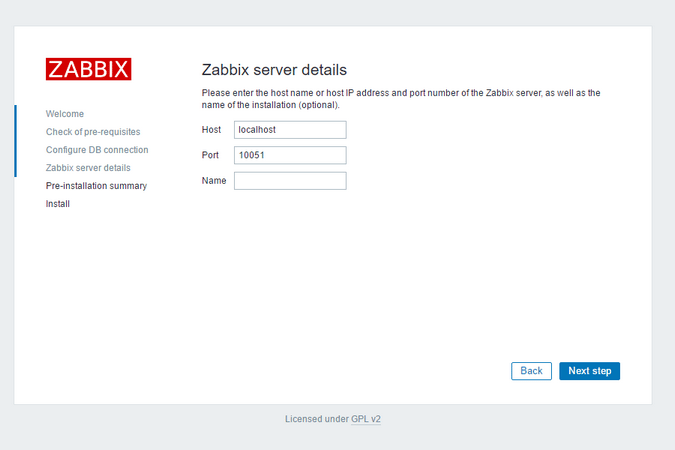
The Name is optional; it is used in the web interface to distinguish one server from another in case you have several monitoring servers. Click Next step to proceed.
The next screen will show the pre-installation summary so you can confirm everything is correct.
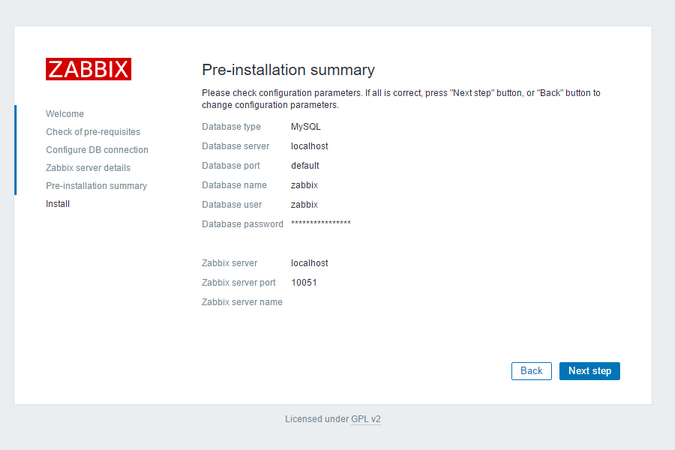
Click Next step to proceed to the final screen.
The web interface setup is complete! This process creates the configuration file /usr/share/zabbix/conf/zabbix.conf.php which you could back up and use in the future. Click Finish to proceed to the login screen. The default user is Admin and the password is zabbix.
Before we log in, let’s set up the Zabbix agent on our other server.
Step 5 — Installing and Configuring the Zabbix Agent
Now we need to configure the agent software that will send monitoring data to the Zabbix server.
Log in to the second server, which we’ll call the “monitored server”.
- ssh sammy@your_monitored_server_ip_address
Then, just like on the Zabbix server, run the following commands to install the repository configuration package:
- wget http://repo.zabbix.com/zabbix/3.2/ubuntu/pool/main/z/zabbix-release/zabbix-release_3.2-1+xenial_all.deb
- sudo dpkg -i zabbix-release_3.2-1+xenial_all.deb
Next, update the package index:
- sudo apt-get update
Then install the Zabbix agent:
- sudo apt-get install zabbix-agent
While Zabbix supports certificate-based encryption, setting up a certificate authority is beyond the scope of this tutorial, but we can use pre-shared keys (PSK) to secure the connection between the server and agent.
So first, generate a PSK:
- sudo sh -c "openssl rand -hex 32 > /etc/zabbix/zabbix_agentd.psk"
Show the key so you can copy it somewhere. You will need it to configure the host.
- cat /etc/zabbix/zabbix_agentd.psk
The key will look something like this:
Outputcd12686e166a80aa09a227ae5f97834eaa3d5ae686d2ae39590f17ef85dd6de5
Now edit the Zabbix agent settings to set up its secure connection to the Zabbix server. Open the agent configuration file in your text editor:
- sudo nano /etc/zabbix/zabbix_agentd.conf
Each setting within this file is documented via informative comments throughout the file, but you only need to edit some of them.
First you have to edit the IP address of the Zabbix server. Find the following section:
### Option: Server
#       List of comma delimited IP addresses (or hostnames) of Zabbix servers.
#       Incoming connections will be accepted only from the hosts listed here.
#       If IPv6 support is enabled then '127.0.0.1', '::127.0.0.1', '::ffff:127.0.0.1' are treated equally.
#
# Mandatory: no
# Default:
# Server=

Server=127.0.0.1
Change the default value to the IP of your Zabbix server:
Server=your_zabbix_server_ip_address
Next, find the section that configures the secure connection to the Zabbix server and enable pre-shared key support. Find the TSLConnect section, which looks like this:
### Option: TLSConnect
#       How the agent should connect to server or proxy. Used for active checks.
#       Only one value can be specified:
#               unencrypted - connect without encryption
#               psk         - connect using TLS and a pre-shared key
#               cert        - connect using TLS and a certificate
#
# Mandatory: yes, if TLS certificate or PSK parameters are defined (even for 'unencrypted' connection)
# Default:
# TLSConnect=unencrypted
Then add this line to configure pre-shared key support:
TLSConnect=psk
Next, locate the TLSAccept section, which looks like this:
### Option: TLSAccept
#       What incoming connections to accept.
#       Multiple values can be specified, separated by comma:
#               unencrypted - accept connections without encryption
#               psk         - accept connections secured with TLS and a pre-shared key
#               cert        - accept connections secured with TLS and a certificate
#
# Mandatory: yes, if TLS certificate or PSK parameters are defined (even for 'unencrypted' connection)
# Default:
# TLSAccept=unencrypted
Configure incoming connections to support pre-shared keys by adding this line:
TLSAccept=psk
Next, find the TLSPSKIdentity section, which looks like this:
### Option: TLSPSKIdentity
#       Unique, case sensitive string used to identify the pre-shared key.
#
# Mandatory: no
# Default:
# TLSPSKIdentity=
Choose a unique name to identify your pre-shared key by adding this line:
TLSPSKIdentity=PSK 001
You’ll use this as the PSK ID when you add your host through the Zabbix web interface.
Then set the option which points to your previously created pre-shared key. Locate the TLSPSKFile option:
### Option: TLSPSKFile
#       Full pathname of a file containing the pre-shared key.
#
# Mandatory: no
# Default:
# TLSPSKFile=
Add this line to point the Zabbix agent to your PSK file you created:
TLSPSKFile=/etc/zabbix/zabbix_agentd.psk
Save and close the file. Now you can start the Zabbix agent and set it to start at boot time:
- sudo systemctl start zabbix-agent
- sudo systemctl enable zabbix-agent
For good measure, check that the Zabbix agent is running properly:
- sudo systemctl status zabbix-agent
You will see the following status, indicating the agent is running:
Output● zabbix-agent.service - Zabbix Agent
   Loaded: loaded (/lib/systemd/system/zabbix-agent.service; disabled; vendor preset: enabled)
   Active: active (running) since Thu 2017-06-08 08:33:52 UTC; 4s ago
  Process: 18185 ExecStart=/usr/sbin/zabbix_agentd -c $CONFFILE (code=exited, status=0/SUCCESS)
  ...
Our agent is now ready to send data to the Zabbix server. But in order to use it, we have to link to it from the server’s web console.
Note:
If you are using UFW, configure it to allow connections to port 10050:
- sudo ufw allow 10050/tcp
You can learn more about UFW in How To Set Up a Firewall with UFW on Ubuntu 16.04.
Step 6 — Adding the New Host to Zabbix Server
Installing an agent on a server we want to monitor is only half of the process. Each host we want to monitor needs to be registered on the Zabbix server, which we can do through the web interface.
Log in to the Zabbix Server web interface by navigating to the address http://your_zabbix_server_ip_address/zabbix/.
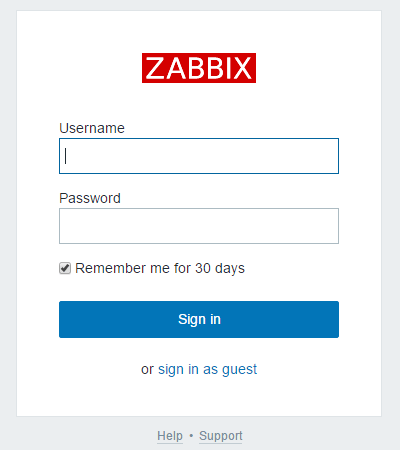
When you have logged in, click on the Configuration, and then Hosts in the top navigation bar. Then click Create host button in the top right corner of the screen. This will open the host configuration page.
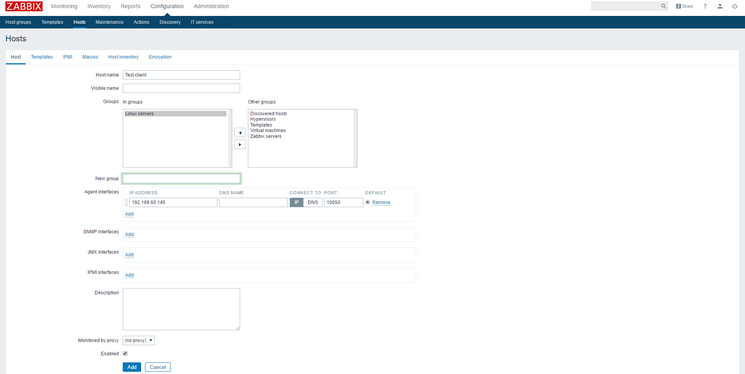
Adjust the Host name and IP ADDRESS to reflect the host name and IP address of your client machine. Then add the host to a group by selecting one of the groups from the list, or by creating your own group. The host can be in multiple groups. The Linux Servers group is a good default choice. Once you’ve added the group, click the Templates tab.
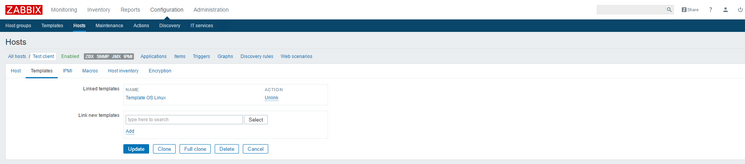
Type Template OS Linux in the Search field and then click Add to add this template to the host.
Next, navigate to Encryption tab. Select PSK for both Connections to host and Connections from host. Then set PSK identity to PSK 001, which is the value of the TLSPSKIdentity setting of the Zabbix agent we configured previously. Then set
PSK value to the key you generated for the Zabbix agent. It’s the one stored in the file /etc/zabbix/zabbix_agentd.psk on the agent machine.
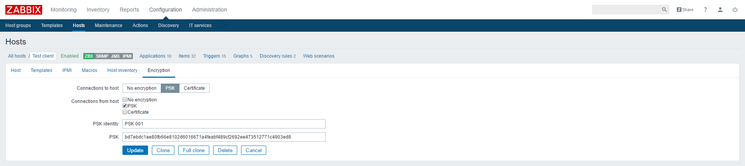
Finally, click the Add button at the bottom of the form to create the host.
You will see your new host with green labels indicating that everything is working fine and the connection is encrypted.
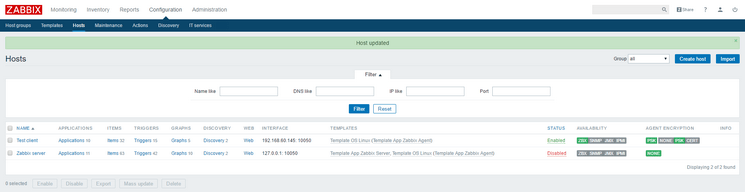
After several seconds you can navigate to Monitoring and then Latest data to see the data from your agent.
To ensure things are working, shut down your monitored server so you can see how Zabbix alerts you to problems. Once your monitored server is offline you will see the warning on the main dashboard:
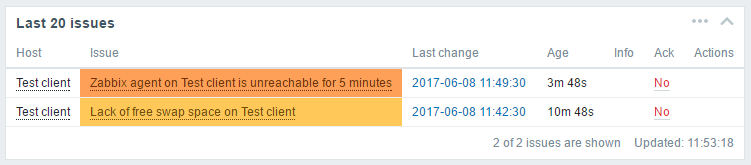
If you have additional servers you need to monitor, log in to each host, install the Zabbix agent, generate a PSK, configure the agent, and add the host to the web interface following the same steps you followed to add your first host.
Conclusion
In this tutorial, you learned how to set up a simple and secure monitoring solution which will help you monitor the state of your servers. It can now warn you of problems, and you have the opportunity to plot some graphs based on the obtained data so you can analyze it and plan accordingly.
Thanks for learning with the DigitalOcean Community. Check out our offerings for compute, storage, networking, and managed databases.
About the author(s)
Monitoring engineer
Managed the Write for DOnations program, wrote and edited community articles, and makes things on the Internet. Expertise in DevOps areas including Linux, Ubuntu, Debian, and more.
Still looking for an answer?
 This work is licensed under a Creative Commons Attribution-NonCommercial- ShareAlike 4.0 International License.
Become a contributor for community
Get paid to write technical tutorials and select a tech-focused charity to receive a matching donation.

DigitalOcean Documentation
Full documentation for every DigitalOcean product.

Resources for startups and AI-native businesses
The Wave has everything you need to know about building a business, from raising funding to marketing your product.
The developer cloud
Scale up as you grow — whether you're running one virtual machine or ten thousand.

Start building today
From GPU-powered inference and Kubernetes to managed databases and storage, get everything you need to build, scale, and deploy intelligent applications.



