Not using Ubuntu 20.04?
Choose a different version or distribution.
Introduction
WordPress is an extremely popular open-source technology for making websites and blogs on the internet today. Used by 63% of all websites that use a content management system (CMS), WordPress sites represent 36% of all websites that are currently online.
There are many different approaches to getting access to WordPress and some setup processes are more complex than others. This tutorial is intended for those who desire to install and administer a Wordpress instance on an unmanaged cloud server via the command line. Though this approach requires more steps than a ready-made WordPress installation, it offers administrators greater control over their WordPress environment.
If you are looking to access a ready-made WordPress installation, DigitalOcean Marketplace offers a one-click app to get you started with WordPress through installation when spinning up your server.
Depending on your needs and goals, you may find other options that are more suitable. As open-source software, WordPress can be freely downloaded and installed, but to be available on the web, you will likely need to purchase cloud infrastructure and a domain name. Continue following this guide if you are interested in working through the server-side installation and set up of a WordPress site.
This tutorial will be using a LAMP (Linux, Apache, MySQL, and PHP) stack, which is one option for a server architecture that supports WordPress by providing the Linux operating system, Apache web server, MySQL database, and PHP programming language. We’ll install and set up WordPress via LAMP on a Linux Ubuntu 20.04 server.
Prerequisites
In order to complete this tutorial, you will need access to an Ubuntu 20.04 server and will need to complete these steps before beginning this guide:
- Set up your server by following our Ubuntu 20.04 initial server setup guide, and ensure you have a non-root
sudouser. - Install a LAMP stack by following our LAMP guide to install and configure this software.
- Secure your site: WordPress takes in user input and stores user data, so it is important for it to have a layer of security. TLS/SSL is the technology that allows you to encrypt the traffic from your site so that your and your users’ connection is secure. Here are two options available to you to meet this requirement:
- If you have a domain name… you can secure your site with Let’s Encrypt, which provides free, trusted certificates. Follow our Let’s Encrypt guide for Apache to set this up.
- If you do not have a domain… and you are just using this configuration for testing or personal use, you can use a self-signed certificate instead. This provides the same type of encryption, but without the domain validation. Follow our self-signed SSL guide for Apache to get set up.
When you are finished with the setup steps, log into your server as your sudo user and continue below.
Step 1 — Creating a MySQL Database and User for WordPress
The first step that we will take is a preparatory one. WordPress uses MySQL to manage and store site and user information. We have MySQL installed already, but we need to make a database and a user for WordPress to use.
To get started, log into the MySQL root (administrative) account by issuing this command (note that this is not the root user of your server):
- mysql -u root -p
You will be prompted for the password you set for the MySQL root account when you installed the software.
Note: If you cannot access your MySQL database via root, as a sudo user you can update your root user’s password by logging into the database like so:
- sudo mysql -u root
Once you receive the MySQL prompt, you can update the root user’s password. Here, replace new_password with a strong password of your choosing.
- ALTER USER 'root'@'localhost' IDENTIFIED WITH mysql_native_password BY 'new_password';
You may now type EXIT; and can log back into the database via password with the following command:
- mysql -u root -p
Within the database, we can create an exclusive database for WordPress to control. You can call this whatever you would like, but we will be using the name wordpress in this guide. Create the database for WordPress by typing:
- CREATE DATABASE wordpress DEFAULT CHARACTER SET utf8 COLLATE utf8_unicode_ci;
Note: Every MySQL statement must end in a semi-colon (;). Check to make sure this is present if you are running into any issues.
Next, we are going to create a separate MySQL user account that we will use exclusively to operate our new database. Creating specific databases and accounts can support us from a management and security standpoint. We will use the name wordpressuser in this guide, but feel free to use whatever name is relevant for you.
We are going to create this account, set a password, and grant access to the database we created. We can do this by typing the following command. Remember to choose a strong password here for your database user where we have password:
- CREATE USER 'wordpressuser'@'%' IDENTIFIED WITH mysql_native_password BY 'password';
Next, let the database know that our wordpressuser should have complete access to the database we set up:
- GRANT ALL ON wordpress.* TO 'wordpressuser'@'%';
You now have a database and user account, each made specifically for WordPress. We need to flush the privileges so that the current instance of MySQL knows about the recent changes we’ve made:
- FLUSH PRIVILEGES;
Exit out of MySQL by typing:
- EXIT;
In the next step, we’ll lay some foundations for WordPress plugins by downloading PHP extensions for our server.
Step 2 — Installing Additional PHP Extensions
When setting up our LAMP stack, we only required a very minimal set of extensions in order to get PHP to communicate with MySQL. WordPress and many of its plugins leverage additional PHP extensions.
We can download and install some of the most popular PHP extensions for use with WordPress by typing:
- sudo apt update
- sudo apt install php-curl php-gd php-mbstring php-xml php-xmlrpc php-soap php-intl php-zip
This will lay the groundwork for installing additional plugins into our WordPress site.
Note: Each WordPress plugin has its own set of requirements. Some may require additional PHP packages to be installed. Check your plugin documentation to discover its PHP requirements. If they are available, they can be installed with apt as demonstrated above.
We will need to restart Apache to load these new extensions, we’ll be doing more configurations on Apache in the next section, so you can wait until then, or restart now to complete the PHP extension process.
- sudo systemctl restart apache2
Step 3 — Adjusting Apache’s Configuration to Allow for .htaccess Overrides and Rewrites
Next, we will be making a few minor adjustments to our Apache configuration. Based on the prerequisite tutorials, you should have a configuration file for your site in the /etc/apache2/sites-available/ directory.
In this guide, we’ll use /etc/apache2/sites-available/wordpress.conf as an example here, but you should substitute the path to your configuration file where appropriate. Additionally, we will use /var/www/wordpress as the root directory of our WordPress install. You should use the web root specified in your own configuration. If you followed our LAMP tutorial, it may be your domain name instead of wordpress in both of these instances.
Note: It’s possible you are using the 000-default.conf default configuration (with /var/www/html as your web root). This is fine to use if you’re only going to host one website on this server. If not, it’s better to split the necessary configuration into logical chunks, one file per site.
With our paths identified, we can move onto working with .htaccess so that Apache can handle configuration changes on a per-directory basis.
Enabling .htaccess Overrides
Currently, the use of .htaccess files is disabled. WordPress and many WordPress plugins use these files extensively for in-directory tweaks to the web server’s behavior.
Open the Apache configuration file for your website with a text editor like nano.
- sudo nano /etc/apache2/sites-available/wordpress.conf
To allow .htaccess files, we need to set the AllowOverride directive within a Directory block pointing to our document root. Add the following block of text inside the VirtualHost block in your configuration file, making sure to use the correct web root directory:
<Directory /var/www/wordpress/>
	AllowOverride All
</Directory>
When you are finished, save and close the file. In nano, you can do this by pressing CTRL and X together, then Y, then ENTER.
Enabling the Rewrite Module
Next, we can enable mod_rewrite so that we can utilize the WordPress permalink feature:
- sudo a2enmod rewrite
This allows you to have more human-readable permalinks to your posts, like the following two examples:
http://example.com/2012/post-name/
http://example.com/2012/12/30/post-name
The a2enmod command calls a script that enables the specified module within the Apache configuration.
Enabling the Changes
Before we implement the changes we’ve made, check to make sure we haven’t made any syntax errors by running the following test.
- sudo apache2ctl configtest
You may receive output like the following:
OutputAH00558: apache2: Could not reliably determine the server's fully qualified domain name, using 127.0.1.1. Set the 'ServerName' directive globally to suppress this message
Syntax OK
If you wish to suppress the top line, just add a ServerName directive to your main (global) Apache configuration file at /etc/apache2/apache2.conf. The ServerName can be your server’s domain or IP address. This is just a message, however, and doesn’t affect the functionality of your site. As long as the output contains Syntax OK, you are ready to continue.
Restart Apache to implement the changes. Make sure to restart now even if you have restarted earlier in this tutorial.
- sudo systemctl restart apache2
Next, we will download and set up WordPress itself.
Step 4 — Downloading WordPress
Now that our server software is configured, we can download and set up WordPress. For security reasons in particular, it is always recommended to get the latest version of WordPress from their site.
Change into a writable directory (we recommend a temporary one like /tmp) and download the compressed release.
- cd /tmp
- curl -O https://wordpress.org/latest.tar.gz
Extract the compressed file to create the WordPress directory structure:
- tar xzvf latest.tar.gz
We will be moving these files into our document root momentarily. Before we do, we can add a dummy .htaccess file so that this will be available for WordPress to use later.
Create the file by typing:
- touch /tmp/wordpress/.htaccess
We’ll also copy over the sample configuration file to the filename that WordPress reads:
- cp /tmp/wordpress/wp-config-sample.php /tmp/wordpress/wp-config.php
We can also create the upgrade directory, so that WordPress won’t run into permissions issues when trying to do this on its own following an update to its software:
- mkdir /tmp/wordpress/wp-content/upgrade
Now, we can copy the entire contents of the directory into our document root. We are using a dot at the end of our source directory to indicate that everything within the directory should be copied, including hidden files (like the .htaccess file we created):
- sudo cp -a /tmp/wordpress/. /var/www/wordpress
Ensure that you replace the /var/www/wordpress directory with the directory you have set up on your server.
Step 5 — Configuring the WordPress Directory
Before we do the web-based WordPress setup, we need to adjust some items in our WordPress directory.
Adjusting the Ownership and Permissions
An important step that we need to accomplish is setting up reasonable file permissions and ownership.
We’ll start by giving ownership of all the files to the www-data user and group. This is the user that the Apache web server runs as, and Apache will need to be able to read and write WordPress files in order to serve the website and perform automatic updates.
Update the ownership with the chown command which allows you to modify file ownership. Be sure to point to your server’s relevant directory.
- sudo chown -R www-data:www-data /var/www/wordpress
Next we’ll run two find commands to set the correct permissions on the WordPress directories and files:
- sudo find /var/www/wordpress/ -type d -exec chmod 750 {} \;
- sudo find /var/www/wordpress/ -type f -exec chmod 640 {} \;
These permissions should get you working effectively with WordPress, but note that some plugins and procedures may require additional tweaks.
Setting Up the WordPress Configuration File
Now, we need to make some changes to the main WordPress configuration file.
When we open the file, our first task will be to adjust some secret keys to provide a level of security for our installation. WordPress provides a secure generator for these values so that you do not have to try to come up with good values on your own. These are only used internally, so it won’t hurt usability to have complex, secure values here.
To grab secure values from the WordPress secret key generator, type:
- curl -s https://api.wordpress.org/secret-key/1.1/salt/
You will get back unique values that resemble output similar to the block below.
Warning! It is important that you request unique values each time. Do NOT copy the values below!
Outputdefine('AUTH_KEY',         '1jl/vqfs<XhdXoAPz9 DO NOT COPY THESE VALUES c_j{iwqD^<+c9.k<J@4H');
define('SECURE_AUTH_KEY',  'E2N-h2]Dcvp+aS/p7X DO NOT COPY THESE VALUES {Ka(f;rv?Pxf})CgLi-3');
define('LOGGED_IN_KEY',    'W(50,{W^,OPB%PB<JF DO NOT COPY THESE VALUES 2;y&,2m%3]R6DUth[;88');
define('NONCE_KEY',        'll,4UC)7ua+8<!4VM+ DO NOT COPY THESE VALUES #`DXF+[$atzM7 o^-C7g');
define('AUTH_SALT',        'koMrurzOA+|L_lG}kf DO NOT COPY THESE VALUES  07VC*Lj*lD&?3w!BT#-');
define('SECURE_AUTH_SALT', 'p32*p,]z%LZ+pAu:VY DO NOT COPY THESE VALUES C-?y+K0DK_+F|0h{!_xY');
define('LOGGED_IN_SALT',   'i^/G2W7!-1H2OQ+t$3 DO NOT COPY THESE VALUES t6**bRVFSD[Hi])-qS`|');
define('NONCE_SALT',       'Q6]U:K?j4L%Z]}h^q7 DO NOT COPY THESE VALUES 1% ^qUswWgn+6&xqHN&%');
These are configuration lines that we can paste directly in our configuration file to set secure keys. Copy the output you received now.
Next, open the WordPress configuration file:
- sudo nano /var/www/wordpress/wp-config.php
Find the section that contains the example values for those settings.
. . .

define('AUTH_KEY',         'put your unique phrase here');
define('SECURE_AUTH_KEY',  'put your unique phrase here');
define('LOGGED_IN_KEY',    'put your unique phrase here');
define('NONCE_KEY',        'put your unique phrase here');
define('AUTH_SALT',        'put your unique phrase here');
define('SECURE_AUTH_SALT', 'put your unique phrase here');
define('LOGGED_IN_SALT',   'put your unique phrase here');
define('NONCE_SALT',       'put your unique phrase here');

. . .
Delete those lines and paste in the values you copied from the command line:
. . .

define('AUTH_KEY',         'VALUES COPIED FROM THE COMMAND LINE');
define('SECURE_AUTH_KEY',  'VALUES COPIED FROM THE COMMAND LINE');
define('LOGGED_IN_KEY',    'VALUES COPIED FROM THE COMMAND LINE');
define('NONCE_KEY',        'VALUES COPIED FROM THE COMMAND LINE');
define('AUTH_SALT',        'VALUES COPIED FROM THE COMMAND LINE');
define('SECURE_AUTH_SALT', 'VALUES COPIED FROM THE COMMAND LINE');
define('LOGGED_IN_SALT',   'VALUES COPIED FROM THE COMMAND LINE');
define('NONCE_SALT',       'VALUES COPIED FROM THE COMMAND LINE');

. . .
Next, we are going to modify some of the database connection settings at the beginning of the file. You need to adjust the database name, the database user, and the associated password that you configured within MySQL.
The other change we need to make is to set the method that WordPress should use to write to the filesystem. Since we’ve given the web server permission to write where it needs to, we can explicitly set the filesystem method to “direct”. Failure to set this with our current settings would result in WordPress prompting for FTP credentials when we perform some actions.
This setting can be added below the database connection settings, or anywhere else in the file:
. . .

// ** MySQL settings - You can get this info from your web host ** //
/** The name of the database for WordPress */
define( 'DB_NAME', 'wordpress' );

/** MySQL database username */
define( 'DB_USER', 'wordpressuser' );

/** MySQL database password */
define( 'DB_PASSWORD', 'password' );

/** MySQL hostname */
define( 'DB_HOST', 'localhost' );

/** Database Charset to use in creating database tables. */
define( 'DB_CHARSET', 'utf8' );

/** The Database Collate type. Don't change this if in doubt. */
define( 'DB_COLLATE', '' );


. . .

define('FS_METHOD', 'direct');
Save and close the file when you are finished.
Step 6 — Completing the Installation Through the Web Interface
Now that the server configuration is complete, we can complete the installation through the web interface.
In your web browser, navigate to your server’s domain name or public IP address:
https://server_domain_or_IP
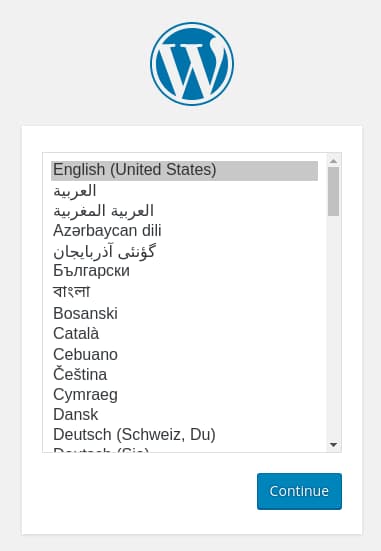
Select the language you would like to use:
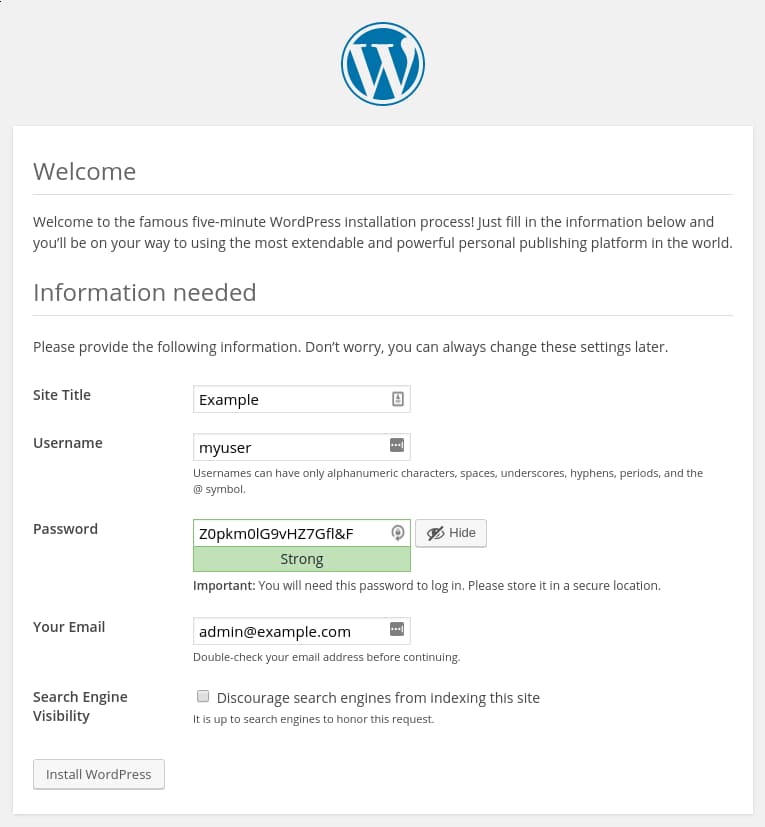
Next, you will come to the main setup page.
Select a name for your WordPress site and choose a username. It is recommended to choose something unique and avoid common usernames like “admin” for security purposes. A strong password is generated automatically. Save this password or select an alternative strong password.
Enter your email address and select whether you want to discourage search engines from indexing your site:
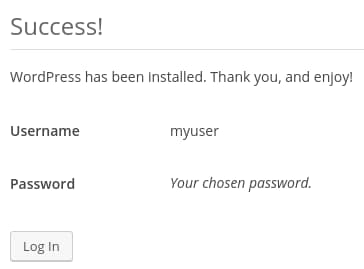
When you click ahead, you will be taken to a page that prompts you to log in:
Once you log in, you will be taken to the WordPress administration dashboard:
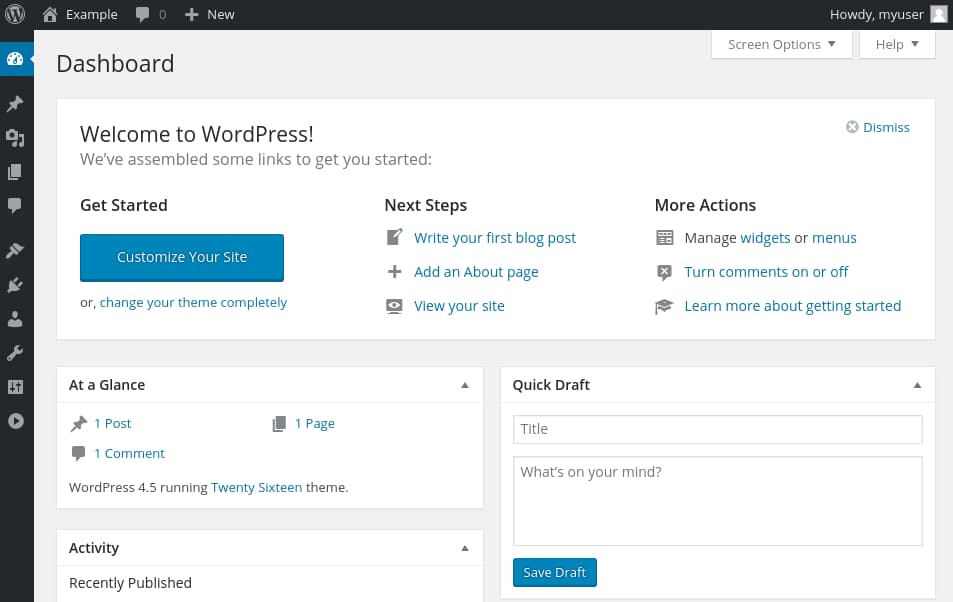
At this point, you can begin to design your WordPress website! If this is your first time using WordPress, explore the interface a bit to get acquainted with your new CMS.
Conclusion
Congratulations, WordPress is now installed and is ready to be used!
At this point you may want to start doing the following:
- Choose your permalinks setting for WordPress posts, which can be found in
Settings > Permalinks. - Select a new theme in
Appearance > Themes. - Install new plugins to increase your site’s functionality under
Plugins > Add New. - If you are going to collaborate with others, you may also wish to add additional users at this time under
Users > Add New.
You can find additional resources for alternate ways to install WordPress, learn how to install WordPress on different server distributions, automate your WordPress installations, and scale your WordPress sites by checking out our WordPress Community tag.
Thanks for learning with the DigitalOcean Community. Check out our offerings for compute, storage, networking, and managed databases.
About the author

Community and Developer Education expert. Former Senior Manager, Community at DigitalOcean. Focused on topics including Ubuntu 22.04, Ubuntu 20.04, Python, Django, and more.
Still looking for an answer?
 This work is licensed under a Creative Commons Attribution-NonCommercial- ShareAlike 4.0 International License.
Become a contributor for community
Get paid to write technical tutorials and select a tech-focused charity to receive a matching donation.

DigitalOcean Documentation
Full documentation for every DigitalOcean product.

Resources for startups and AI-native businesses
The Wave has everything you need to know about building a business, from raising funding to marketing your product.
The developer cloud
Scale up as you grow — whether you're running one virtual machine or ten thousand.

Start building today
From GPU-powered inference and Kubernetes to managed databases and storage, get everything you need to build, scale, and deploy intelligent applications.



