
Introduction
If you are running a web application and database, say a LAMP stack, on a single VPS, you may run into a situation where you want to scale your environment to handle more traffic. A good way to get started with scaling your environment is by migrating your database server to another, separate VPS in the same datacenter.
In this guide, we will discuss how to migrate your existing MySQL database off of your application server. Because every application has its own configuration quirks, with regards to database connections and interactions, we will demonstrate the migration process with WordPress but you can adapt this guide to any other application that uses MySQL as its database.
Note: If you want to do an initial setup of your application with a separate database server, and therefore have no existing data to preserve, you should read the following linked tutorial instead of this one: How To Set Up a Remote Database to Optimize Site Performance with MySQL.
Prerequisites
This tutorial assumes that you have some web application and database which reside on the same server, like in this diagram:
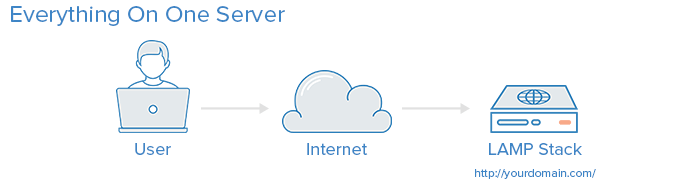
An example of this type of setup is: How To Install Wordpress on Ubuntu 14.04
From now on, we will refer to your existing server as lamp-1.
You will need to create an additional VPS, with private networking, that will serve as your separate MySQL server. For reference purposes, we will call this server mysql-1.
Our Goal
When we are finished with this tutorial, we want to take our original lamp-1 server and migrate its database to a new server, mysql-1.
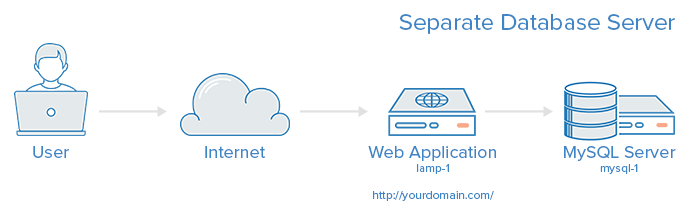
Tasks to Reach Our Goal
There are two main tasks that we need to complete to accomplish our goal:
- Migrate existing database to new server
- Reconfigure application to connect to new database
Let’s get started on migrating the existing database!
Migrating Existing Database To New Server
Create New MySQL VPS
You will want to create the new VPS that will be your new MySQL database server–again, for reference purposes, we will call this server mysql-1. Create the new VPS now. If you do not have a standard setup that you do on your servers, you may want to follow steps 1-4 of this link: Initial Server Setup with Ubuntu 14.04
Install and Configure MySQL Server
After you have created your new database VPS, connect to it and install MySQL Server.
On mysql-1, update apt with the following command:
sudo apt-get update
Then run the following apt command to install MySQL Server:
sudo apt-get install mysql-server
Enter a root password for your MySQL installation (you can use the same password as your original MySQL server). Then run the following command create the default MySQL database tables:
sudo mysql_install_db
Next, run the following command to finish up the MySQL installation:
sudo mysql_secure_installation
You can respond “no” to resetting the root password (which you just set), and Yes to everything else.
Currently, your new MySQL database is configured to listen to localhost, or 127.0.0.1, only. We need to configure your database server to listen on its private IP address so your application server, lamp-1, can connect to it. Open your MySQL configuration for editing:
sudo vi /etc/mysql/my.cnf
Find the following line in your MySQL configuration file:
bind-address = 127.0.0.1
Replace 127.0.0.1 with the your database server’s private IP address:
<pre> bind-address = <span class=“highlight”>mysql_1_private_IP</span> </pre>
If you have any other MySQL configuration changes to make (such as non-default settings that were configured on your lamp-1 VPS), do it now then save and quit. To put these changes into effect, restart mysql with the following command:
sudo service mysql restart
Now your new server, mysql-1 is listening for MySQL traffic on its private IP address. Next, we will work on exporting your original database.
Export Backup Of Original Database
Optionally, you may stop your application server to prevent attempted updates to your existing database during the migration process. The database will be locked anyway, but it is something you may want to consider.
Next, we will want to export a backup of your original MySQL database, which will be used to migrate to our new database. We need to lock the database so we can do a data dump. Note: Locking your database will block updates to it, so your application will only be able to do read-only operations until you finish the rest of this tutorial.
On lamp-1, enter the MySQL console:
mysql -u root -p
To lock your database on lamp-1, run this from the MySQL console:
FLUSH TABLES WITH READ LOCK;
SET GLOBAL read_only = ON;
EXIT
Now, from your command shell, run the following command to export a backup of the databases on your original MySQL server to a file called dump.sql:
mysqldump --lock-all-tables -u root -p --all-databases > dump.sql
Copy your dump.sql file to your new database server, mysql-1, using scp:
<pre> scp dump.sql <span class=“highlight”>user</span>@<span class=“highlight”>mysql_1_private_IP</span>:/tmp </pre>
Since we are no longer going to use MySQL on your original server, we can leave it locked. If you want to unlock it, run the following commands in the MySQL Console:
SET GLOBAL read_only = OFF;
UNLOCK TABLES;
Import Original Database Into New Server
Now we will want to import your original database into mysql-1 so all of your existing data is preserved.
On mysql-1, run this command to import the dump.sql file:
mysql -u root -p < /tmp/dump.sql
At this point, all of your original database data and users have been copied over to your new database server, mysql-1. The next step is to create new database users that have the same privileges as the original ones.
Create Users To Allow Connections From Web Application Server
Because of the way that MySQL manages its users (they are identified as username and source host pairs), you will have to create new users with a “host” value that matches your application server’s private IP address.
Enter the MySQL console:
mysql -u root -p
Enter the following statement to list all of the database users and hosts:
<pre> SELECT user,host FROM mysql.user; </pre> <pre> Example Output: ±-----------------±----------+ | user | host | ±-----------------±----------+ | root | 127.0.0.1 | | root | ::1 | | debian-sys-maint | localhost | | root | localhost | | <span class=“highlight”>wordpressuser</span> | <span class=“highlight”>localhost</span> | ±-----------------±----------+ 5 rows in set (0.00 sec) </pre>
In our example output, we see that there is a user called wordpressuser and its source host is localhost. Let’s assume “wordpressuser” is our application user. Because the application and the database are now on separate servers, the application will no longer be connecting from “localhost”. We need to create a new user called wordpressuser with its host value set to the private IP address of the application server lamp-1, to allow the application to connect.
Create a new user with the same name but change its host to the private IP address of your application server, lamp-1. Also, make sure your password matches the user’s original password (substitute all the highlighted items with your own):
<pre> CREATE USER ‘<span class=“highlight”>wordpressuser</span>’@‘<span class=“highlight”>lamp_1_private_IP</span>’ IDENTIFIED BY ‘<span class=“highlight”>password</span>’; </pre>
For each user that you want to recreate, wordpressuser in our case, run the following statement to output its privileges (which we will need to assign in a moment):
<pre> SHOW GRANTS FOR <span class=“highlight”>wordpressuser</span>@localhost; </pre>
Example Output:

Take a note of the line(s) after GRANT USAGE ON *.* because you will be using a modified version of it to grant privileges to the user you just created. For example, based on the grants of the original user, we will run the following statement to assign the same grants to our new user (wordpress is the database name, in this example). It is a copy of the output above, but localhost has been changed to our lamp-1’s private IP address:
<pre>
GRANT ALL PRIVILEGES ON <span class="highlight">wordpress</span>.* TO ‘<span class=“highlight”>wordpressuser</span>’@‘<span class=“highlight”>lamp_1_private_IP</span>’;
</pre>
Now show the privileges for your new user:
<pre> SHOW GRANTS FOR <span class=“highlight”>wordpressuser</span>@<span class=“highlight”>lamp_1_private_IP</span>; </pre>
Example Output:

After you are done updating the host values for the appropriate database users, run the following statements to put those changes into effect and exit the MySQL console:
FLUSH PRIVILEGES;
EXIT
Now that the new database server has been migrated and configured, you must update your application configuration to connect to your new database server!
Update Application Configuration
The last step is to update your application configuration to point to your new database server, mysql-1. That location of your configuration will vary depending on your application and where you installed it so we will use WordPress as an example.
WordPress Example Configuration
WordPress stores its database connection configuration in a file called wp-config.php in its installation directory (say /var/www/html/, for example).
Open WordPress configuration:
sudo vi /var/www/html/wp-config.php
Look for the following lines:
/** MySQL hostname */
define('DB_HOST', 'localhost');
Replace localhost with the private IP address of your new database server, mysql-1. It should look something like this (replace the highlighted):
<pre> define(‘DB_HOST’, ‘<span class=“highlight”>mysql_1_private_IP</span>’); </pre>
Save and quit. Now access your application how you normally do (lamp-1’s public IP address or domain name). It should look exactly the same as it used to, but now it is connecting to the MySQL database on your new server, mysql-1!
Other Applications
If you are running a different application, simply update the application’s database connection configuration to use the private IP address or name instead of “localhost” or “127.0.0.1”. Depending on how your application handles its database connections, you may need to restart the application to connect to your new database.
Stop MySQL on Your Original Server
After you have confirmed that your application works fine with your new, separate database server, you will want to clean up your original MySQL database Server. Minimally, you will want to stop the MySQL service, so it stops using resources.
On lamp-1: run the following commands to stop MySQL and set it to NOT start on boot:
sudo service mysql stop
sudo sh -c "echo 'manual' > /etc/init/mysql.override"
Conclusion
Now that your database server has been separated from your application server, your environment should be able to handle more traffic because more resources are dedicated to each component. Also, your environment is now better prepared for other improvements such as load balancing and database replication.
Here are some tutorials on scalability topics:
- Introduction to Load Balancing and HAProxy
- How To Optimize WordPress Performance With MySQL Replication On Ubuntu 14.04
<div class=“author”>By Mitchell Anicas</div>
Thanks for learning with the DigitalOcean Community. Check out our offerings for compute, storage, networking, and managed databases.
About the author

Software Engineer @ DigitalOcean. Former Señor Technical Writer (I no longer update articles or respond to comments). Expertise in areas including Ubuntu, PostgreSQL, MySQL, and more.
Still looking for an answer?
 This work is licensed under a Creative Commons Attribution-NonCommercial- ShareAlike 4.0 International License.
Become a contributor for community
Get paid to write technical tutorials and select a tech-focused charity to receive a matching donation.

DigitalOcean Documentation
Full documentation for every DigitalOcean product.

Resources for startups and AI-native businesses
The Wave has everything you need to know about building a business, from raising funding to marketing your product.
The developer cloud
Scale up as you grow — whether you're running one virtual machine or ten thousand.

Start building today
From GPU-powered inference and Kubernetes to managed databases and storage, get everything you need to build, scale, and deploy intelligent applications.



