
By Alex LaFroscia

Introduction
In April 2013, John O’Nolan, no newcomer to the field of blog-making, launched a Kickstarter for a new kind of blog called Ghost, which could radically simplify writing and maintaining a blog. Here, we’ll walk through all of the steps to get Ghost set up and running on a DigitalOcean VPS.
Prerequisites
Before you get started, there are a few things that you should pull together
-
Obtain a copy of Ghost
- This tutorial will assume you already have a copy of Ghost on your local computer. Since it’s only available to Kickstarter backers right now, you should have been sent a link to the site where you can download it. <br/>
-
Set up a VPS
- This tutorial will assume that you’ve already set up a VPS. We’ll be using Ubuntu 12.04, but you should be fine with whatever you’d like. If you need help with this part, this tutorial will get you started. <br/>
-
Point a domain at your VPS
- This tutorial will assume that you’ve already pointed a domain at your VPS. This tutorial should help you out with that part, if you’re unsure of how to do that.
Step 1: Install npm
Before we get started, I highly recommend making sure your system is up-to-date. Start by SSHing into your VPS by running:
ssh root@*your-server-ip*
on your local machine, and running the following on your VPS:
apt-get update
apt-get upgrade
Once that is complete, we need to get npm installed. Running the following commands will install some dependancies for Node, add its repository to apt-get, and then install nodejs.
apt-get install python-software-properties python g++ make
add-apt-repository ppa:chris-lea/node.js
apt-get update
apt-get install nodejs
Note: You shouldn’t need to run the commands with sudo because you’re probably logged in as root, but if you’re deviating from this tutorial and are logged in as another user, remember that you’ll probably need sudo.
Now, if you run npm at the command line, you should see some help information printed out. If that’s all good, you’re ready to install Ghost!
Step 2: Install Ghost
The next thing to do will be getting your copy of Ghost onto the remote server. Please note that this step is only necessary for now, while Ghost is in beta. Once it is available to the public, it will be installable through npm (and this tutorial will likely be updated to reflect that).
You’re welcome to download the file directly to your VPS or transfer it via FTP. I will show you how to use SCP to copy the folder from your host to the server. The following commands are to be run in your local terminal:
cd /path/to/unzipped/ghost/folder
scp -r ghost-0.3 root@*your-server-ip*:~/
This will copy all of the contents of the ghost-0.3 folder to the home folder of the root user on the server.
Now, back on the remote server, move into the Ghost folder that you just uploaded and use npm to install Ghost. The commands will look something like this:
cd ~/ghost-0.3
npm install --production
Once this finishes, run the following to make sure that the install worked properly:
npm start
Your output should look something like the following:
> ghost@0.3.0 start /root/ghost-0.3
> node index

Ghost is running...
Listening on 127.0.0.1:2368
Url configured as: http://my-ghost-blog.com
If that is the case, congratulations! Ghost is up and running on your server. Stop the process with Control-C and move onto the next steps to complete the configuration.
Step 3: Install and Configure nginx
The next step is to install and configure nginx. Nginx (pronounced “engine-x”) is “a free, open-source, high-performance HTTP server and reverse proxy”. Basically, it will allow connections from the outside on port 80 to connect through to the port that Ghost is running on, so that people can see your blog.
Intallation is simple:
apt-get install nginx
Configuration is only a little more challenging. Start off by cding to nginx’s configuration files and removing the default file:
cd /etc/nginx/
rm sites-enabled/default
Now, make a new configuration file:
cd sites-available
touch ghost
And paste in the following code, modifying it to adapt to your own configuration (the only thing you should need to change is the domain name):
server {
    listen 0.0.0.0:80;
    server_name *your-domain-name*;
    access_log /var/log/nginx/*your-domain-name*.log;

    location / {
        proxy_set_header X-Real-IP $remote_addr;
        proxy_set_header HOST $http_host;
        proxy_set_header X-NginX-Proxy true;

        proxy_pass http://127.0.0.1:2368;
        proxy_redirect off;
    }
}
Finally, create a symlink from the file in sites-available to sites-enabled:
cd ..
ln -s /etc/nginx/sites-available/ghost /etc/nginx/sites-enabled/ghost
This will listen for traffic incoming on port 80 and pass the requests along to Ghost, provided they are connecting to the domain that you provide.
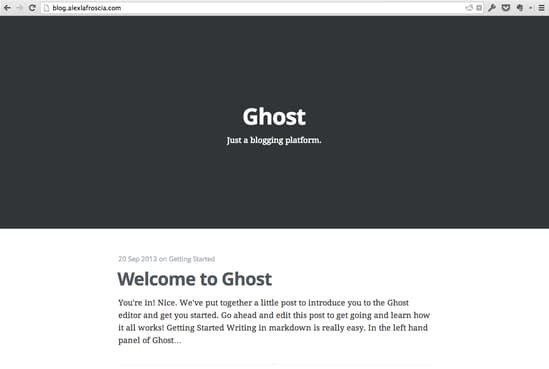
Start up the server again (use the code from the end of Step 2) and visit your domain. If you see Ghost, you’re good to go!
Step 4: Configure Upstart
The last step is to make an Upstart task that will handle Ghost and make sure that, should your server get turned off for some reason, Ghost will get kicked back on. Start by making a new Upstart configuration file by doing the following:
cd /etc/init
nano ghost.conf
And paste in the following configuration:
# ghost

# description "An Upstart task to make sure that my Ghost server is always running"
# author "Your Name Here"

start on startup

script
    cd /root/ghost
    npm start
end script
This should ensure that Ghost gets started whenever your server does, and allow you to easily control Ghost using service ghost start, service ghost stop, and service ghost restart.
Thanks for learning with the DigitalOcean Community. Check out our offerings for compute, storage, networking, and managed databases.
About the author

Still looking for an answer?
 This work is licensed under a Creative Commons Attribution-NonCommercial- ShareAlike 4.0 International License.
Become a contributor for community
Get paid to write technical tutorials and select a tech-focused charity to receive a matching donation.

DigitalOcean Documentation
Full documentation for every DigitalOcean product.

Resources for startups and AI-native businesses
The Wave has everything you need to know about building a business, from raising funding to marketing your product.
The developer cloud
Scale up as you grow — whether you're running one virtual machine or ten thousand.

Start building today
From GPU-powered inference and Kubernetes to managed databases and storage, get everything you need to build, scale, and deploy intelligent applications.



