
Warning
This guide is targeted at Chef 11. The Chef 12 platform introduces some significant configuration differences. You can find a guide on how to set up a Chef 12 server, workstation, and node here.
Introduction
As your organizational structure grows and the separate components necessary to manage your environment expand, administering each server and service can become unmanageable.
Configuration management solutions are designed to simplify the management of systems and infrastructure. The goal of configuration management tools are to allow you to manage your infrastructure as a code base. Chef is a configuration management solution that allows you to manage large numbers of servers easily.
In a previous guide, we discussed the general structure of the Chef components and the way the system operates on a conceptual level. We went over some key terminology and the relationship between many different components.
In this guide, we will work to install a small Chef 11 setup. This will be one Chef server used to store configuration data and administer access rights. This will serve as a hub for our other machines.
We will also install a workstation that will allow us to interact with our server and build our configuration policies. This is where we will do the work to manage our infrastructure environment.
Finally, we will bootstrap a node, which will represent one of the servers in our organization that will be managed through Chef. We will do this using the server and workstation that we configured.
All three of these machines will be using Ubuntu 12.04 x86_64 VPS instances for simplicity’s sake. We will be targeting the Chef 11 release as it is stable and well tested.
Server Installation
The first component that we need to get online is the Chef server. Because this is central to the communication of our other components, it needs to be available for our other machines to complete their setup.
Before doing this, it is important to set up a domain name for your Chef server to resolve requests correctly. You can see our guide on getting a domain name set up with DigitalOcean here.
If you do not have a domain name, you will need to edit the /etc/hosts file on each of the VPS instances that you will be using, so that they can all resolve the Chef server by name. If you do have a domain name, this should only be necessary on the VPS you will be using as the Chef server. You can do this by typing this on the VPS you will use as the Chef server:
<pre> sudo nano /etc/hosts </pre>
Inside, add the IP address of this computer and then the name you would like to use to connect to the server. You can then add a short name after that. Something like this:
<pre> <span class=“highlight”>111.222.333.444 chef.domain.com chef</span> </pre>
Change the 111.222.333.444 to your Chef server’s IP address and change the other two values to whatever you’d like to use to refer to your server as. Add this line to point to your Chef server to this file on each of the machines you plan to use if you are not using a domain name.
You can check that this is setup correctly by typing:
<pre> hostname -f </pre>
This should give you the name that is used to reach this server.
You can get the chef server package by visiting this page in your web browser.
Click on the “Chef Server” tab and then select the menus that match your operating system:
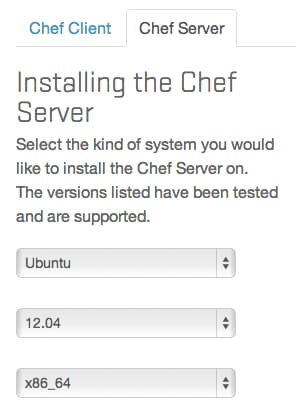
Select the most recent version of the Chef 11 server available to you on the right-hand side:
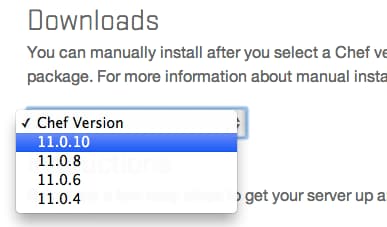
You will be presented with a link to a deb file. Right-click on this and select the option that is similar to “copy link location”.
In the VPS instance that you will be using as the server, change to your user’s home directory and use the wget utility to download the deb. At the time of this writing, the most recent link is this:
cd ~
wget https://opscode-omnibus-packages.s3.amazonaws.com/ubuntu/12.04/x86_64/chef-server_11.0.10-1.ubuntu.12.04_amd64.deb
This will download the installation package that you can then install like this:
sudo dpkg -i chef-server*
This will install the server component on this machine.
It prints to the screen afterwards that you should run this next command to actually configure the service around your specific machine. This will configure everything automatically:
sudo chef-server-ctl reconfigure
Once this step is complete, the server should be up and running. You can access the web interface immediately by typing https:// followed by your server’s domain name or IP address.
<pre> https://<span class=“highlight”>server_domain_or_IP</span> </pre>
Because the SSL certificates were signed by an authority that your browser does not recognize by default, you will see a warning message appear:
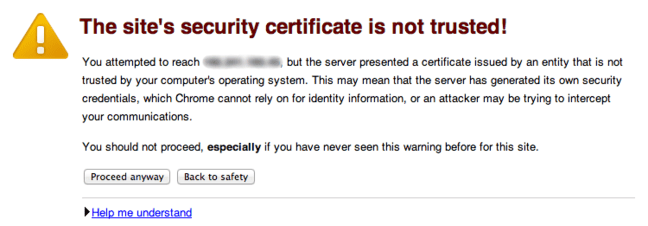
Click the “Proceed anyway” button to bypass this screen and access the login screen. It will look something like this:
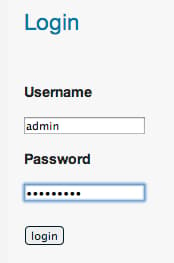
The default login credentials are as follows:
<pre> Default Username: <span class=“highlight”>admin</span> Default Password: <span class=“highlight”>p@ssw0rd1</span> </pre>
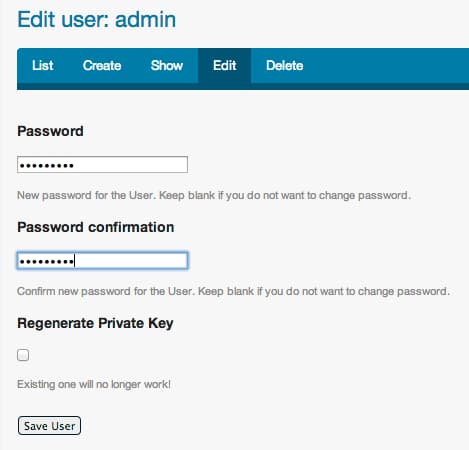
When you log in for the first time, you will be immediately prompted to change your password. Select a new password and then click on the “Save User” button on the bottom:
You have now configured the server to a point where we can leave it and begin our workstation configuration.
Workstation Installation
Our workstation computer is the VPS that we will use to create and edit the actual policies that dictate our infrastructure environments. This machine has a copy of the Chef repo that describes our machines and services and it uploads those to the Chef server for implementation.
We will start by simply installing git for version control:
sudo apt-get update
sudo apt-get install git
This actually has two purposes. The obvious use is that we will be keeping our configuration under version control to track changes. The second purpose is to temporarily cache our password with sudo so that the following command works.
We will now download and run the client installation script from the Chef website. Type this command to complete all of these steps:
curl -L https://www.opscode.com/chef/install.sh | sudo bash
Our Chef workstation component is now installed. However it is very far from being configured.
The next step is to acquire the “chef-repo” directory structure for a properly formatted Chef repository from GitHub. We can clone the structure into our home directory by typing:
cd ~
git clone https://github.com/opscode/chef-repo.git
This will create a directory called chef-repo in your home directory. This is where the entire configuration for your setup will be contained.
We will create a configuration directory for the Chef tools themselves within this directory:
mkdir -p ~/chef-repo/.chef
Within this directory, we will need to put some of the authentication files from our Chef server. Specifically, we need two private keys.
Generating and Copying Keys from the Server
Go back to your Chef server in your web browser:
<pre> https://<span class=“highlight”>server_domain_or_IP</span> </pre>
Log in using the admin user’s credentials that you changed before.
Click on the “Clients” tab in the top navigation bar. You will see two two clients called chef-validator and chef-webui:
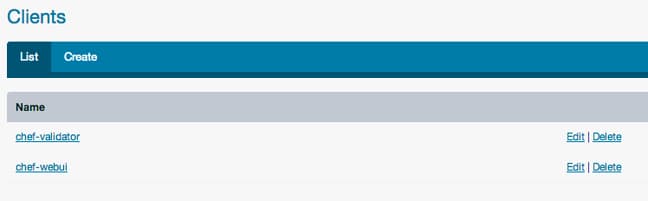
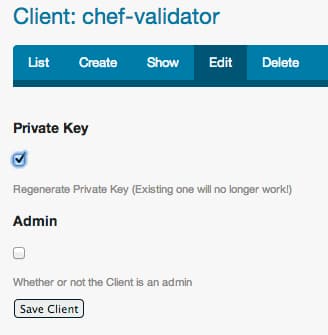
Click on the “Edit” button associated with the chef-validator client. Regenerate the private key by selecting that box and clicking “Save Client”:
You will be taken a screen with the newly generated values for the key file.
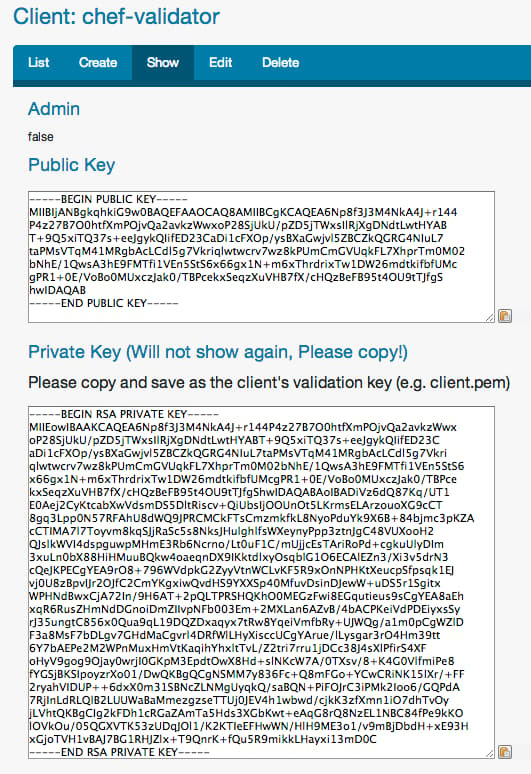
Note: This key will only be available once, so don’t click out of this page! If you do, you will need to regenerate the key again.
Copy the value of the private key field (the one at the bottom).
On your workstation machine, change to the Chef configuration directory we created in the repo:
cd ~/chef-repo/.chef
Open a new file for the validator key we just created:
nano chef-validator.pem
In this file, paste the contents of the key you copied from the server’s web interface (some lines have been removed for brevity here):
-----BEGIN RSA PRIVATE KEY-----
MIIEowIBAAKCAQEA6Np8f3J3M4NkA4J+r144P4z27B7O0htfXmPOjvQa2avkzWwx
oP28SjUkU/pZD5jTWxsIlRjXgDNdtLwtHYABT+9Q5xiTQ37s+eeJgykQIifED23C
aDi1cFXOp/ysBXaGwjvl5ZBCZkQGRG4NIuL7taPMsVTqM41MRgbAcLCdl5g7Vkri
. . .
. . .
xGjoTVH1vBAJ7BG1RHJZlx+T9QnrK+fQu5R9mikkLHayxi13mD0C
-----END RSA PRIVATE KEY-----
Ensure that there are not extra blank lines above or below the key. Save and close the file.
We will follow the same procedure to regenerate and save the admin user’s key file. This time, the key is for a user, so click on the “Users” tab on the top.
Again, click on the “Edit” button associated with the admin user, check the “Regenerate Private Key” box and click the “Save User” button:
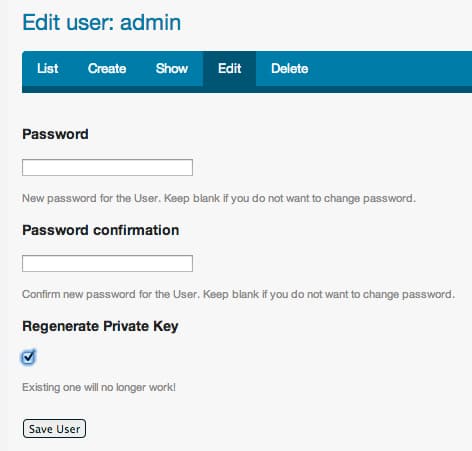
Copy the Private key value on the next screen. Once again, this will not be shown again, so copy it correctly the first time.
Back on your workstation computer, you will need to create another file for the admin user in the same directory:
nano admin.pem
Paste the contents of the key you copied from the server’s interface (again, this is shortened):
-----BEGIN RSA PRIVATE KEY-----
MIIEpAIBAAKCAQEA/apu0+F5bkVtX6qGYcfoA6sIW/aLFUEc3Bw7ltb50GoZnUPj
0Ms1N1Rv/pdVZXeBa8KsqICAhAzvwSr0H9j+AoURidbkLv4urVC9VS4dZyIRfwvq
PGvAKop9bbY2WJMs23SiEkurEDyfKaqXKW687taJ9AKbH2yVx0ArPI2RwS3Sze3g
. . .
. . .
VTkNpg3lLRSGbQkvRUP6Kt20erS2bfETTtH6ok/zW4db8B/vnBlcZg==
-----END RSA PRIVATE KEY-----
Verify that there are no extra lines above or below the pasted key lines. Save and close the file.
Configure the Knife Command
We now have to configure the knife command. This command is the central way of communicating with our server and the nodes that we will be configuring. We need to tell it how to authenticate and then generate a user to access the Chef server.
Luckily, we’ve been laying the groundwork for this step by acquiring the appropriate credential files. We can start the configuration by typing:
knife configure --initial
This will ask you a series of questions. We will go through them one by one:
<pre> WARNING: No knife configuration file found Where should I put the config file? [/home/<span class=“highlight”>your_user</span>/.chef/knife.rb] </pre>
The values in the brackets ([]) are the default values that knife will use if we do not select a value.
We want to place our knife configuration file in the hidden directory we have been using:
<pre> /home/<span class=“highlight”>your_user</span>/chef-repo/.chef/knife.rb </pre>
In the next question, type in the domain name or IP address you use to access the Chef server. This should begin with https:// and end with :443:
<pre> https://<span class=“highlight”>server_domain_or_IP</span>:443 </pre>
You will be asked for a name for the new user you will be creating. Choose something descriptive:
<pre> Please enter a name for the new user: [root] <span class=“highlight”>station1</span> </pre>
It will then ask you for the admin name. This you can just press enter on to accept the default value (we didn’t change the admin name).
It will then ask you for the location of the existing administrators key. This should be:
<pre> /home/<span class=“highlight”>your_user</span>/chef-repo/.chef/admin.pem </pre>
It will ask a similar set of questions about the validator. We haven’t changed the validator’s name either, so we can keep that as chef-validator. Press enter to accept this value.
It will then ask you for the location of the validation key. It should be something like this:
<pre> /home/<span class=“highlight”>your_user</span>/chef-repo/.chef/chef-validator.pem </pre>
Next, it will ask for the path to the repository. This is the chef-repo folder we have been operating in:
<pre> /home/<span class=“highlight”>your_user</span>/chef-repo </pre>
Finally, it will ask you to select a password for your new user. Select anything you would like.
This should complete our knife configuration. If we look in our chef-repo/.chef directory, we should see a knife configuration file and the credentials of our new user:
ls ~/chef-repo/.chef
admin.pem chef-validator.pem knife.rb station1.pem
Cleaning up and Testing the Workstation
Our configuration for our workstation is almost complete. We need to do a few things to clean up and verify that our connections work.
First, we should get our Chef repository under version control. Because Chef configuration operates as source code, we can handle it in the same way as we would with the files for any program.
First, we need to initialize our git name and email. Type:
<pre> git config --global user.email “<span class=“highlight”>your_email@domain.com</span>” git config --global user.name “<span class=“highlight”>Your Name</span>” </pre>
Since our “chef-repo” directory structure was pulled straight from GitHub, it is under git version control already.
However, we do not want to include the “chef-repo/.chef” directory in this version control. This contains our private keys and the knife configuration file. They do not have anything to do with our infrastructure we want to design.
Add this directory to the ignore list by opening the .gitignore file:
nano ~/chef-repo/.gitignore
At the bottom of the file, type .chef to include the entire directory:
<pre> .rake_test_cache
Ignore Chef key files and secrets
.chef/*.pem .chef/encrypted_data_bag_secret <span class=“highlight”>.chef</span> </pre>
Save and close the file.
Now, we can commit our current state (which probably won’t have any changes beside the .gitignore file we just modified) by typing:
git add .
git commit -m 'Finish configuring station1'
We also want to make sure that our user uses the version of Ruby packaged with our Chef installation. Otherwise, calls made by Chef could be interpreted by the system’s Ruby installation, which may be incompatible with the rest of our tools.
We can just modify our path by adding a line to the bottom of our .bash_profile file.
Type this in to add the line:
echo 'export PATH="/opt/chef/embedded/bin:$PATH"' >> ~/.bash_profile
Now, we can implement these changes into our current environment by typing:
source ~/.bash_profile
We can test whether we can connect successfully with the Chef server by requesting some information from the server using the knife command.
This will return a list of all of our users:
knife user list
admin
station1
If this is successful, then our workstation can successfully communicate with our server.
Bootstrapping a Client Node
Now that we have the Chef server and a workstation online, we can try to bootstrap a Chef client on a sample node. We will use another Ubuntu instance.
The bootstrapping process involves setting up Chef client on a node. Chef client is a piece of software that communicates with the server in order to receive directions for its own configuration. The client then brings the node it is installed on in-line with the policy given to it by the server.
This process will simply configure our new VPS instance to be under the umbrella of our Chef management system. We can then configure it however we would like by creating policies on our workstation and uploading them to our server.
To complete this process, we only need to know three pieces of information about the VPS we want to install the client software on:
- IP address or domain name
- Username (accessible through SSH and with sudo privileges)
- Password
With these pieces of information, we can install the appropriate packages by using our knife tool on our workstation.
You want to type a command that looks like this:
<pre> knife bootstrap <span class=“highlight”>node_domain_or_IP</span> -x <span class=“highlight”>username</span> -P <span class=“highlight”>password</span> -N <span class=“highlight”>name_for_node</span> --sudo </pre>
Let’s break this down a bit. The domain name/IP address tells knife which server to connect to. The username and password provide the login credentials.
If the user you are using is not root, then the --sudo option is necessary in order for the bootstrapping process to successfully install software on the remote computer. It will prompt you for the password once you log in to use the sudo command.
The name for the node is a name that you select that is used internally by Chef. This is how you will refer to this machine when crafting policies and using knife.
After the command is run, the client software will be installed on the remote node. It will be configured to communicate with the Chef server to receive instructions.
We can query our list of clients by typing:
knife client list
chef-validator
chef-webui
client1
We can see the two clients that are configured by default during the Chef server installation (chef-validator and chef-webui), as well as the client we just created.
You can just as easily set up other nodes to bring them under configuration control of your Chef system.
Conclusion
You should now have a Chef server, a separate workstation to create your configurations, and an example node.
We have not done any actual configuration of the node through Chef at this point, but we are set up to begin this process. In future tutorials, we will discuss how to implement policies and create recipes and cookbooks to manage your nodes.
<div class=“author”>By Justin Ellingwood</div>
Thanks for learning with the DigitalOcean Community. Check out our offerings for compute, storage, networking, and managed databases.
Tutorial Series: Getting Started Managing Your Infrastructure Using Chef
Chef is a powerful configuration management system that can be used to programmatically control your infrastructure environment. Leveraging the Chef system allows you to easily recreate your environments in a predictable manner by automating the entire system configuration. In this series, we will introduce you to Chef concepts and demonstrate how to install and utilize the its powerful features to manage your servers.
About the author

Former Senior Technical Writer at DigitalOcean, specializing in DevOps topics across multiple Linux distributions, including Ubuntu 18.04, 20.04, 22.04, as well as Debian 10 and 11.
Still looking for an answer?
 This work is licensed under a Creative Commons Attribution-NonCommercial- ShareAlike 4.0 International License.
Become a contributor for community
Get paid to write technical tutorials and select a tech-focused charity to receive a matching donation.

DigitalOcean Documentation
Full documentation for every DigitalOcean product.

Resources for startups and AI-native businesses
The Wave has everything you need to know about building a business, from raising funding to marketing your product.
The developer cloud
Scale up as you grow — whether you're running one virtual machine or ten thousand.

Start building today
From GPU-powered inference and Kubernetes to managed databases and storage, get everything you need to build, scale, and deploy intelligent applications.



