Introducing CPU-based Autoscaling for DigitalOcean App Platform


By Bikram Gupta and mfranco
- Published:
- 3 min read
We are thrilled to announce the availability of CPU-based autoscaling for dedicated instances on the DigitalOcean App Platform, enhancing our managed platform-as-a-service solution with automatic horizontal scaling capabilities. This new feature allows developers to build applications that can efficiently handle varying loads without manual intervention, optimizing both performance and cost.
DigitalOcean App Platform is loved by developers and startups for its simplicity and hands-free experience. It is a fully managed platform-as-a-service (PAAS) solution that allows users to effortlessly deploy their applications by simply providing their code (via a git repository) or a pre-built container image. App Platform takes care of the entire application lifecycle, from building and deploying to monitoring and scaling, removing the complexity of managing the underlying infrastructure.
In the past, customers had to manually scale their app or write their own scripts for automating the scaling. This made managing dynamic apps a difficult experience on App Platform.
App Platform now offers CPU-based autoscaling, a powerful feature that allows you to automatically scale your application components horizontally based on CPU utilization metrics. This capability helps ensure that your applications can seamlessly handle fluctuating demand while optimizing resource usage and minimizing costs. You can configure autoscaling using either the user interface or via appspec.
CPU-based autoscaling works as follows:
-
Metric collection: App Platform continuously collects CPU usage metrics from the containers running your application components.
-
Threshold monitoring: The autoscaling system compares the average CPU utilization across all containers for a given component against the configured CPU threshold.
-
Automatic scaling: When the average CPU usage exceeds the configured threshold, App Platform automatically scales up the component by cloning the current deployment and adding more container instances. Conversely, if the CPU usage falls below the threshold, the system scales down by removing excess instances. Autoscaling range is between configured minimum and maximum instance count.
Configuring CPU-based Autoscaling
Configuring CPU-based autoscaling is straightforward. It is supported for any app platform component with dedicated instances. You can either use the user interface or appspec to configure the minimum and maximum instance count and CPU threshold.
The App Platform console provides a user-friendly interface to configure autoscaling settings for any component with dedicated instances, as follows.
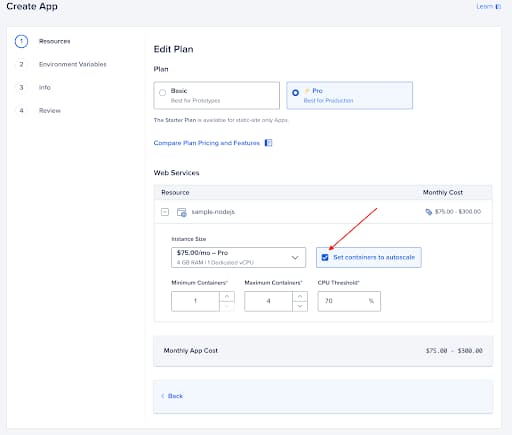
You can also configure autoscaling parameters within your appspec (via Create a New App or Update an App). In the example below, the my-service component will automatically scale between 2 and 10 instances, based on the average CPU utilization across all instances. If the average CPU usage exceeds 80%, the system will add more instances, and if it falls below 80%, instances will be removed.
alerts:
- rule: DEPLOYMENT_FAILED
- rule: DOMAIN_FAILED
ingress
  rules:
  - component:
      name: sample-nodejs
    match:
      path:
        prefix: /
name: plankton-app-2
region: nyc
services:
- autoscaling:
    max_instance_count: 10
    min_instance_count: 2
    metrics:
      cpu:
        percent: 80
  environment_slug: node-js
  github:
    branch: main
    deploy_on_push: true
    repo: digitalocean/sample-nodejs
  http_port: 8080
  instance_size_slug: professional-xs
  name: sample-nodejs
  run_command: yarn start
  source_dir: /
Get started with autoscaling today
For more information on configuring autoscaling, please refer to the product documentation.
We can’t wait to see how you leverage this new feature to build and scale your applications more efficiently. If you have any questions or feedback, please don’t hesitate to reach out to our support team.
Happy scaling!
About the author(s)


Related Articles

Building a computer that can pause and resume in milliseconds: Inside the MicroVM architecture behind Managed Agents
Braden Bassingthwaite
- October 15, 2026
- 20 min read

DigitalOcean Inference Router Enhancements: Performance Tuned Routing, No Rules to Write
DigitalOcean
- October 13, 2026
- 4 min read
Introducing DigitalOcean Agent Data Services: The Data Foundation for Agents
- October 12, 2026
- 5 min read