Technical Deep Dive: How DigitalOcean and AMD Delivered a 2x Production Inference Performance Increase for Character.ai


By Piyush Srivastava and Karnik Modi
- Published:
- 13 min read
Background: How Character.ai worked with DigitalOcean and AMD to optimize performance
Character.ai, a leading AI entertainment platform with about 20 million worldwide users, wanted to optimize GPU performance and achieve lower inference costs for its application, which requires low-latency performance at large scale. They approached DigitalOcean and AMD in order to achieve this goal. Working closely together, the Character.ai, AMD, and DigitalOcean teams optimized AMD Instinct™ MI300X and MI325X GPU platforms, resulting in a 2x production inference throughput. In optimized configurations, DigitalOcean delivered high request density per node while maintaining exceptional p90 responsiveness for initial token and sustained token generation throughput, outperforming prior deployments on generic, non-optimized GPU infrastructure.
These gains were achieved through platform-level optimizations, including clever parallelization strategies for large Mixture-of-Experts models, efficient FP8 execution paths, optimized kernels with AITER, topology-aware GPU allocation, and production-ready Kubernetes orchestration through DigitalOcean Kubernetes (DOKS). Together, these capabilities allowed Character.ai to scale inference predictably without increasing operational burden. In this post, we will explore the specific orchestration and tuning strategies that made these gains possible.
Technical deep dive overview
Character.ai leverages multiple models like Qwen, Mistral and more to power their applications. This document is focused on how we optimized the Qwen3-235B Instruct FP8 model on a cluster of DigitalOcean featuring AMD Instinct GPUs. This workload was migrated from a generic, non-optimized setup on other providers to AMD Instinct™ MI325X platform on DigitalOcean, and following the outlined optimizations we were able to achieve up to a 2x improvement in request throughput (QPS) under strict latency and concurrency constraints. The Character.ai team has a demanding workload, but with deep collaboration with the customer and AMD, we were able to achieve an outcome that exceeded Character.ai’s expectations and resulted in a multi-year, eight-figure annual agreement with DigitalOcean for GPU infrastructure.
The objective that we started with was to run the Qwen3-235B model to optimize a 5600 / 140 (ISL / OSL) workload on AMD Instinct™ GPUs. The primary goal was to maximize request throughput (QPS) per MI325X 8x GPU server while keeping the p90 first token latency (TTFT) and time per output token (TPOT) under a defined upper bound target. Once all the optimizations were done, we landed on ~2x QPS per 8x MI325X server compared to a generic setup on other providers.
We will discuss the optimizations in the following section, however, before we get deep into the technical weeds, it is worth defining a few terms used extensively in the sections below.
Distributed Serving
This technique involves multiple replicas on a single node and across multiple nodes in the cluster and routes incoming requests to independent replicas. There is no sharing of weights or KV cache across the replicas. Routing to replicas in distributed inference systems is usually based on several heuristics - load, prefix cache awareness and so on. At the cluster level, implementations like Character.ai have a concept of persistent user session to ensure the consistency of the following requests from the same user, to maximize KV cache hit rate.
Tensor Parallelism (TP)
Tensor Parallelism horizontally slices the model layers or tensors across several GPUs. Every GPU works on the same layers at the same time, each computing a fraction of the layer’s output. This technique is useful to run models which don’t fit in a single GPU memory, however, requires GPUs participating in the TP group to be connected over a high speed link, therefore, this technique is primarily designed for data center grade GPUs.
Expert Parallelism (EP)
Expert Parallelism (EP) is used for Mixture of Experts (MoE) models to distribute experts across multiple GPUs rather than duplicating them. Tokens are routed to specific GPUs holding the relevant experts. MoE architectures are much more memory efficient with sparse activation techniques.
AITER
AITER (AI Tensor Engine for ROCm) GitHub repository is AMD’s centralized library of high-performance AI operators designed to accelerate machine learning workloads on AMD Instinct GPUs. It provides a unified platform where developers can access and integrate optimized kernels—built on technologies like Triton, Composable Kernel (CK), and Assembly—into frameworks like PyTorch and JAX to maximize hardware efficiency.
Technical optimizations
DP1 / TP8 / EP8 with AITER
Character.ai runs models using vLLM. Since this was the first time they were using AMD Instinct GPUs, it was critical to ensure that they would be able to migrate their software tooling to be compatible with AMD Instinct GPUs without significant effort. AMD has contributed extensive ROCm support to upstream vLLM with almost full compatibility to support porting of CUDA applications to ROCm for generic off-the-shelf open source models. In our experience running the Qwen3 model using a vLLM image with ROCm support, there were some initial hiccups that we ran into, like memory access faults during model loading, compatibility issues between TP, EP and AITER. Through close technical collaboration and targeted fixes upstream, these issues were resolved, resulting in a stable and performant vLLM configuration for DP1 / TP8 / EP8 with AITER.
vLLM recipe for DP1 / TP8 / EP8 with AITER
VLLM_USE_V1=1 SAFETENSORS_FAST_GPU=1 \
VLLM_ROCM_USE_AITER=1 VLLM_ROCM_USE_AITER_MOE=1 \
VLLM_USE_TRITON_FLASH_ATTN=0 \
vllm serve Qwen/Qwen3-235B-A22B-Instruct-2507-FP8 \
--tensor-parallel-size 8 \
--enable-expert-parallel \
--kv-cache-dtype fp8 \
--quantization fp8 \
--distributed-executor-backend mp \
--compilation-config '{"full_cuda_graph":false, "max_capture_size": 32768}' \
--trust-remote-code \
--disable-log-requests \
--enable-prefix-caching \
--max-model-len 32768 \
--max_num_batched_tokens 32768 \
--gpu-memory-utilization 0.90
A few key points to note in the above configuration: The --kv-cache-dtype flag is explicitly set to fp8, even though the model itself is FP8. This is important because KV cache and model weights are managed separately in vLLM, so even if the model weights are in FP8, the KV cache defaults to internal model precision, which in this case is BF16. Using FP8 for KV cache explicitly has some benefits, including lower VRAM usage (~50% reduction), better throughput due to reduced memory bandwidth pressure, and more capacity for handling a higher number of concurrent users.
Moreover, AMD Instinct GPUs like MI325X have good native support for FP8 (peak FP8 TFLOPs of 2614.9 or 5229.8 with sparsity) at the hardware level. Using FP8 for both weights and cache allows the hardware to stay in the “fast path” rather than having to cast between the data types (for example BF16 cache to FP8 over and over). There is also the --quantization fp8 flag which feels a bit redundant as the model weights are already FP8. However–this one is a bit counter intuitive–vLLM uses this flag as a “factory” (think factory pattern from classic object oriented languages) to determine which linear layer implementation is instantiated when the model is loaded. For ROCm/AITER setup, this config lets vLLM identify the FP8Config and use specialized quantized linear layers to call the FP8 AITER MoE kernels.
Qwen3-235B is a Mixture of Experts (MoE) model with 128 experts (you can validate this with num_experts field in the model’s config.json). With vLLM, it is important to enable expert parallel (--enable-expert-parallel) so that vLLM does not shard the experts across all 8 GPUs and instead distributes the full experts across the GPUs. With 8 GPUs, each GPU then hosts 128 / 8 = 16 full experts. With each GPU holding full experts, the MoE router sends specific tokens to specific GPUs that hold the expert resulting in significant reduction of the amount of data that needs to move across the GPUs.
We tweaked the CUDA graph compilation settings a bit as well ({“full_cuda_graph”: false, "max_capture_size": 32768}). In our benchmarks for model performance and loading time, we found this setting was the most optimal. Moreover, we saw some crashes on ROCm vLLM when full CUDA graph compilation was enabled (most likely some interoperability issues of the ROCm stack with CUDA). For piecewise compilation (false), vLLM breaks the model’s execution into pieces (parts before and after the attention layers). It captures CUDA graphs for math heavy linear layers but runs Attention layers in eager mode. The full compilation attempts to capture the entire forward pass (including Attention) into a massive CUDA graph which can have an impact on 1) VRAM utilization, 2) Model startup time. CUDA compilation config also includes a “max_capture_size” setting that is used to tell vLLM the max size of sequences to capture a graph for. This setting is aligned with --max-model-length to ensure vLLM captures CUDA graphs for sequences upto max_model_length without falling back into eager mode that can affect performance.
There are some context related parameters here as well that are worth mentioning. Notice that we have capped the --max-model-len at 32768. The default native context length for this model is 256K and if we leave it at default, vLLM will try to reserve enough VRAM to handle at least one request at that maximum length. For the workload that we were trying to optimize, we knew we would not require that much. The average ISL+OSL for the specific workload is ~6000, so we could reduce this further to free up more VRAM. It’s also worth mentioning that --max_num_batched_tokens is also set to 32768 which matches --max_model_length. There are a few nuances to consider with this approach:
-
There will be no chunking for long prompts - this is great for optimizing TTFT as the GPU can run the entire forward pass for the full prompt without chunking, however it comes at the cost of massive compute spikes.
-
There will be higher peaks of VRAM usage for long prompts. This goes into the heart of vLLM scheduler, which has significantly advanced with the v1 backend through the chunked prefill feature. There is always a balance to strike with
–max_num_batched_tokens. Setting it high (32768) results in better TTFT, higher throughput for long prompts but carries a risk of large VRAM usage spikes while setting it low results in better, more predictable decode performance and lower memory spikes. For this workload, we found 32768 to be a sweet spot with FP8. -
Finally, we enabled prefix caching (
--enable-prefix-caching). This is especially useful for multi-turn chats that share a common prompt prefix and lets vLLM avoid computing the KV cache for already computed prefixes. This helps with improved latency, generation throughput, and also lowers compute spikes.
With the above DP1 / TP8 / EP8 optimized configuration with AITER, we were able to get a slightly better performance compared to Character.ai’s setup on other providers.
DP2 / EP4 / TP4 with AITER
The team brainstormed several innovative approaches to further enhance the QPS, including the utilization of two TP4 groups on a single 8-GPU server. Having previously encountered the TP4 configuration during the internal development phase, the decision was made to benchmark this setup extensively to evaluate its potential benefits. Given that the Qwen-235B FP8 model can be readily accommodated on 4 GPUs with sufficient remaining capacity for activation memory and Key-Value (KV) cache, the team’s initial hypothesis was that a DP2 / TP4 / EP4 configuration should enable a 2x increase in throughput. Here is the final vLLM recipe we went with -
vLLM recipe for DP2 / EP4 / TP4 with AITER
VLLM_USE_V1=1 SAFETENSORS_FAST_GPU=1
VLLM_ROCM_USE_AITER=1 VLLM_ROCM_USE_AITER_MOE=1
VLLM_USE_TRITON_FLASH_ATTN=0
vllm serve Qwen/Qwen3-235B-A22B-Instruct-2507-FP8 \

--tensor-parallel-size 4 \

--enable-expert-parallel \

--kv-cache-dtype fp8 \

--quantization fp8 \

--distributed-executor-backend mp \

--compilation-config '{"full_cuda_graph":false, "max_capture_size": 32768}' \

--trust-remote-code \

--disable-log-requests \

--enable-prefix-caching \

--max-model-len 32768 \

--max_num_batched_tokens 32768 \

--gpu-memory-utilization 0.90
There are a few considerations when moving from TP8 to TP4 -
VRAM squeeze
Transitioning from TP8 to TP4 consolidates the model weights from eight GPUs onto four. In a TP8 configuration, each GPU maintains a approximately 29 GB weight footprint; however, under TP4, this requirement doubles to ~58 GB per GPU. This increased memory pressure reduces the available overhead for the KV cache and activation memory, which directly constrains the maximum context length and batch size per GPU. Given the 256 GB HBM capacity of the MI325X, this reduction in available VRAM was manageable and did not present a significant bottleneck.
EP8 to EP4 shift
Consolidating experts from eight GPUs down to four increases expert density to 32 per GPU. This higher concentration raises the risk of hardware ‘hotspots,’ as specific prompts may simultaneously route requests to multiple experts co-located on the same physical GPU.
Hardware topology considerations
ROCm/k8s-device-plugin has a basic allocation policy for providing GPUs to a K8s pod when requested using the amd.com/gpu parameter in the k8s manifest. When requesting all 8 GPUs in a server, hardware considerations are still important - for example, it is highly recommended to disable NUMA balancing among other things. However, when requesting a smaller amount like amd.com/gpu:4 for TP4, we need to make sure we are getting the best possible subset of 4 GPUs for optimal performance. The k8s-device-plugin performs a series of calculations to provide the most optimal setup for TP4 configuration. During device initialization, it prepares a scoring matrix, gives lower weights (more optimal) for devices on the same NUMA node and connected via xGMI and higher weights to GPUs connected via PCIe or across different NUMA nodes. Subset with the smallest weight wins and is handed out to the k8s pod. On AMD MI325X platform, the xGMI (Infinity Fabric) is a full mesh. Every GPU has a dedicated 128 GB/s bidirectional link to every other GPU. So, any combination (consecutive or not) of 4 GPUs is equally optimal on TP4 from a GPU-to-GPU bandwidth standpoint. However, if the system is dual socket (which is almost always the case), there are bottlenecks worth watching out for - 1) If you choose GPUs spread across NUMA nodes, the vLLM process has to manage GPUs across different CPU sockets. Every time a CPU has to send a command to kick off a kernel on a GPU on a different socket, that signal has to cross the CPU-to-CPU Infinity Fabric link. This can potentially create TTFT degradation and cause jitters in decode performance, 2) CPU to GPU latency will be relatively higher over the PCIe link for GPU on a different socket which may degrade transfer of “long” tokenized prompts to GPU, thereby degrading TTFT and also affecting decode metrics such as TPOT and ITL. The diagram below illustrates an optimal hardware / software topology for DP2 / TP4 / EP4 setup on a single 8x server.
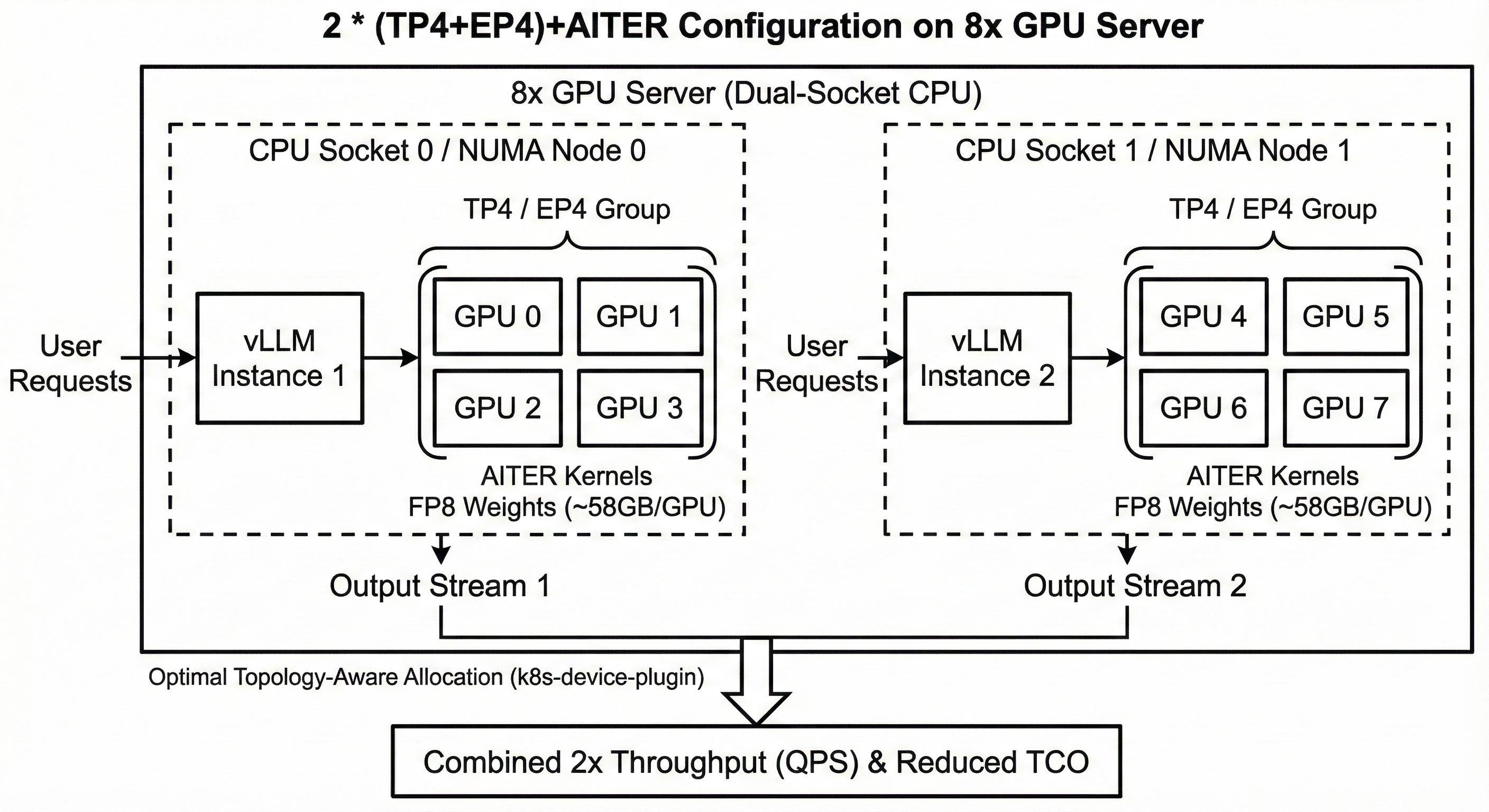
Essentially, this was N * (DP2 / TP4 / EP4) configuration where N is the number of 8x GPU servers in the cluster. There is a layer of routing infra fronting the N server cluster which is optimally able to load balance across the model pods.
Communication vs compute trade-off
With TP4, each GPU has to do fewer communication hops, however, each GPU has to do ~2x more heavy math compared to TP8 which can impact prefill and decode performance.
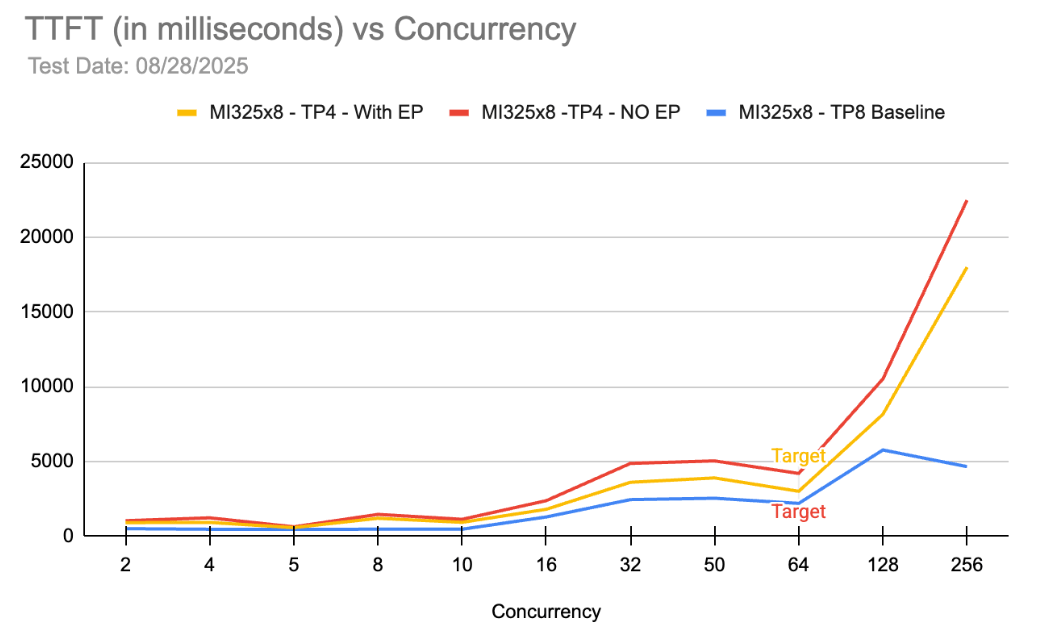
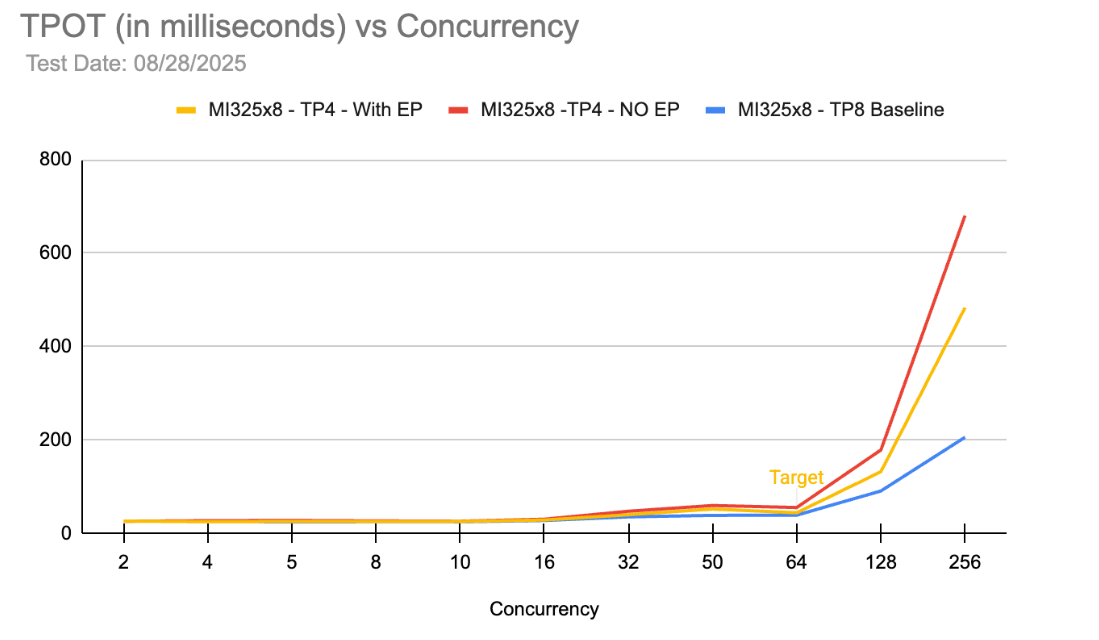
The charts above show a comparison between DP1 / TP8 / EP8 vs DP1 / TP4 / EP4 on MI325X. As expected, there is no scenario under which a single TP4 group is better than TP8 in terms of TTFT and TPOT. However, if we compare the QPS numbers at approximately 64 concurrency (which is the desired workload), we can compute that two TP4 groups i.e. DP2 / TP4 / EP4 provides ~2x QPS compared to DP1 / TP8 / EP8. Moreover, at 64 concurrency, we are still able to meet the p90 TTFT and TPOT requirements.
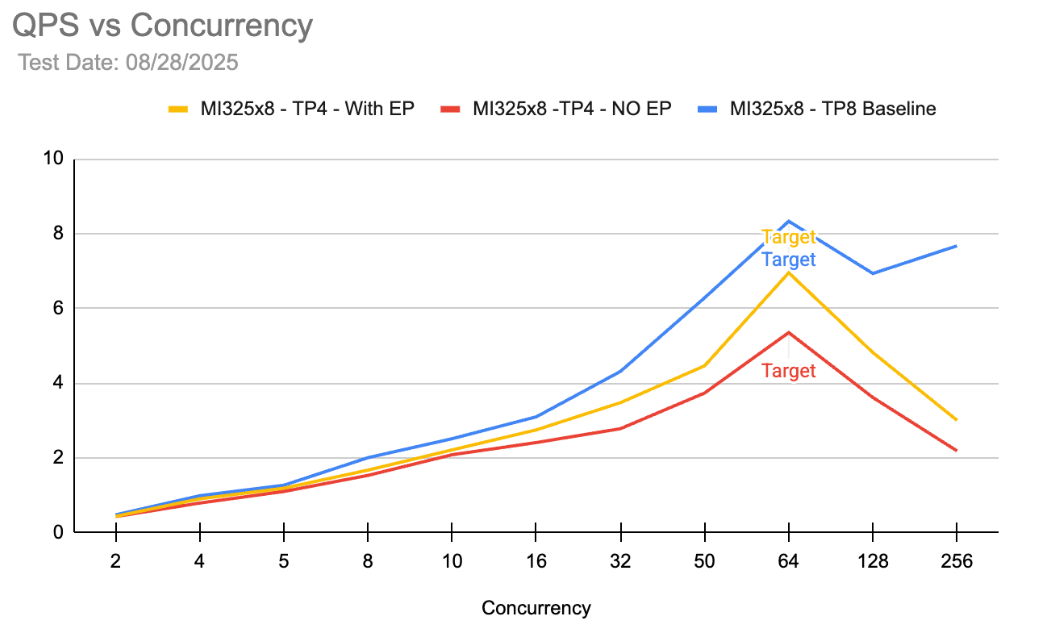
Under similar latency and concurrency conditions, DP2 / TP4 / EP4 setup is ~45% better on throughput compared to DP1 / TP8 / EP8 and ~91% better compared to generic setup on other providers. This directly brings down cost-per-token by a similar factor resulting in significant reduction in TCO. For Character.ai, this configuration was horizontally scaled across a number of 8x GPU servers as the required throughput was much higher than a single 8x server could handle.
Infrastructure setup
Managed Kubernetes
DigitalOcean Kubernetes (DOKS) is a fully managed Kubernetes product that eases Day-0, Day-1, and Day-2 operations of Kubernetes, which can be a significant challenge to manage if running on your own. DOKS is a feature-rich product used by many of our customers in production environments, and we’ve recently made significant advancements such as support for 1000 node clusters, Native VPC support, and more. As we were working on the Character.ai setup, we wanted to make sure that running GPU workloads on K8s was as easy as possible. Installing and managing GPU driver versions, K8s device plugins make it difficult to get started and present operational challenges on an ongoing basis. DOKS provides a ready to use GPU cluster as soon as it is provisioned: K8s worker nodes are Debian based virtualized GPU instances (GPU Droplets) and are baked with hardware compatible GPU drivers, K8s device plugin and AMD device metrics exporter for a smooth out of the box experience. This made Character.ai’s onboarding really simple as they were able to spin up LLM workloads and get started very quickly. Moreover, all of these packaged components are managed, so users do not have to worry about maintenance and version upgrades.
Cached Weights
Character.ai had been downloading the Qwen3 235B Instruct FP8 model from huggingface. This model is ~240 GB in size and downloading it every time for a new Pod can significantly contribute to the model loading time. DigitalOcean recently launched a NFS product which proved to be useful here. Rather than downloading the weights from the internet every time, the weights were cached on NFS and mounted by the Pods to pull in during vLLM start up. This helps in reducing model loading time on vLLM by 10-15%.
The New AI Systems Paradigm
Our analysis has distilled several foundational shifts required to move from experimental setups to production-grade AI infrastructure, and has demonstrated the importance of creating the optimal set up for inference at scale. Requirements include:
Multi-Dimensional Optimization Inference performance must balance the competing dimensions of cost, latency, throughput and concurrency. Strategic architectural choices can drive down cost-per-token while simultaneously enhancing overall performance.
Infrastructure Paradigms Deploying large scale models within a data center environment is a distinct discipline from traditional web services management of the past decade. It requires comprehensive “full-stack” re-evaluation of deployment strategies.
Hardware-Software Co-Design Performance is deeply coupled to low-level system architecture including host-to-GPU topology, GPU-to-GPU interconnects, memory bandwidth efficiency and FLOPs utilization . Achieving peak performance and efficiency requires precise alignment between these hardware constraints, model serving software stack, and specific model deployment topologies.
Granular Observability End-to-end telemetry is indispensable for identifying latent bottlenecks, mitigating errors and uncovering opportunities for cost and performance optimization.
As we continue to build the inference cloud at DigitalOcean, we’re excited to be partnering with industry heavyweights like AMD and Character.ai. As demonstrated here, with the combined power of AMD Instinct GPUs and DigitalOcean’s scalable platform and optimization expertise, we can achieve excellent performance improvements at scale. To learn how you can achieve similar results, talk to our team today.
Footnote: The performance results cited, including the 2x improvement in request throughput (QPS) and 91% increase compared to non-optimized setups, are based on internal testing conducted by DigitalOcean and AMD using the Qwen3-235B Instruct FP8 model. These results were achieved under specific conditions, including a 5600 / 140 (ISL / OSL) workload and p90 first token latency targets. Actual performance and throughput may vary significantly based on model choice, prompt complexity, hardware availability, and specific network conditions.
References to “generic, non-optimized GPU infrastructure” or “other providers” refer to standard cloud instances utilizing standard GPU configurations without the specific platform-level optimizations described in this post, such as topology-aware GPU allocation via DOKS, AITER-optimized kernels, and custom DP2 / TP4 / EP4 parallelization strategies.
The vLLM recipes and environment variables provided are intended for informational purposes and represent the optimal configuration found for Character.ai’s specific requirements. Use of these configurations may require managed GPU drivers and ROCm support available through DigitalOcean Kubernetes (DOKS). DigitalOcean does not guarantee identical results for third-party software deployments or open-source models not specifically tested herein.
About the author(s)

Principal Engineer, AI Infrastructure

Karnik leads Solutions Architecture for AI and GPU initiatives at DigitalOcean, driving technical strategy and execution for strategic customers and partners operating large-scale, production-grade workloads. He focuses on customer-first outcomes, cross-functional leadership, and delivering simple, powerful cloud platforms at scale.
Related Articles

The Inference Alpha: Maximizing Frontier Models on AMD
Balaji Varadarajan
- June 10, 2026
- 12 min read

The Inference Tax: How Prefix-Aware Routing Eliminates the Hidden Cost of LLMs at Scale
- June 1, 2026
- 13 min read
DigitalOcean Serverless Inference: A Deep Dive
- June 1, 2026
- 17 min read