
Hi, I am running a docker based Discourse droplet. I would like to create a redundant environment and I was thinking about load balancing. What eludes me is the process. I now have a production droplet that runs the website. Should I stop the droplet, make a backup and spin up a new one out of the backup? At that point, I assume I assign both the droplet at the load balancing. My question is, how are the droplets kept in sync ( database and codebase ). Do I need to manually sync them?
This textbox defaults to using Markdown to format your answer.
You can type !ref in this text area to quickly search our full set of tutorials, documentation & marketplace offerings and insert the link!

Thanks @bobbyiliev , I had the impression this was a little harder than just dropping the droplets in the loadbalancer. I was expecting a little more of automation :)

Hello,
Indeed spinning up a new Droplet from a backup sounds like a plan.
Regarding the database, I would recommend moving your Database to a separate Droplet or using DigitalOcean managed databases. That way your database would be external and your two Droplets would be connecting to the same database and you would not have to set up database replication. So it would be something like this:
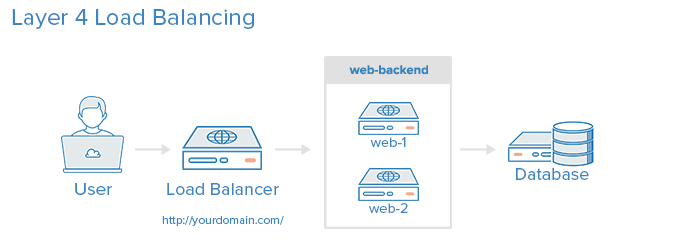
Regarding the storage sync, you could do one of the following:
- Lsyncd:
For similar setups, I’ve been using
lsyncdand it works pretty well, you can take a look at this tutorial here on how to do that:
One problem that I’ve had in the past is that if there are too many files to be synced, you might start hitting some Kernel limits which could cause unexpected behavior.
- NFS: Another thing you could do is to use NFS and mount a shared directory on your second Droplet:
https://www.digitalocean.com/community/tutorials/how-to-set-up-an-nfs-mount-on-ubuntu-18-04
Regards, Bobby

Become a contributor for community
Get paid to write technical tutorials and select a tech-focused charity to receive a matching donation.

DigitalOcean Documentation
Full documentation for every DigitalOcean product.

Resources for startups and AI-native businesses
The Wave has everything you need to know about building a business, from raising funding to marketing your product.
The developer cloud
Scale up as you grow — whether you're running one virtual machine or ten thousand.

Get started for free
Sign up and get $200 in credit for your first 60 days with DigitalOcean.*

*This promotional offer applies to new accounts only.