
By clevertrove
I have a droplet that was created when ubuntu 12.04.4 was the most current. Unfortunately, 12.04.4 is no longer a supported HWE stack. I updated:
apt-get -y update && apt-get -y upgrade && apt-get dist-upgrade && shutdown -r now
After reboot, it says
Your current Hardware Enablement Stack (HWE) is no longer supported
since 2014-08-07.  Security updates for critical parts (kernel
and graphics stack) of your system are no longer available.

For more information, please see:
http://wiki.ubuntu.com/1204_HWE_EOL

To upgrade to a supported (or longer supported) configuration:

* Upgrade from Ubuntu 12.04 LTS to Ubuntu 14.04 LTS by running:
sudo do-release-upgrade

OR

* Install a newer HWE version by running:
sudo apt-get install linux-generic-lts-trusty linux-image-generic-lts-trusty
So I ran the install
apt-get install linux-generic-lts-trusty linux-image-generic-lts-trusty
But after reboot, it’s still running kernel 3.8.0-29-generic
# uname -a
Linux hostname 3.8.0-29-generic #42~precise1-Ubuntu SMP Wed Aug 14 16:19:23 UTC 2013 x86_64 x86_64 x86_64 GNU/Linux
I looked into grub … Read through /etc/default/grub and /boot/grub/grub.cfg and confirmed everything there looks like it makes sense. Default entry is 0, and first entry in cfg file is 3.13.0-39. Ran the following anyway, and confirmed the files still look like they make sense…
grub-set-default "Ubuntu, with Linux 3.8.0-29-generic"
grub-reboot 'Ubuntu, with Linux 3.13.0-39-generic'
update-grub
shutdown -r now
Still it comes up with 3.8.0-29-generic. I watch the console, and it doesn’t even try 3.13.0-39. Which makes me think, maybe digitalocean isn’t using grub or something?
This textbox defaults to using Markdown to format your answer.
You can type !ref in this text area to quickly search our full set of tutorials, documentation & marketplace offerings and insert the link!
These answers are provided by our Community. If you find them useful, show some love by clicking the heart. If you run into issues leave a comment, or add your own answer to help others.


Do to the nature of our virtualization technology, the kernel needs to be set in the Control Panel as well:
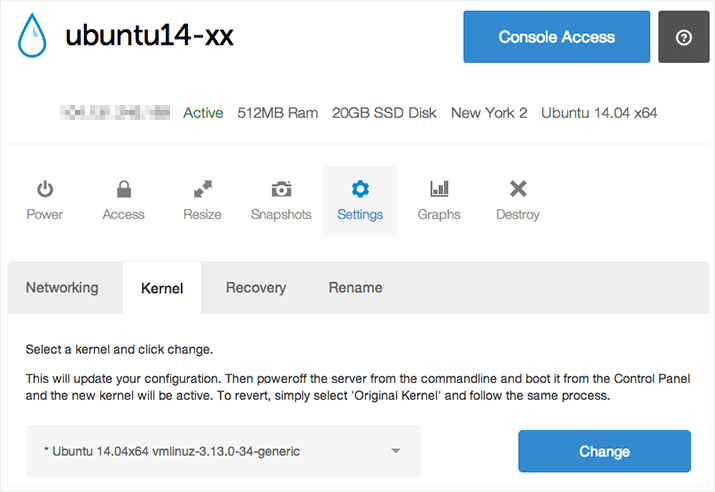
Check out this tutorial for all the details:

Become a contributor for community
Get paid to write technical tutorials and select a tech-focused charity to receive a matching donation.

DigitalOcean Documentation
Full documentation for every DigitalOcean product.

Resources for startups and AI-native businesses
The Wave has everything you need to know about building a business, from raising funding to marketing your product.
The developer cloud
Scale up as you grow — whether you're running one virtual machine or ten thousand.

Start building today
From GPU-powered inference and Kubernetes to managed databases and storage, get everything you need to build, scale, and deploy intelligent applications.
