DigitalOcean Load Balancers Now Support Proxy Protocol

By Tyler Crandall
- Published:
- 3 min read
DigitalOcean Load Balancers are a compelling, cost-efficient way to distribute traffic across backend servers, thanks to features such as automatic provisioning and renewal of SSL certificates, at a cost of just $12 per month (pricing as of July 1, 2022). Perhaps you’re already among the thousands of developers who rely on DigitalOcean Load Balancers every day.
But while load balancers are great, they introduce a change that may matter in certain use cases: instead of your backend servers seeing the original client requests, backend servers see requests as though they had originated from load balancers. This means that, by default, backend servers no longer receive client information such as IP address and port number. The loss of this information is a problem if, for example, you want to analyze traffic logs, or to adjust your application’s functionality based on GeoIP.
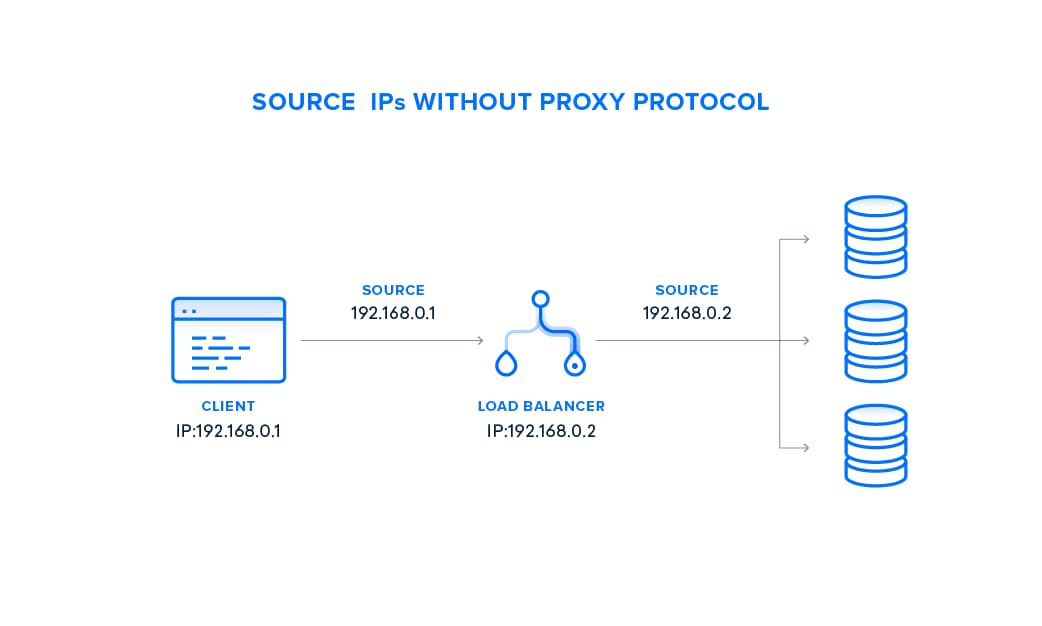
To address this issue, today we’re enhancing DigitalOcean Load Balancers to support Proxy Protocol.
What is Proxy Protocol?
Proxy Protocol is an industry standard to pass client connection information through a load balancer on to the destination server. DigitalOcean Load Balancers implement Proxy Protocol version 1, which simply prepends a human-readable header containing client information to the data sent to your Droplet.
Turning on Proxy Protocol inserts a string formatted like this at the top of the request transmitted by the Load Balancer:
PROXY_STRING + single space + INET_PROTOCOL + single space + CLIENT_IP +``single space + PROXY_IP + single space + CLIENT_PORT + single space + PROXY_PORT + “\r\n”
For example, a Proxy Protocol line for an IPv4 address would look like this:
PROXY TCP4 192.168.0.1 192.168.0.2 42300 443\r\n
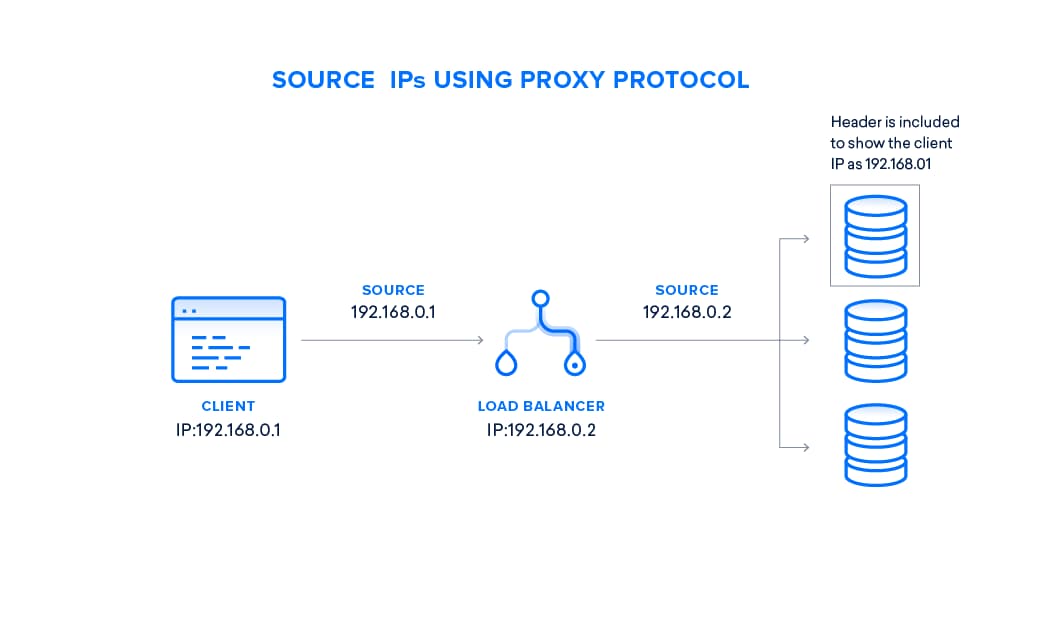
Turning on Proxy Protocol for Your Load Balancers
All DigitalOcean Load Balancers now have the ability to turn on Proxy Protocol, at no additional cost. When you create a new Load Balancer, or when managing an existing one, you can activate Proxy Protocol by checking a box in the “Advanced settings” section.

If you’re automating management of your infrastructure, you can also toggle the Proxy Protocol setting via our Load Balancer API.
Before turning on Proxy Protocol on your Load Balancers, make sure to configure your backend servers to accept Proxy Protocol. For example, here’s how to configure NGINX. If your backend servers are not configured for Proxy Protocol, the requests will fail.
Using DigitalOcean Kubernetes with Load Balancers and Proxy Protocol
DigitalOcean Kubernetes (DOKS) is our new service for running the de facto standard container orchestration platform atop of Droplets. DigitalOcean Kubernetes seamlessly integrates with DigitalOcean Load Balancers so that you can provision Load Balancers simply by declaring them in a cluster’s resource configuration file.
With today’s launch of Proxy Protocol, the [DigitalOcean cloud controller manager has been updated to allow for creating Load Balancers of this type. Now you can ensure that each pod in your Kubernetes cluster can retrieve the original client IP address.
DOKS clusters prior to version 1.11.9 need to contact support to have their master recycled prior to enabling proxy protocol. Clusters later than 1.11.9 have this functionality already enabled by default. Here’s an example of how an annotation in the service manifest can be used to enable Proxy Protocol support.
Get Started with DigitalOcean Load Balancers and Proxy Protocol Today
DigitalOcean Load Balancers with Proxy Protocol are available in all regions for just $12 per month. For more information about Load Balancers, please check out these community tutorials:
- An Introduction to DigitalOcean Load Balancers
- How to Use Let’s Encrypt with DigitalOcean Load Balancers
- Best Practices for Performance on DigitalOcean Load Balancers
Happy coding,
Tyler Crandall
Product Manager
About the author

Related Articles

Upcoming GPU Pricing Updates
- July 21, 2026
- 2 min read
Scale Faster with Managed Weaviate: Now in Public Preview on DigitalOcean
- July 9, 2026
- 4 min read

DigitalOcean Evaluations: Production Model and Router Testing for the Inference Stack
- July 1, 2026
- 3 min read