• Blog
  • Docs
  • Careers
  • Get Support
  • Contact Sales
DigitalOcean
  • Featured AI Products

    Compute

    Build, deploy, and scale cloud compute resources

    Containers and Images

    Safely store and manage containers and backups

    Managed Databases

    Fully managed resources running popular database engines

    Management and Dev Tools

    Control infrastructure and gather insights

    Networking

    Secure and control traffic to apps

    Security

    Help protect your account and resources with these security features

    Storage

    Store and access any amount of data reliably in the cloud

    Browse all products

  • AI/ML

    CMS

    Data and IoT

    Developer Tools

    Gaming and Media

    Hosting

    Security and Networking

    Startups and SMBs

    Web and App Platforms

    See all solutions

  • Community

    Documentation

    Developer Tools

    Get Involved

    Utilities and Help

  • Become a Partner

    Marketplace

  • Pricing
  • Log in
  • Sign up
  • Log in
  • Sign up

Company

  • About
  • Leadership
  • Blog
  • Careers
  • Customers
  • Partners
  • Referral Program
  • Affiliate Program
  • Press
  • Legal
  • Privacy Policy
  • Security
  • Investor Relations

Products

  • GPU Droplets
  • Bare Metal GPUs
  • Inference Engine
  • Data & Learning
  • Model Library
  • Droplets
  • Kubernetes
  • Functions
  • App Platform
  • Load Balancers
  • Managed Databases
  • Spaces
  • Block Storage
  • Network File Storage
  • API
  • Uptime
  • Cloud Security Posture Management (CSPM)
  • Identity and Access Management (IAM)
  • Cloudways
  • View all Products

Resources

  • Community Tutorials
  • Community Q&A
  • CSS-Tricks
  • Write for DOnations
  • Currents Research
  • DigitalOcean Startups
  • Wavemakers Program
  • Compass Council
  • Open Source
  • Newsletter Signup
  • Marketplace
  • Pricing
  • Pricing Calculator
  • Documentation
  • Release Notes
  • Code of Conduct
  • Shop Swag

Solutions

  • AI Training GPU
  • GPU Inference
  • VPS Hosting
  • Website Hosting
  • VPN
  • Docker Hosting
  • Node.js Hosting
  • Web Mobile Apps
  • WordPress Hosting
  • Virtual Machines
  • View all Solutions

Contact

  • Support
  • Sales
  • Report Abuse
  • System Status
  • Share your ideas

Company

  • About
  • Leadership
  • Blog
  • Careers
  • Customers
  • Partners
  • Referral Program
  • Affiliate Program
  • Press
  • Legal
  • Privacy Policy
  • Security
  • Investor Relations

Products

  • GPU Droplets
  • Bare Metal GPUs
  • Inference Engine
  • Data & Learning
  • Model Library
  • Droplets
  • Kubernetes
  • Functions
  • App Platform
  • Load Balancers
  • Managed Databases
  • Spaces
  • Block Storage
  • Network File Storage
  • API
  • Uptime
  • Cloud Security Posture Management (CSPM)
  • Identity and Access Management (IAM)
  • Cloudways
  • View all Products

Resources

  • Community Tutorials
  • Community Q&A
  • CSS-Tricks
  • Write for DOnations
  • Currents Research
  • DigitalOcean Startups
  • Wavemakers Program
  • Compass Council
  • Open Source
  • Newsletter Signup
  • Marketplace
  • Pricing
  • Pricing Calculator
  • Documentation
  • Release Notes
  • Code of Conduct
  • Shop Swag

Solutions

  • AI Training GPU
  • GPU Inference
  • VPS Hosting
  • Website Hosting
  • VPN
  • Docker Hosting
  • Node.js Hosting
  • Web Mobile Apps
  • WordPress Hosting
  • Virtual Machines
  • View all Solutions

Contact

  • Support
  • Sales
  • Report Abuse
  • System Status
  • Share your ideas
© 2026 DigitalOcean, LLC.Sitemap.
Trust & Security

Securing your DigitalOcean account

author

By DigitalOcean

  • Published: January 10, 2023
  • 3 min read
<- Back to blog home

Authored by Audrey Simonne and Jorge Gomez

Data breaches in the services we rely on can be scary. We know third party compromises (e.g. password manager compromise, CI/CD compromises, third-party API integration compromise, public bucket disclosure, etc.) happen regularly, and you may be concerned about the impact to your DigitalOcean account. Check out these 5 ways you can improve the security of your DigitalOcean account, in order of priority.

1. Enable multi-factor authentication

The most important step to improve the security of your DigitalOcean account is to enable multi-factor authentication. Multi-factor authentication prevents bad actors from logging into your account even if they successfully change the password, and you’ll be able to initiate the password reset process yourself.

While DigitalOcean supports time-based one-time passwords (TOTP), SMS, and backup codes as second factors, we recommend that you use TOTP codes, as it is the more secure secondary factor of the list. This article will show you how to enable multi-factor authentication for your account.

You can also take advantage of our OAuth-based login partnership with Google and GitHub to delegate authentication using those providers.

Note: There is no multi-factor authentication when using these partners, since they will manage authentication. We strongly recommend that you enable two-factor authentication on the Google or GitHub account you use to log in to DigitalOcean.

2. Change your DO account password

Prevent immediate access to your account by resetting your password. If you still have access to your account, reset your password in your account settings. If not, use our Forgot Password mechanism to reset your password. Should you have additional issues accessing your account, contact support to regain access to your account.

DigitalOcean personal access token should be treated in the same manner as passwords. Regenerate any DigitalOcean personal access token that you believe may have been leaked and ensure they have the minimum permissions needed.

3. Review your account security history and login activity

Bad actors won’t always make themselves known right away. Check your security history for any suspicious activity. Pay special attention to any creation of keys like SSH keys, API Tokens, and Spaces API Keys.

Remember to also check your account activity history to see if there has been any suspicious login activity. Pay close attention to IP addresses to see if they’re different from the IP addresses you normally log in from.

4. Review the members of your teams

Similar to creating unauthorized api tokens, a bad actor may seek to add themselves as a user to Teams you are an Owner for. Review your Teams and check that only the right people are on your account and they have the right role. You can review the members of your Team here. Be sure to check all your teams if you own more than one. Learn more about team membership management here.

5. Rotate API keys

Direct access to your account will not expose your existing API tokens or spaces keys to bad actors, as the secrets are only shown to the user on creation. DigitalOcean’s tokens have new management features that help protect your account. If you have any older API tokens, you can generate a new key, update your integrations to use the new key, then delete your older tokens to take advantage of these new features like expiration and secret scanning in GitHub public repos.

You can also regenerate your Spaces access key secrets as needed.
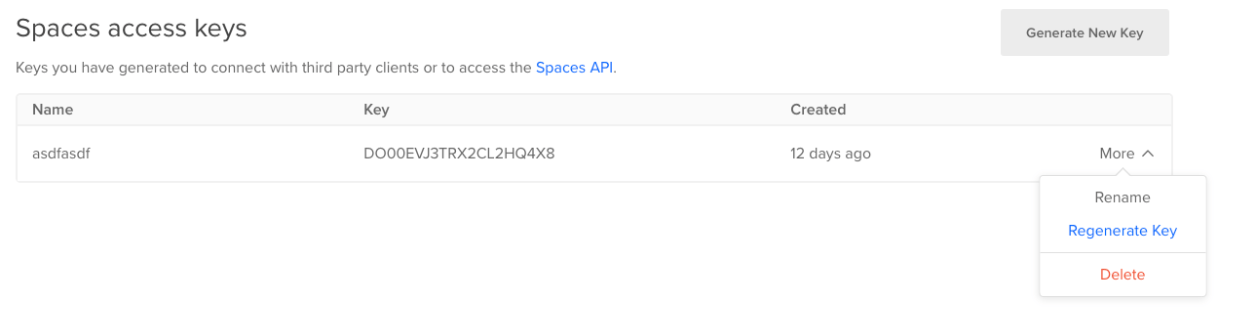
Spaces access keys table in the DigitalOcean control panel showing the context menu for a key. Regenerate Key comes after Rename and before Delete in the menu.

These steps are by no means exhaustive, but can help provide increased security for your account.

Happy Safe Coding and Happy New Year.

Swimmingly,

The DigitalOcean Team

About the author

DigitalOcean
DigitalOcean
Author

Share

  • Trust Security

Start building today

From GPU-powered inference and Kubernetes to managed databases and storage, get everything you need to build, scale, and deploy intelligent applications.
Sign up

Related Articles

Enhancing Security with User-Specific Access Keys for DigitalOcean Functions
Product updates

Enhancing Security with User-Specific Access Keys for DigitalOcean Functions

Amulya Tomer
  • March 23, 2026
  • 5 min read

Read more

OAuth App Based Workload Identity for Droplets
Trust & Security

OAuth App Based Workload Identity for Droplets

John Andersen
  • October 22, 2025
  • 8 min read

Read more

How DigitalOcean Uses Semgrep to Fortify Security: A Highlight From Our Toolset
Trust & Security

How DigitalOcean Uses Semgrep to Fortify Security: A Highlight From Our Toolset

Jordan Vaughn
  • October 7, 2024
  • 2 min read

Read more