
I am looking at a lot of docs and tutorials, but I am not sure yet how this exactly works. Lets say I do want to setup a:
- Load Balancer
- Wordpress1 VPS
- Wordpress2 VPS
Where Wordpress1 is a server with like 15 Wordpress websites on it.
- When load balanced, and client gets on WP2 server, how does it get the site information available on WP1? Do I somehow need to create symlinks?
- Do I need to setup something extra for when I have multiple Wordpress websites on a server, instead of one, which will be load balanced?
This textbox defaults to using Markdown to format your answer.
You can type !ref in this text area to quickly search our full set of tutorials, documentation & marketplace offerings and insert the link!

Hi there,
Would you mind giving a little bit more information on why you need a load balancer with this setup? I believe that with the setup that you’ve described, there is not really a need for a layer 4 load balancer.
You would add a load balancer to a setup where server 1 and server 2 are copies of each other so that the layer 4 load balancer would distribute the traffic between the two servers, eg:
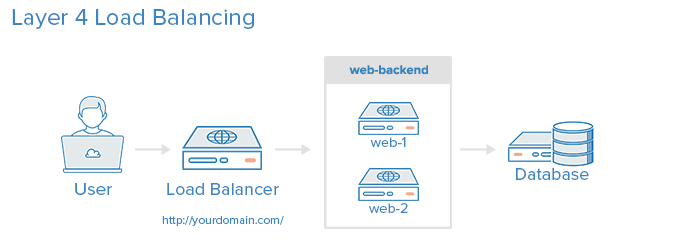
That way, if web server 1 goes down, the load balancer would distribute the traffic to the healthy web server.
However in your case if you only have some sites on server 1 and some sites on server 2, this would still be a single point of failure.
For a quick introduction on what the benefits of a load balancer are, I could suggest the following tutorial:
Hope that this helps and let me know if you have any questions!
Best,
Bobby

Become a contributor for community
Get paid to write technical tutorials and select a tech-focused charity to receive a matching donation.

DigitalOcean Documentation
Full documentation for every DigitalOcean product.

Resources for startups and AI-native businesses
The Wave has everything you need to know about building a business, from raising funding to marketing your product.
The developer cloud
Scale up as you grow — whether you're running one virtual machine or ten thousand.

Get started for free
Sign up and get $200 in credit for your first 60 days with DigitalOcean.*

*This promotional offer applies to new accounts only.